> ## Documentation Index
> Fetch the complete documentation index at: https://www.checklyhq.com/docs/llms.txt
> Use this file to discover all available pages before exploring further.
# Checkly Plugin for AI Coding Agents
> Install the Checkly plugin to give your AI coding agent Checkly monitoring skills and Playwright best practices in a single package.
The [Checkly plugin](https://github.com/checkly/checkly-plugin) bundles the official Checkly skills and the Checkly MCP server for AI coding agents in a single installable package. It targets Claude Code, OpenAI Codex, Cursor, and any agent supporting the plugins standard.
## Getting started
### Installation
Add the Checkly plugin marketplace and install the plugin from within Claude Code:
```txt theme={null}
/plugin marketplace add checkly/checkly-plugin
/plugin install checkly@checkly
```
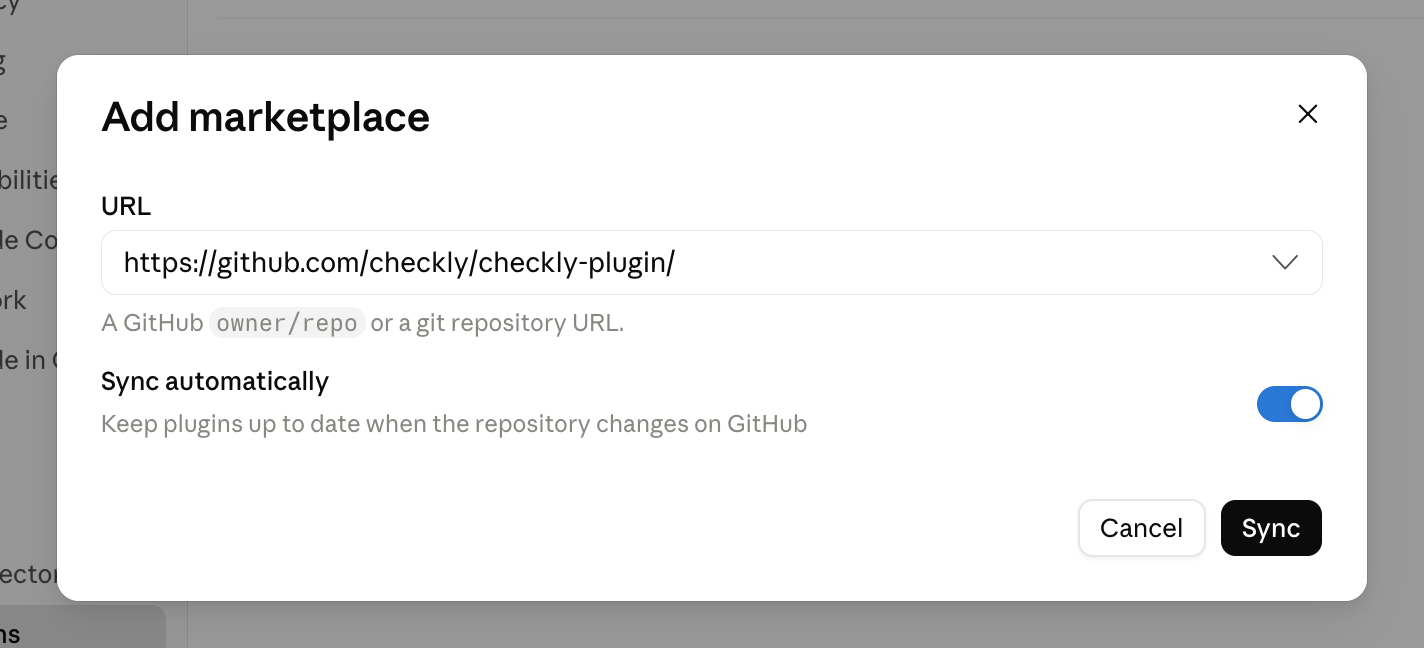
1. Open the plugin settings and click **Add marketplace**.
2. Select **Add from a repository**.
3. Enter `https://github.com/checkly/checkly-plugin/` as the URL and click **Sync**.
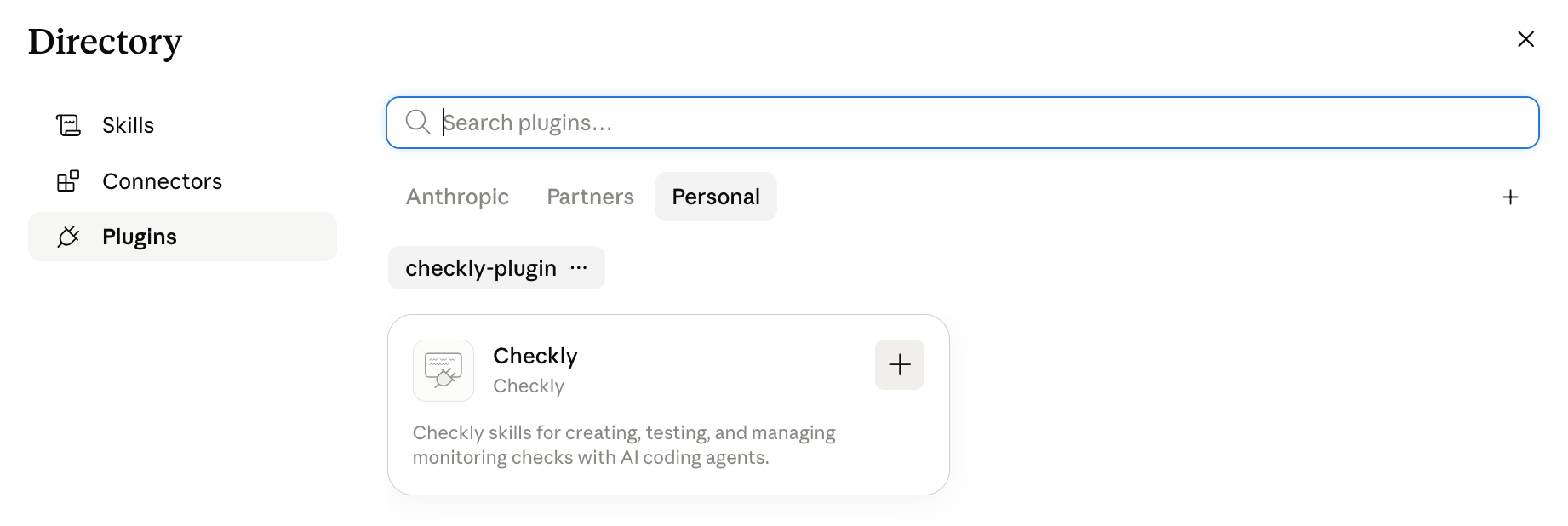
 4. Install the Checkly plugin from the newly added marketplace.
 The Checkly plugin has been submitted to Anthropic and is awaiting review. Until it's approved, install it from the GitHub repository as described above.
After installation, restart your AI agent to load the plugin.
## What the plugin provides
### MCP server
The plugin configures the [Checkly MCP server](/docs/ai/mcp-server), connecting your agent to your Checkly account for live operations like inspecting check status and results, triggering checks, or starting root cause analyses.
### Skills
The plugin also ships two skills. Both are synced daily from their source repositories, so you always get the latest guidance.
| Skill | Description |
| -------------------------------------- | ----------------------------------------------------------------------------------------------------------------------------------------------- |
| `checkly` | Set up, create, test, and manage monitoring checks with the Checkly CLI. See [Checkly Skills](/docs/ai/skills) for details on what the skill covers. |
| `playwright-best-practices-for-agents` | Agent-first best practices for writing, structuring, debugging, and stabilizing Playwright tests. |
## Usage
Once installed, your agent automatically loads the relevant skill whenever a Checkly or Playwright task comes up — no manual context loading required.
```txt Claude Code Example highlight={3-4} theme={null}
❯ Can you create a new URLMonitor with Checkly for example.com?
⏺ Skill(checkly:checkly)
⎿ Successfully loaded skill · 3 tools allowed
⏺ Let me read more references and check the existing project structure
```
In agents supporting slash commands, you can also invoke the bundled skills explicitly:
```txt theme={null}
/checkly:checkly
/checkly:playwright-best-practices-for-agents
```
If you only want the Checkly monitoring skill without the plugin wrapper, install it directly via the Checkly CLI. See [Checkly Skills](/docs/ai/skills).
## Reporting issues
If a skill gives incorrect advice or the plugin doesn't behave as expected, [file an issue on GitHub](https://github.com/checkly/checkly-plugin/issues).
## Additional resources
* [checkly/checkly-plugin on GitHub](https://github.com/checkly/checkly-plugin)
* [Checkly Skills](/docs/ai/skills)
* [Agent Skills Specification](https://agentskills.io/specification.md)
The Checkly plugin has been submitted to Anthropic and is awaiting review. Until it's approved, install it from the GitHub repository as described above.
After installation, restart your AI agent to load the plugin.
## What the plugin provides
### MCP server
The plugin configures the [Checkly MCP server](/docs/ai/mcp-server), connecting your agent to your Checkly account for live operations like inspecting check status and results, triggering checks, or starting root cause analyses.
### Skills
The plugin also ships two skills. Both are synced daily from their source repositories, so you always get the latest guidance.
| Skill | Description |
| -------------------------------------- | ----------------------------------------------------------------------------------------------------------------------------------------------- |
| `checkly` | Set up, create, test, and manage monitoring checks with the Checkly CLI. See [Checkly Skills](/docs/ai/skills) for details on what the skill covers. |
| `playwright-best-practices-for-agents` | Agent-first best practices for writing, structuring, debugging, and stabilizing Playwright tests. |
## Usage
Once installed, your agent automatically loads the relevant skill whenever a Checkly or Playwright task comes up — no manual context loading required.
```txt Claude Code Example highlight={3-4} theme={null}
❯ Can you create a new URLMonitor with Checkly for example.com?
⏺ Skill(checkly:checkly)
⎿ Successfully loaded skill · 3 tools allowed
⏺ Let me read more references and check the existing project structure
```
In agents supporting slash commands, you can also invoke the bundled skills explicitly:
```txt theme={null}
/checkly:checkly
/checkly:playwright-best-practices-for-agents
```
If you only want the Checkly monitoring skill without the plugin wrapper, install it directly via the Checkly CLI. See [Checkly Skills](/docs/ai/skills).
## Reporting issues
If a skill gives incorrect advice or the plugin doesn't behave as expected, [file an issue on GitHub](https://github.com/checkly/checkly-plugin/issues).
## Additional resources
* [checkly/checkly-plugin on GitHub](https://github.com/checkly/checkly-plugin)
* [Checkly Skills](/docs/ai/skills)
* [Agent Skills Specification](https://agentskills.io/specification.md)