> ## Documentation Index
> Fetch the complete documentation index at: https://checklyhq.com/docs/llms.txt
> Use this file to discover all available pages before exploring further.
# Using npm packages and local dependencies
Checkly lets you use JavaScript and TypeScript in your [Browser](/detect/synthetic-monitoring/browser-checks/overview) and [Multistep](/detect/synthetic-monitoring/multistep-checks/overview) checks, [API check setup and teardown scripts](/detect/synthetic-monitoring/api-checks/setup-and-teardown), and [Playwright Check Suites](/detect/synthetic-monitoring/playwright-checks/overview). Checks can use npm packages and import local JavaScript and TypeScript files.
How dependencies work depends on the check type:
| Check type | Dependency model | Environment field |
| ----------------------------------- | ----------------------------------------------------------------------------------------- | ----------------- |
| Browser Checks and Multistep Checks | Run in a Checkly runtime with fixed Checkly-provided dependencies | `runtimeId` |
| Playwright Check Suites | Install dependencies from your project files, including `package.json` and your lock file | `engine` |
Use `runtimeId` to choose a custom Checkly runtime for Browser Checks and Multistep Checks. Use `engine` only for Playwright Check Suites, where it overrides the JavaScript engine version that runs your own Playwright project.
## npm packages
### Browser, Multistep, and API Checks
Not all npm packages are available in a Checkly runtime.
The JavaScript code for these check types executes in a runtime environment managed by Checkly.
Runtime versions can be selected by setting a `runtimeId`.
You can configure `runtimeId` at the check and group level using constructs, and set a project default in the [project configuration file](/constructs/project#param-checks-runtime-id).
A runtime includes fixed dependencies such as:
* Node.js 22+
* `@playwright/test 1.51.1`
* `axios 0.28.0`
* `lodash 4.17.21`
* `moment 2.30.1`
Runtimes also include other popular npm packages to help you write and assert checks.
* [Browse the latest runtime specs](/platform/runtimes/runtime-specification)
* [Learn more about runtimes](/platform/runtimes/overview)
* [Why can't I import any npm package or other third-party dependencies?](/platform/runtimes/overview)
### Playwright Check Suites
Playwright Check Suites do not use Checkly runtimes. Instead, Checkly installs your project's dependencies from your `package.json` and lock file. This lets you use [custom dependencies](/detect/synthetic-monitoring/playwright-checks/custom-dependencies/), including private packages or packages from a custom registry.
Use the `engine` field to override the JavaScript engine version for a Playwright Check Suite. `engine` does not select a Checkly runtime or a fixed package set.
## Local Dependencies
Your checks can also import other JavaScript and TypeScript files as dependencies.
This is useful for defining helper functions to be reused across multiple checks.
The Checkly CLI automatically detects these dependencies and bundles them with the check.
No additional configuration is needed.
Here is a [Browser Check](/detect/synthetic-monitoring/browser-checks/overview) example of how this works in practice.
The directory tree looks like the following:
```
__checks__
├── login.check.ts
├── login.spec.ts
└── login-helper.ts
```
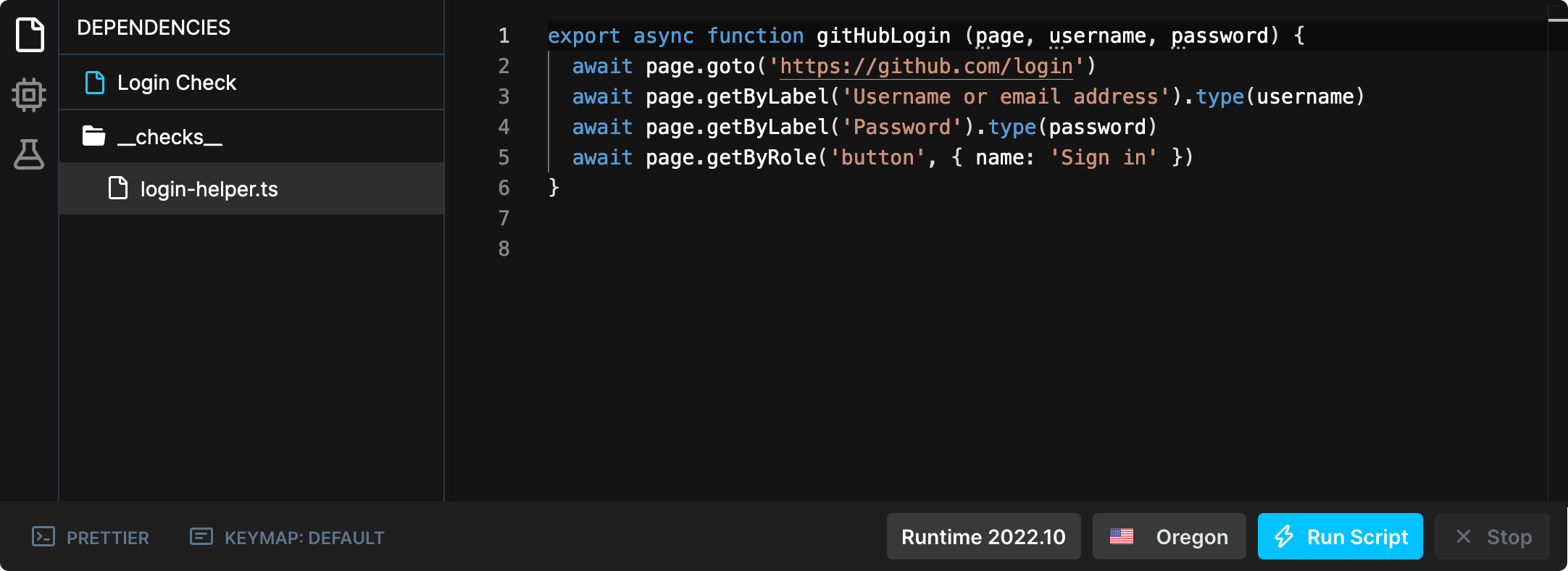
`login-helper.ts` defines a function `gitHubLogin` that can be used by multiple Browser Checks.
```ts login-helper.ts theme={null}
export async function gitHubLogin (page, username, password) {
await page.goto('https://github.com/login')
await page.getByLabel('Username or email address').type(username)
await page.getByLabel('Password').type(password)
await page.getByRole('button', { name: 'Sign in' })
}
```
In `login.spec.ts` we define the actual Playwright test. This file can import the `gitHubLogin` function from `login-helper.ts`.
It also reads the username and password from [remote environment variables](/cli/environment-variables#remote-environment-variables).
```ts login.spec.ts theme={null}
// @ts-ignore
import { test } from '@playwright/test'
import { gitHubLogin } from './login-helper'
test('Github login', async ({ page }) => {
await gitHubLogin(page, process.env.GITHUB_USER, process.env.GITHUB_PWD)
// your normal check code
await page.click('.header-search-input')
})
```
`login.check.ts` initializes a new [BrowserCheck construct](/constructs/browser-check). Note that it's only necessary to configure the main Playwright file `login.spec.ts`. The `login-helper.ts` dependency is automatically detected by the CLI.
```ts login.check.ts theme={null}
import { BrowserCheck } from 'checkly/constructs'
new BrowserCheck('login-check', {
name: 'Login Check',
code: { entrypoint: './login.spec.ts' }
})
```
After running [`npx checkly deploy`](/cli/checkly-deploy), you can see in the Web UI that the helper file `login-helper.ts` was also uploaded for this Check.
 The maximum total size of a Checkly project when deploying or running a test session, including local dependencies, is 40 MB.