> ## Documentation Index
> Fetch the complete documentation index at: https://www.checklyhq.com/docs/llms.txt
> Use this file to discover all available pages before exploring further.
# Alert Channels
> Configure notification channels to receive alerts when checks fail, degrade, or recover. Choose from email, Slack, webhooks, PagerDuty, SMS, and custom integrations.
Alert channels determine **how** alert notifications reach your team when checks fail, degrade, or recover. Checkly supports a wide range of notification methods to fit your team's communication preferences and operational workflows.
## Available Alert Channels
### Communication Platforms
* [Email](/docs/integrations/alerts/email)
* [Slack](/docs/integrations/alerts/slack)
* [Discord](/docs/integrations/alerts/discord)
* [Telegram](/docs/integrations/alerts/telegram)
* [SMS](/docs/integrations/alerts/sms)
* [Phone Call](/docs/integrations/alerts/phone-calls)
* [Microsoft Teams](/docs/integrations/alerts/msteams)
* [GitLab Alerts](/docs/integrations/alerts/gitlab_alerts)
### Incident Management
* [PagerDuty](/docs/integrations/incident-management/pagerduty)
* [Opsgenie](/docs/integrations/incident-management/opsgenie)
* [FireHydrant](/docs/integrations/incident-management/firehydrant)
* [Incident.io](/docs/integrations/incident-management/incidentio)
* [Rootly](/docs/integrations/incident-management/rootly)
* [ilert](/docs/integrations/incident-management/ilert)
* [Splunk On-Call](/docs/integrations/incident-management/splunk-on-call)
* [Spike.sh](/docs/integrations/incident-management/spike)
* [StatusPage](/docs/integrations/incident-management/statuspage)
### Custom Integrations
* [Webhooks](/docs/integrations/alerts/webhooks)
## Managing Alert Channels
### Channel Configuration Overview
Configure channels with flexible subscription and filtering options:
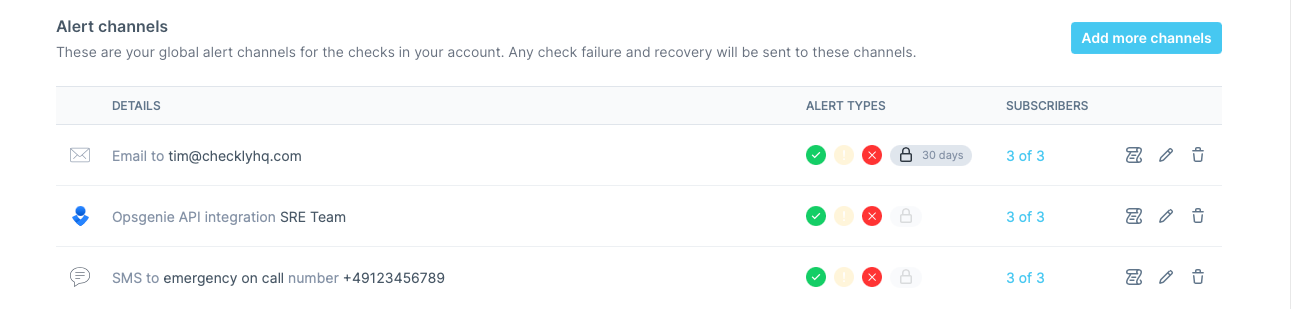 Choose your notification method and provide connection details
Select which types of events should trigger notifications
Choose which checks and check groups use this channel
Verify the channel works correctly with test notifications
## Using variables and secrets in channel configs
Any literal-secret field in an alert-channel configuration — webhook URL, API key, bearer token, PagerDuty service key, and so on — accepts a reference to an account [environment variable](/docs/platform/variables) or [secret](/docs/platform/secrets) using `{{NAME}}` syntax. The channel UI also lets you promote an inline value to a secret without leaving the page.
**Using environment variables and secrets in this channel's config**
Any literal-secret field in this alert channel — webhook URL, API key, bearer token, service key, etc. — accepts a [variable](/docs/platform/variables) or [secret](/docs/platform/secrets) reference using the familiar Handlebars syntax: `{{MY_VARIABLE}}`.
You can also promote a value to a secret directly from the field: type the literal value, click the lock icon next to the input, and choose a name. The value is stored as an encrypted account secret and is never re-displayed in the UI.
Use Checkly's alert notification log to track delivery success rates and identify any channels that frequently fail to deliver notifications.
Choose your notification method and provide connection details
Select which types of events should trigger notifications
Choose which checks and check groups use this channel
Verify the channel works correctly with test notifications
## Using variables and secrets in channel configs
Any literal-secret field in an alert-channel configuration — webhook URL, API key, bearer token, PagerDuty service key, and so on — accepts a reference to an account [environment variable](/docs/platform/variables) or [secret](/docs/platform/secrets) using `{{NAME}}` syntax. The channel UI also lets you promote an inline value to a secret without leaving the page.
**Using environment variables and secrets in this channel's config**
Any literal-secret field in this alert channel — webhook URL, API key, bearer token, service key, etc. — accepts a [variable](/docs/platform/variables) or [secret](/docs/platform/secrets) reference using the familiar Handlebars syntax: `{{MY_VARIABLE}}`.
You can also promote a value to a secret directly from the field: type the literal value, click the lock icon next to the input, and choose a name. The value is stored as an encrypted account secret and is never re-displayed in the UI.
Use Checkly's alert notification log to track delivery success rates and identify any channels that frequently fail to deliver notifications.