> ## Documentation Index
> Fetch the complete documentation index at: https://checklyhq.com/docs/llms.txt
> Use this file to discover all available pages before exploring further.
# Alerting With Checkly
> Comprehensive alerting and retry strategies to minimize false positives and ensure reliable incident response when your checks fail or recover.
Checkly alerts you when your checks or monitors transition between states such as **passing** to **failing**, **degraded performance**, or **recovery**. The system is designed to provide actionable notifications while minimizing noise through intelligent retry strategies and flexible escalation policies.
 ### Benefits
* Configurable alert thresholds and escalation
* Reduce false positives with intelligent retries
* Fixed, linear, and exponential backoff options
* Multiple notification channels and integrations
* Location-based failure filtering
## Alert Settings
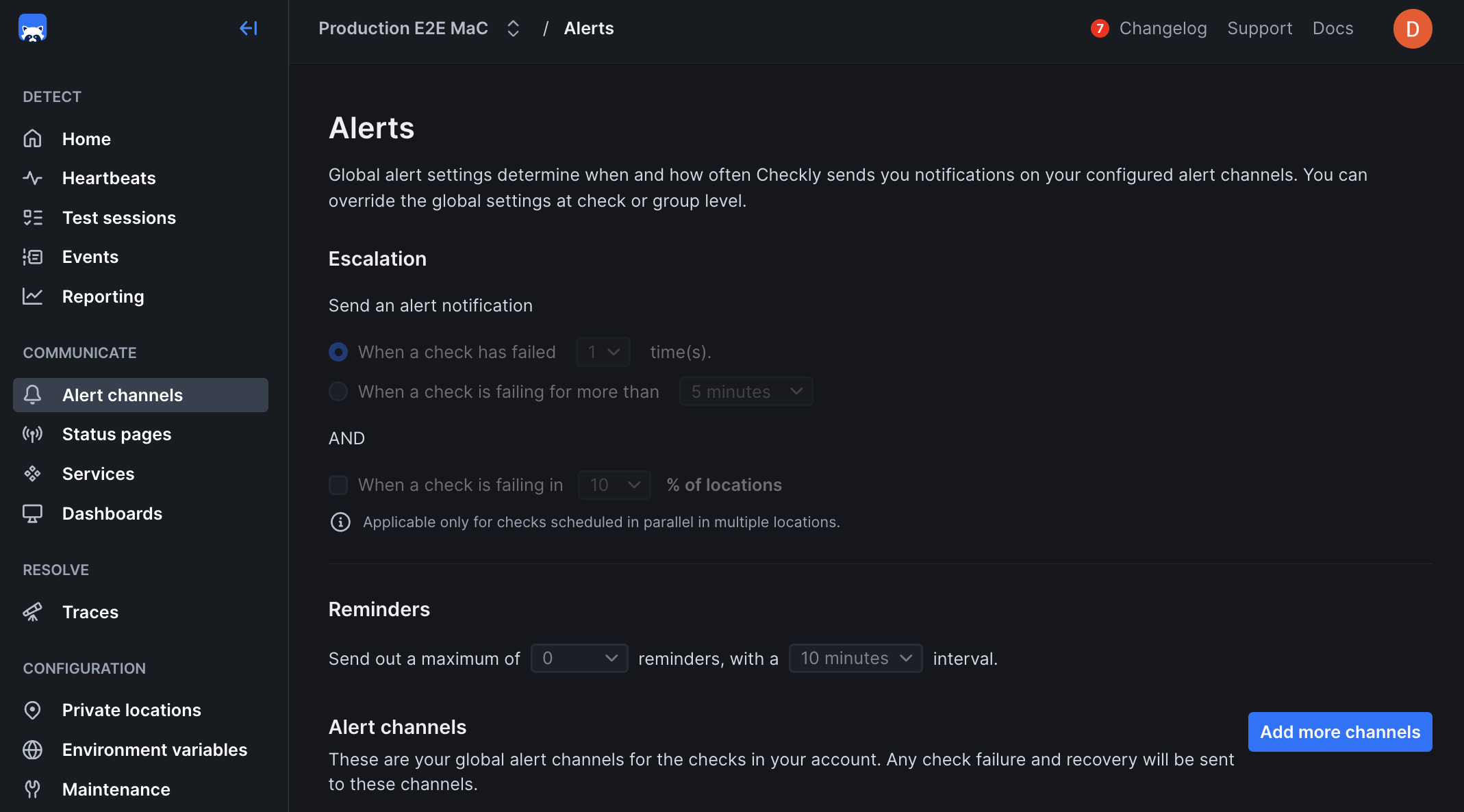
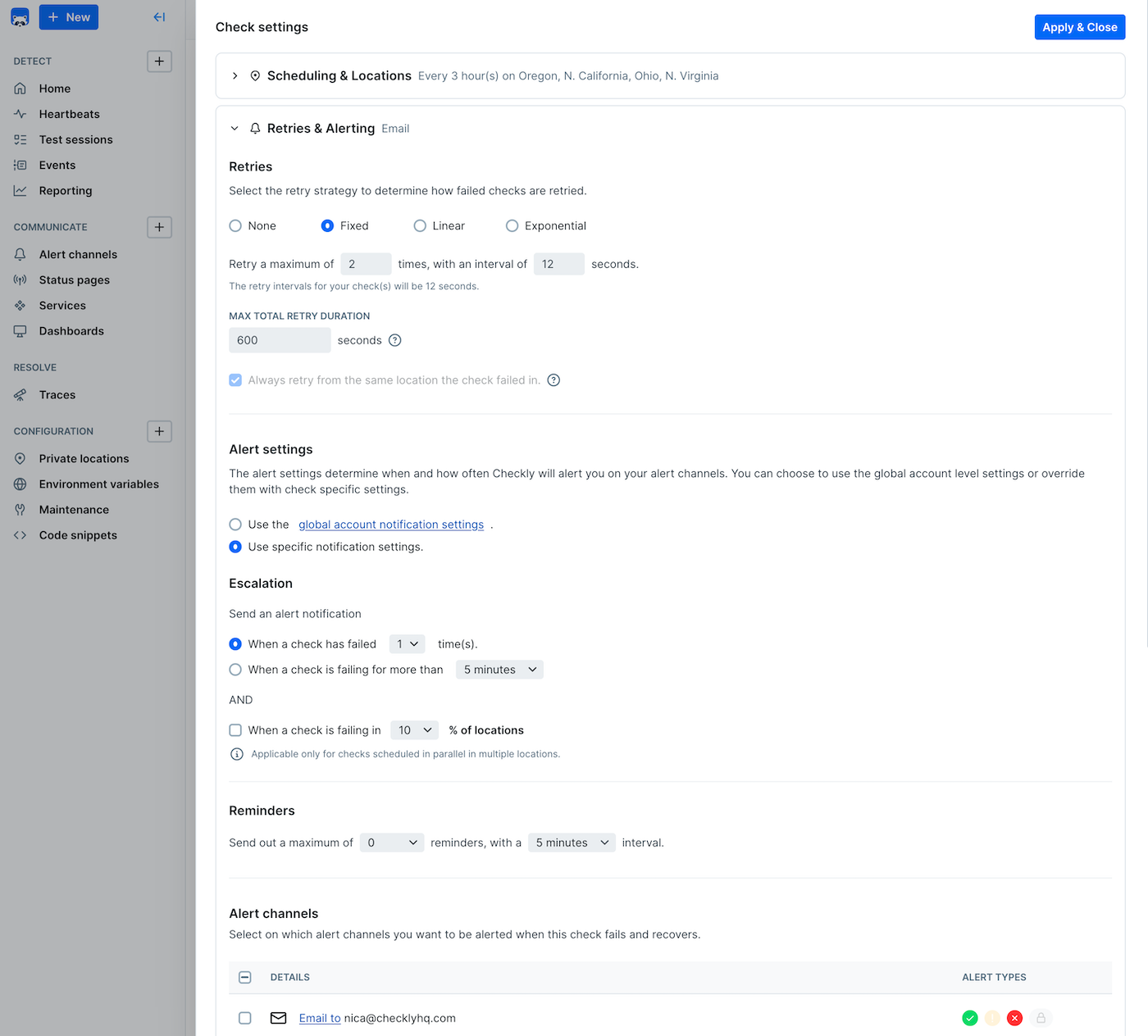
The [alert settings screen](https://app.checklyhq.com/alerts/settings) gives you the options to tailor when, how and how often you want to be alerted when a check fails at the Account Level. This is also sometimes referred to as **threshold alerting**. For example:
* Get an alert on the second or third failure.
* Get an alert after 5 minutes of failures.
* Get one or more reminders after a failure is triggered.
Your alert notifications can be configured at three levels:
1. **Account** level: This is the default level and applies to all of your check unless you override these settings at the check level.
2. **Group** level: You can explicitly override the alert settings at the group level.
3. **Check** level: You can explicitly override the account alert settings per check. Very handy for debugging or other one-off cases.
You can select whether group settings will override individual check settings for alerts, retries, scheduling, and location
### Benefits
* Configurable alert thresholds and escalation
* Reduce false positives with intelligent retries
* Fixed, linear, and exponential backoff options
* Multiple notification channels and integrations
* Location-based failure filtering
## Alert Settings
The [alert settings screen](https://app.checklyhq.com/alerts/settings) gives you the options to tailor when, how and how often you want to be alerted when a check fails at the Account Level. This is also sometimes referred to as **threshold alerting**. For example:
* Get an alert on the second or third failure.
* Get an alert after 5 minutes of failures.
* Get one or more reminders after a failure is triggered.
Your alert notifications can be configured at three levels:
1. **Account** level: This is the default level and applies to all of your check unless you override these settings at the check level.
2. **Group** level: You can explicitly override the alert settings at the group level.
3. **Check** level: You can explicitly override the account alert settings per check. Very handy for debugging or other one-off cases.
You can select whether group settings will override individual check settings for alerts, retries, scheduling, and location
 ## Alert Channels
When adding a channel, you can select which checks to subscribe to the channel. This way you can create specific routings
for specific checks.
## Alert Channels
When adding a channel, you can select which checks to subscribe to the channel. This way you can create specific routings
for specific checks.
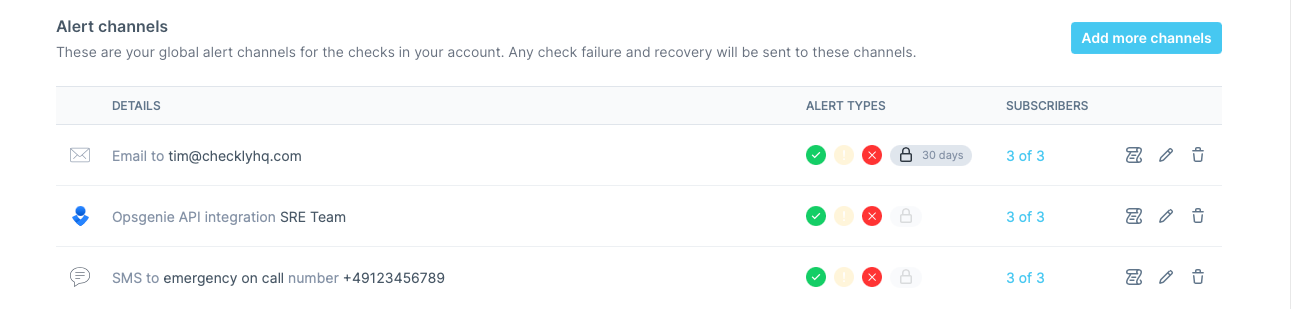 You can also select which types of alerts should be send to your channel:
* **Failure**: When a check encounters a hard error.
* **Degradation**: When a checks is just slow, but still working.
* **Recovery**: When a check recovers from either failing or being degraded.
* [**SSL certificate expirations**](/communicate/alerts/ssl-expiration/)
Configuring alert channels is mostly self explanatory except for our [advanced webhook builder](/integrations/alerts/webhooks).
After adding the channels, you either **edit** or **delete** them, or change which checks are subscribed to that specific channel.
> If you are using [Terraform](/integrations/iac/terraform/overview) or the [CLI](/cli/overview), you will need to specify alert channel subscriptions *explicitly* for each check / group.
## Alert States
Sending out alert notifications like emails and Slack hooks depends on four factors:
1. The **alert state** of the check, e.g. "passing", "degraded" or "failing".
2. The **transition** between these states.
3. Your **threshold alerting** preferences, e.g. "alert after two failures" or "alert after 5 minutes of failures".
4. Your **notification preferences** per alert channel.
As you can see, 1 and 2 are how Checkly works in the backend; you have no influence on this. But 3 and 4 are user configurable.
We can even add a fifth factor: if the check is muted, no alerts are send out at all.
> Note: Browser checks currently do not have a degraded state.
### States & Transitions
The following table shows all states and their transitions. There are some exceptions to some of the more complex states,
as the history or "vector" of the state transition influences how we alert.
✅ = passing ⚠️ = degraded ❌ = "hard" failing
| transition | notification | threshold | code | notes |
| ---------- | ------------ | --------- | ------------------------- | --------------------------------------------------------------------------------------------------------------------------------- |
| ✅ --> ✅ | None | - | `NO_ALERT` | Nothing to see here, keep moving |
| ✅ --> ⚠️ | Degraded | x | `ALERT_DEGRADED` | Send directly, if threshold is *"alert after 1 failure"* |
| ✅ --> ❌ | Failure | x | `ALERT_FAILURE` | Send directly, if threshold is *"alert after 1 failure"* |
| ⚠️ --> ⚠️ | Degraded | x | `ALERT_DEGRADED_REMAIN` | i.e. when threshold is *"alert after 2 failures"* or *"after 5 minutes"* |
| ⚠️ --> ✅ | Recovery | - | `ALERT_DEGRADED_RECOVERY` | Send but only if you received a degraded notification before |
| ⚠️ --> ❌ | Failure | - | `ALERT_DEGRADED_FAILURE` | This is an **escalation**, it overrides any threshold setting. We send this even if you already received degraded notifications |
| ❌ --> ❌ | Failure | x | `ALERT_FAILURE_REMAIN` | i.e. when threshold is *"alert after 2 failures"* or *"after 5 minutes"* |
| ❌ --> ⚠️ | Degraded | - | `ALERT_FAILURE_DEGRADED` | This is a **deescalation**, it overrides any thresholds settings. We send this even if you already received failure notifications |
| ❌️ --> ✅ | Recovery | - | `ALERT_RECOVERY` | Send directly |
Use Checkly's alert notification log to analyze your alerting patterns and identify opportunities to reduce noise while maintaining coverage of critical issues.
You can also select which types of alerts should be send to your channel:
* **Failure**: When a check encounters a hard error.
* **Degradation**: When a checks is just slow, but still working.
* **Recovery**: When a check recovers from either failing or being degraded.
* [**SSL certificate expirations**](/communicate/alerts/ssl-expiration/)
Configuring alert channels is mostly self explanatory except for our [advanced webhook builder](/integrations/alerts/webhooks).
After adding the channels, you either **edit** or **delete** them, or change which checks are subscribed to that specific channel.
> If you are using [Terraform](/integrations/iac/terraform/overview) or the [CLI](/cli/overview), you will need to specify alert channel subscriptions *explicitly* for each check / group.
## Alert States
Sending out alert notifications like emails and Slack hooks depends on four factors:
1. The **alert state** of the check, e.g. "passing", "degraded" or "failing".
2. The **transition** between these states.
3. Your **threshold alerting** preferences, e.g. "alert after two failures" or "alert after 5 minutes of failures".
4. Your **notification preferences** per alert channel.
As you can see, 1 and 2 are how Checkly works in the backend; you have no influence on this. But 3 and 4 are user configurable.
We can even add a fifth factor: if the check is muted, no alerts are send out at all.
> Note: Browser checks currently do not have a degraded state.
### States & Transitions
The following table shows all states and their transitions. There are some exceptions to some of the more complex states,
as the history or "vector" of the state transition influences how we alert.
✅ = passing ⚠️ = degraded ❌ = "hard" failing
| transition | notification | threshold | code | notes |
| ---------- | ------------ | --------- | ------------------------- | --------------------------------------------------------------------------------------------------------------------------------- |
| ✅ --> ✅ | None | - | `NO_ALERT` | Nothing to see here, keep moving |
| ✅ --> ⚠️ | Degraded | x | `ALERT_DEGRADED` | Send directly, if threshold is *"alert after 1 failure"* |
| ✅ --> ❌ | Failure | x | `ALERT_FAILURE` | Send directly, if threshold is *"alert after 1 failure"* |
| ⚠️ --> ⚠️ | Degraded | x | `ALERT_DEGRADED_REMAIN` | i.e. when threshold is *"alert after 2 failures"* or *"after 5 minutes"* |
| ⚠️ --> ✅ | Recovery | - | `ALERT_DEGRADED_RECOVERY` | Send but only if you received a degraded notification before |
| ⚠️ --> ❌ | Failure | - | `ALERT_DEGRADED_FAILURE` | This is an **escalation**, it overrides any threshold setting. We send this even if you already received degraded notifications |
| ❌ --> ❌ | Failure | x | `ALERT_FAILURE_REMAIN` | i.e. when threshold is *"alert after 2 failures"* or *"after 5 minutes"* |
| ❌ --> ⚠️ | Degraded | - | `ALERT_FAILURE_DEGRADED` | This is a **deescalation**, it overrides any thresholds settings. We send this even if you already received failure notifications |
| ❌️ --> ✅ | Recovery | - | `ALERT_RECOVERY` | Send directly |
Use Checkly's alert notification log to analyze your alerting patterns and identify opportunities to reduce noise while maintaining coverage of critical issues.