> ## Documentation Index
> Fetch the complete documentation index at: https://www.checklyhq.com/docs/llms.txt
> Use this file to discover all available pages before exploring further.
# Status Page Customization
> Add a custom domain and look & feel to your Status Page.
## Custom domain
Custom domains are available on Communicate Starter, Team and Enterprise
plans. [View pricing](https://checklyhq.com/pricing)
You can host your Status Page on your own domain. To set it up, add the domain in Checkly and create the required DNS records with your DNS provider.
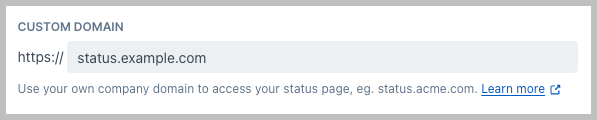 Create a CNAME record with your DNS provider and point it to
`custom-domain.checkly-status-page.com` For example, in Cloudflare, the
configuration looks like this:
Create a CNAME record with your DNS provider and point it to
`custom-domain.checkly-status-page.com` For example, in Cloudflare, the
configuration looks like this:  If your provider is Cloudflare, you must disable the proxy on the CNAME, it
should always be set to DNS only.
After you've added your custom domain and saved the page, one or more TXT records will be displayed depending on the domain you're using.
If your provider is Cloudflare, you must disable the proxy on the CNAME, it
should always be set to DNS only.
After you've added your custom domain and saved the page, one or more TXT records will be displayed depending on the domain you're using.
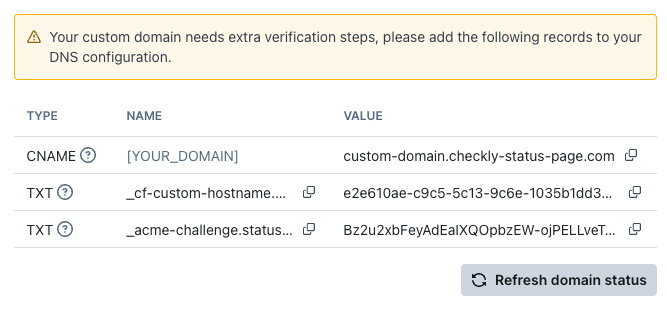 Update your DNS settings to match the TXT record(s) displayed on your Status Page to prove the ownership of the domain.
Search engines require this verification to index and list your Status Page.
## Customize your Status Page to match your brand identity
* Upload your company logo and the link it should open
* Upload a custom favicon
* Choose the default theme: auto (system), light or dark
* Customize the color theme to match your brand
Theme customization is available on Communicate Team and Enterprise plans.
[View pricing](https://checklyhq.com/pricing)
Update your DNS settings to match the TXT record(s) displayed on your Status Page to prove the ownership of the domain.
Search engines require this verification to index and list your Status Page.
## Customize your Status Page to match your brand identity
* Upload your company logo and the link it should open
* Upload a custom favicon
* Choose the default theme: auto (system), light or dark
* Customize the color theme to match your brand
Theme customization is available on Communicate Team and Enterprise plans.
[View pricing](https://checklyhq.com/pricing)