> ## Documentation Index
> Fetch the complete documentation index at: https://www.checklyhq.com/docs/llms.txt
> Use this file to discover all available pages before exploring further.
# Defining Assertions
> Add assertions to validate your check results
Uptime monitors and API checks allow you to define assertions to validate a response and check its data for correctness.
## How assertions work
Assertions let you validate specific parts of a check's response. For example:
* **URL monitor**: HTTP response status equals 200.
* **TCP monitor**: Response contains expected string (e.g. OK).
* **DNS monitor**: Resolved IP equals 93.184.216.34.
* **API check**: HTTP response header "X-Custom-Header" equals "SomeValue".
### Sources
In each assertion, a **source** is connected to a **comparison** and a **target**.
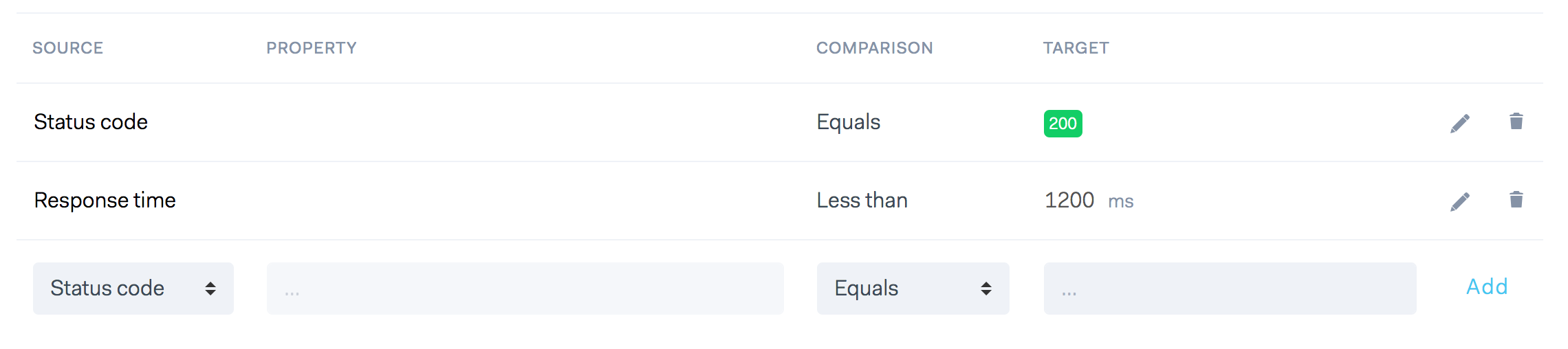 In some cases a [property](#property) is added, for example when asserting API check headers or JSON response bodies.
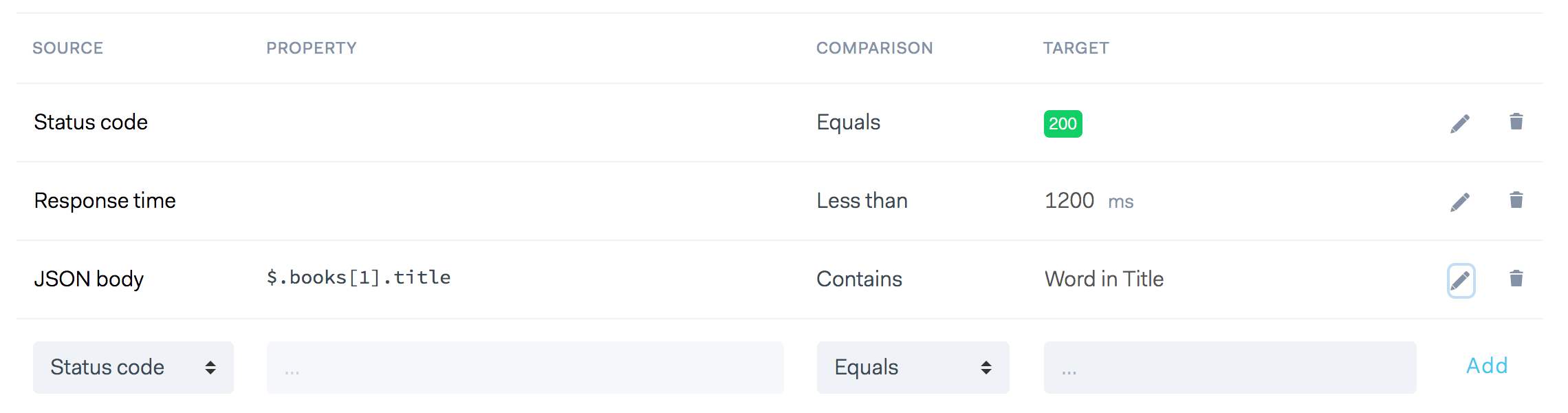 Assertions are executed from top to bottom. If one assertion fails, the full check is considered as failed.
Supported assertion sources vary by monitor type. Refer to the documentation of the specific monitor (API, DNS, TCP, etc.) to see which sources are available.
### Property
The property field is a free-form text input that lets you point to a specific part of the data you want to validate. It’s available for the following types of assertion [sources](#sources):
* **JSON response bodies**: Use a JSON path expression in the form of dot-separated strings to
target nested properties in an object, i.e. `$.product.size` or an item in an array, i.e. `$.[1].key`. [Learn more](#json-responses-with-json-path).
* **Text response bodies**: Provide a regular expression with a capture group to pick out parts,
i.e. ``. [Learn more](#text-body-assertions-with-regular-expressions).
* **API check headers**: Enter the header name you want to assert on i.e. `Content-Type`. You can even add a
regular expression after that to tease out a specific part of the header. [Learn more](#using-regular-expressions).
## Comparison
Comparisons are the operators that work on the source data and target data, e.g.
* Response time is `LESS THAN` 150 milliseconds.
* Status code `EQUALS` 200.
* Header X-MY-HEADER `CONTAINS` the string `some value`.
The following comparisons are available. Note that some comparisons don't make sense when paired with a specific source.
Response time is empty? JSON Object is less than? We block out the comparisons when they are not applicable to the source.
* Equals / Not equals
* Is empty / Not empty
* Greater than
* Less than
* Contains / Not contains
* Is null / Not null
## Target
The target field is a free form text field that determines the desired outcome of your assertion.
## JSON responses with JSON path
For monitors that support JSON body assertions, you can use **JSON path** to specify which field of a JSON response body should be asserted. JSON path is a query language
similar to Xpath for XML, but in general a lot more intuitive and simpler to use.
### JSON path primer
The following JSONPath operators are available:
| JSONPath | Description |
| ------------------ | -------------------------------------------------------------------- |
| `$` | The root object/element |
| `@` | The current object/element |
| `.` | Child member operator |
| `..` | Recursive descendant operator; JSONPath borrows this syntax from E4X |
| `*` | Wildcard matching all objects/elements regardless their names |
| `[]` | Subscript operator |
| `[,]` | Union operator for alternate names or array indices as a set |
| `[start:end:step]` | Array slice operator borrowed from ES4 / Python |
| `?()` | Applies a filter (script) expression via static evaluation |
| `()` | Script expression via static evaluation |
| `.length` | returns the length of an array |
> JSON path expressions in Checkly assertions must start with a `$` (The root object/element) symbol.
Given this sample data set, see example expressions below:
```javascript theme={null}
{
"store": {
"book": [
{
"category": "reference",
"author": "Nigel Rees",
"title": "Sayings of the Century",
"price": 8.95
}, {
"category": "fiction",
"author": "Evelyn Waugh",
"title": "Sword of Honour",
"price": 12.99
}, {
"category": "fiction",
"author": "Herman Melville",
"title": "Moby Dick",
"isbn": "0-553-21311-3",
"price": 8.99
}, {
"category": "fiction",
"author": "J. R. R. Tolkien",
"title": "The Lord of the Rings",
"isbn": "0-395-19395-8",
"price": 22.99
}
],
"bicycle": {
"color": "red",
"price": 19.95
}
}
}
```
JSON path expressions using the store example above:
| JSONPath | Description |
| ------------------------------------------------- | ----------------------------------------------------------- |
| `$.store.book[*].author` | The authors of all books in the store |
| `$..author` | All authors |
| `$.store.*` | All things in store, which are some books and a red bicycle |
| `$.store..price` | The price of everything in the store |
| `$.store.book.length` | The length of the book array |
| `$..book[2]` | The third book |
| `$..book[-1:]` | The last book via slice |
| `$..book[0,1]` | The first two books via subscript union |
| `$..book[:2]` | The first two books via subscript array slice. |
| `$..book[?(@.isbn)]` | Filter all books with isbn number |
| `$..book[?(@.price<10)]` | Filter all books cheaper than 10 |
| `$..book[?(@.price==8.95)]` | Filter all books that cost 8.95 |
| `$..book[?(@.price<30 && @.category=="fiction")]` | Filter all fiction books cheaper than 30 |
| `$..*` | All members of JSON structure |
Use this [online editor](https://jsonpath.com/) to try out your own JSONPath expressions.
For a full description of the syntax and semantics, see [RFC 9535](https://datatracker.ietf.org/doc/rfc9535/). In addition to the RFC-defined syntax, we support a few convenience extensions (for example, `.length`) to make common assertions easier to write.
### Asserting basic types
Asserting string, boolean and number values works exactly as you'd expect, e.g. the example below asserts the number value of
the `id` property is greater than `2000`.
Assertions are executed from top to bottom. If one assertion fails, the full check is considered as failed.
Supported assertion sources vary by monitor type. Refer to the documentation of the specific monitor (API, DNS, TCP, etc.) to see which sources are available.
### Property
The property field is a free-form text input that lets you point to a specific part of the data you want to validate. It’s available for the following types of assertion [sources](#sources):
* **JSON response bodies**: Use a JSON path expression in the form of dot-separated strings to
target nested properties in an object, i.e. `$.product.size` or an item in an array, i.e. `$.[1].key`. [Learn more](#json-responses-with-json-path).
* **Text response bodies**: Provide a regular expression with a capture group to pick out parts,
i.e. ``. [Learn more](#text-body-assertions-with-regular-expressions).
* **API check headers**: Enter the header name you want to assert on i.e. `Content-Type`. You can even add a
regular expression after that to tease out a specific part of the header. [Learn more](#using-regular-expressions).
## Comparison
Comparisons are the operators that work on the source data and target data, e.g.
* Response time is `LESS THAN` 150 milliseconds.
* Status code `EQUALS` 200.
* Header X-MY-HEADER `CONTAINS` the string `some value`.
The following comparisons are available. Note that some comparisons don't make sense when paired with a specific source.
Response time is empty? JSON Object is less than? We block out the comparisons when they are not applicable to the source.
* Equals / Not equals
* Is empty / Not empty
* Greater than
* Less than
* Contains / Not contains
* Is null / Not null
## Target
The target field is a free form text field that determines the desired outcome of your assertion.
## JSON responses with JSON path
For monitors that support JSON body assertions, you can use **JSON path** to specify which field of a JSON response body should be asserted. JSON path is a query language
similar to Xpath for XML, but in general a lot more intuitive and simpler to use.
### JSON path primer
The following JSONPath operators are available:
| JSONPath | Description |
| ------------------ | -------------------------------------------------------------------- |
| `$` | The root object/element |
| `@` | The current object/element |
| `.` | Child member operator |
| `..` | Recursive descendant operator; JSONPath borrows this syntax from E4X |
| `*` | Wildcard matching all objects/elements regardless their names |
| `[]` | Subscript operator |
| `[,]` | Union operator for alternate names or array indices as a set |
| `[start:end:step]` | Array slice operator borrowed from ES4 / Python |
| `?()` | Applies a filter (script) expression via static evaluation |
| `()` | Script expression via static evaluation |
| `.length` | returns the length of an array |
> JSON path expressions in Checkly assertions must start with a `$` (The root object/element) symbol.
Given this sample data set, see example expressions below:
```javascript theme={null}
{
"store": {
"book": [
{
"category": "reference",
"author": "Nigel Rees",
"title": "Sayings of the Century",
"price": 8.95
}, {
"category": "fiction",
"author": "Evelyn Waugh",
"title": "Sword of Honour",
"price": 12.99
}, {
"category": "fiction",
"author": "Herman Melville",
"title": "Moby Dick",
"isbn": "0-553-21311-3",
"price": 8.99
}, {
"category": "fiction",
"author": "J. R. R. Tolkien",
"title": "The Lord of the Rings",
"isbn": "0-395-19395-8",
"price": 22.99
}
],
"bicycle": {
"color": "red",
"price": 19.95
}
}
}
```
JSON path expressions using the store example above:
| JSONPath | Description |
| ------------------------------------------------- | ----------------------------------------------------------- |
| `$.store.book[*].author` | The authors of all books in the store |
| `$..author` | All authors |
| `$.store.*` | All things in store, which are some books and a red bicycle |
| `$.store..price` | The price of everything in the store |
| `$.store.book.length` | The length of the book array |
| `$..book[2]` | The third book |
| `$..book[-1:]` | The last book via slice |
| `$..book[0,1]` | The first two books via subscript union |
| `$..book[:2]` | The first two books via subscript array slice. |
| `$..book[?(@.isbn)]` | Filter all books with isbn number |
| `$..book[?(@.price<10)]` | Filter all books cheaper than 10 |
| `$..book[?(@.price==8.95)]` | Filter all books that cost 8.95 |
| `$..book[?(@.price<30 && @.category=="fiction")]` | Filter all fiction books cheaper than 30 |
| `$..*` | All members of JSON structure |
Use this [online editor](https://jsonpath.com/) to try out your own JSONPath expressions.
For a full description of the syntax and semantics, see [RFC 9535](https://datatracker.ietf.org/doc/rfc9535/). In addition to the RFC-defined syntax, we support a few convenience extensions (for example, `.length`) to make common assertions easier to write.
### Asserting basic types
Asserting string, boolean and number values works exactly as you'd expect, e.g. the example below asserts the number value of
the `id` property is greater than `2000`.
 ### Nested properties
You can traverse a JSON object using a dot notation. In the example below we are checking the string-based `size`
property that is part of the `product` object in the JSON response.
### Nested properties
You can traverse a JSON object using a dot notation. In the example below we are checking the string-based `size`
property that is part of the `product` object in the JSON response.
 This next example checks for a **boolean** value in the `owner.site_admin` property:
 ### Asserting arrays
For response bodies with JSON arrays you use JSON path's `[]` expressions.
In the first example below we check if the first item in our result array has a property `title`:
### Asserting arrays
For response bodies with JSON arrays you use JSON path's `[]` expressions.
In the first example below we check if the first item in our result array has a property `title`:
 In the next example we pick the last item in the array and check if the `customerId` property has the value `123abc`:
 In this example we pick the item with index value 4. This is the 5th item as array indexes start at 0. We then assert
that the `responseTime` property is less than `2000`.
In this example we pick the item with index value 4. This is the 5th item as array indexes start at 0. We then assert
that the `responseTime` property is less than `2000`.
 In the last example we check if the returned array has more than 10 items.
 > If the JSON path expression in an assertion returns an array of values, Checkly will perform the comparison for
> **every element of the array**, chaining them with a logical `AND` (&&).
> For example, if the JSON path expression returns an array: `[1,5,2]`, and we use a `Less than` comparison, with `3`
> as the target, the assertion **will fail**, because the comparison is **falsy** for the second element of the array
> (`5` is greater than `3`).
## Using regular expressions
Regular expressions give you the power to extract specific parts of text from a larger text using **capturing groups**.
You can use regular expressions with two assertions sources:
1. **Text body:** Use the property field to add your regex.
2. **API check headers:** First select the header you are interested in the property field, then click "add regex".
We *do not use the `/g` modifier* and return the first matched group the expression finds.
Here is an example input:
```
The quick brown fox jumps over the lazy dog. It barked.
```
And the following regular expression:
```
/quick (.*) fox/
```
The assertion extracts:
```
brown
```
In the example above we return the string `brown` because it is the first capture group, the `(.*)` bit.
The first item `quick brown fox` is the full match, which we do not return.
> Remember: regular expressions in assertions only return the **first capturing group**
### Text body assertions with regular expressions
When a check returns a text-based response, you can use regular expressions to extract and assert on specific parts of the response body.
For example, an HTML document might include a `lang="en"` attribute on the `` element. You can capture the two-character language code using the following regular expression:
> If the JSON path expression in an assertion returns an array of values, Checkly will perform the comparison for
> **every element of the array**, chaining them with a logical `AND` (&&).
> For example, if the JSON path expression returns an array: `[1,5,2]`, and we use a `Less than` comparison, with `3`
> as the target, the assertion **will fail**, because the comparison is **falsy** for the second element of the array
> (`5` is greater than `3`).
## Using regular expressions
Regular expressions give you the power to extract specific parts of text from a larger text using **capturing groups**.
You can use regular expressions with two assertions sources:
1. **Text body:** Use the property field to add your regex.
2. **API check headers:** First select the header you are interested in the property field, then click "add regex".
We *do not use the `/g` modifier* and return the first matched group the expression finds.
Here is an example input:
```
The quick brown fox jumps over the lazy dog. It barked.
```
And the following regular expression:
```
/quick (.*) fox/
```
The assertion extracts:
```
brown
```
In the example above we return the string `brown` because it is the first capture group, the `(.*)` bit.
The first item `quick brown fox` is the full match, which we do not return.
> Remember: regular expressions in assertions only return the **first capturing group**
### Text body assertions with regular expressions
When a check returns a text-based response, you can use regular expressions to extract and assert on specific parts of the response body.
For example, an HTML document might include a `lang="en"` attribute on the `` element. You can capture the two-character language code using the following regular expression:
 The expression `lang="(.{2})"` means 'grab any of the first two characters between `lang="` and the next `"`'. If we were
sure there are only non-capital characters, we could tighten it up a bit with `lang="([a-z]*)"`.
### API check header assertions with regular expressions
We can use regular expressions with [API check headers](/detect/synthetic-monitoring/api-checks/configuration#headers) too. In this example, we check if the `max-age` property of a `Strict-Transport-Security`
response header is above a `100000`.
The expression `lang="(.{2})"` means 'grab any of the first two characters between `lang="` and the next `"`'. If we were
sure there are only non-capital characters, we could tighten it up a bit with `lang="([a-z]*)"`.
### API check header assertions with regular expressions
We can use regular expressions with [API check headers](/detect/synthetic-monitoring/api-checks/configuration#headers) too. In this example, we check if the `max-age` property of a `Strict-Transport-Security`
response header is above a `100000`.
