> ## Documentation Index
> Fetch the complete documentation index at: https://checklyhq.com/docs/llms.txt
> Use this file to discover all available pages before exploring further.
# Client certificates
Use client certificates to authenticate your API checks to APIs that require mutual TLS (mTLS) authentication, or
any other authentication scheme where the requester needs to provide a certificate.
Each client certificate is specific to a domain name, e.g. `acme.com` and will be used automatically by any API checks
targeting that domain.
Client certificates are available on the [**Enterprise** plan](https://www.checklyhq.com/pricing/) only.
## Adding a certificate
Go to the **[Client Certificates](https://app.checklyhq.com/settings/account/client-certificates)** tab on the Account settings screen.
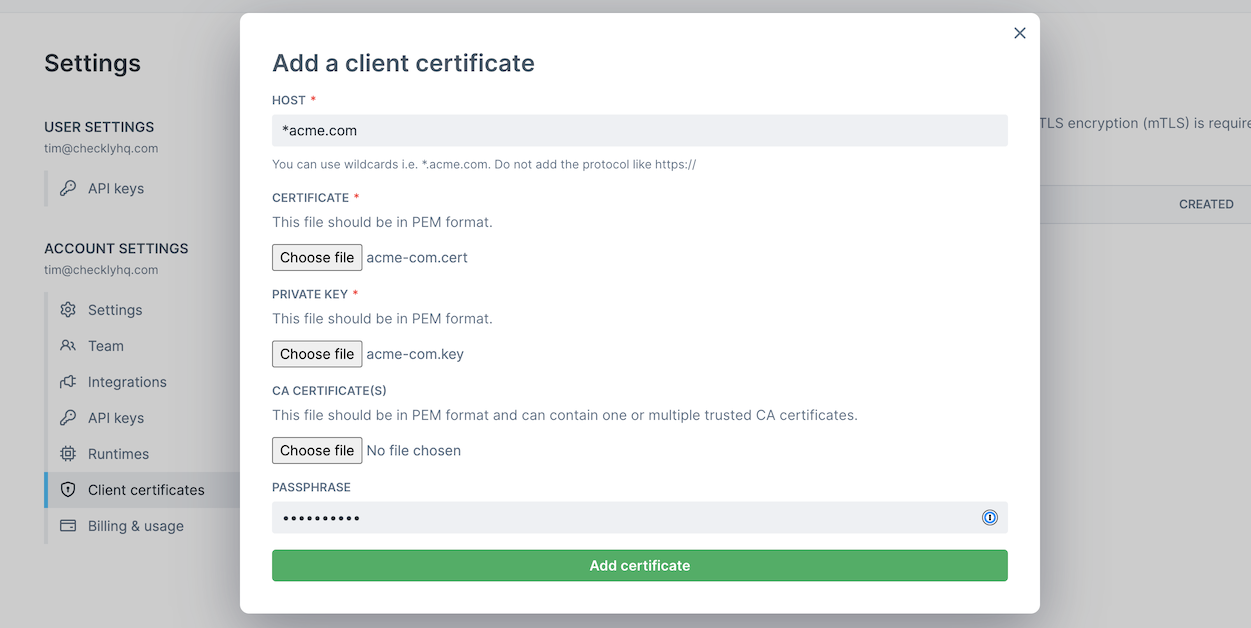 1. Click "Add client certificate".
2. Provide the **host name** for the certificate. You can use wildcard like `*.acme.com`. Under the hood we use [minimatch](https://www.npmjs.com/package/minimatch)
3. Select the **certificate file** and **private key** file. Both need to be in `PEM` format.
4. If your client certificate requires a custom **Certificate Authority**, you can add another `PEM` file that contains one or more concatenated CA certificates.
5. If you provided a **passphrase** when generating your certificate and private key files, provide it in the passphrase input. You can leave it empty if no passphrase is needed.
Note that your passphrase will be encrypted at rest, in transit and only used at very end when executing your API check.
## Using a certificate
Client certificates are automatically used by API checks that match the host name of the certificate. Client certificates
are active account wide and cannot be limited to a specific group.
You can add multiple certificate for the same host. In this case we match the certificate by the following rules:
1. The most recently added certificate that matches the host name wins. This goes for both full hostname and ones with wildcards.
2. A certificate with a full hostname wins over one that matches on a wildcard, e.g. `www.acme.com` wins from `*.acme.com` for the host `www.acme.com`
## Editing a certificate
Client certificates cannot be edited. You can only remove or add client certificates.
## Removing a certificate
You can remove a certificate by going to [Client Certificates](https://app.checklyhq.com/settings/account/client-certificates)
tab and clicking the **delete** icon. Note that any API checks that require a client certificate will start failing.
## Known limitations
1. Because we need to match your certificate to your target endpoint for your API checks, you cannot change the `request.url`
in [a setup script as described here](/detect/synthetic-monitoring/api-checks/setup-and-teardown#request).
2. We do not support `PKCS12` certificate bundles. You can convert your `PKCS12` bundles to `PEM` format using `openssl`
```bash theme={null}
openssl pkcs12 -in .p12 -out .key -nodes -nocerts
openssl pkcs12 -in .p12 -out .cert -nokeys
```
1. Click "Add client certificate".
2. Provide the **host name** for the certificate. You can use wildcard like `*.acme.com`. Under the hood we use [minimatch](https://www.npmjs.com/package/minimatch)
3. Select the **certificate file** and **private key** file. Both need to be in `PEM` format.
4. If your client certificate requires a custom **Certificate Authority**, you can add another `PEM` file that contains one or more concatenated CA certificates.
5. If you provided a **passphrase** when generating your certificate and private key files, provide it in the passphrase input. You can leave it empty if no passphrase is needed.
Note that your passphrase will be encrypted at rest, in transit and only used at very end when executing your API check.
## Using a certificate
Client certificates are automatically used by API checks that match the host name of the certificate. Client certificates
are active account wide and cannot be limited to a specific group.
You can add multiple certificate for the same host. In this case we match the certificate by the following rules:
1. The most recently added certificate that matches the host name wins. This goes for both full hostname and ones with wildcards.
2. A certificate with a full hostname wins over one that matches on a wildcard, e.g. `www.acme.com` wins from `*.acme.com` for the host `www.acme.com`
## Editing a certificate
Client certificates cannot be edited. You can only remove or add client certificates.
## Removing a certificate
You can remove a certificate by going to [Client Certificates](https://app.checklyhq.com/settings/account/client-certificates)
tab and clicking the **delete** icon. Note that any API checks that require a client certificate will start failing.
## Known limitations
1. Because we need to match your certificate to your target endpoint for your API checks, you cannot change the `request.url`
in [a setup script as described here](/detect/synthetic-monitoring/api-checks/setup-and-teardown#request).
2. We do not support `PKCS12` certificate bundles. You can convert your `PKCS12` bundles to `PEM` format using `openssl`
```bash theme={null}
openssl pkcs12 -in .p12 -out .key -nodes -nocerts
openssl pkcs12 -in .p12 -out .cert -nokeys
```