> ## Documentation Index
> Fetch the complete documentation index at: https://checklyhq.com/docs/llms.txt
> Use this file to discover all available pages before exploring further.
# Creating An API Check
> Step-by-step guide to creating your first API check in Checkly using the web UI and CLI.
Learn more about all the [API Check capabilities](/detect/synthetic-monitoring/api-checks/overview) in the general overview.
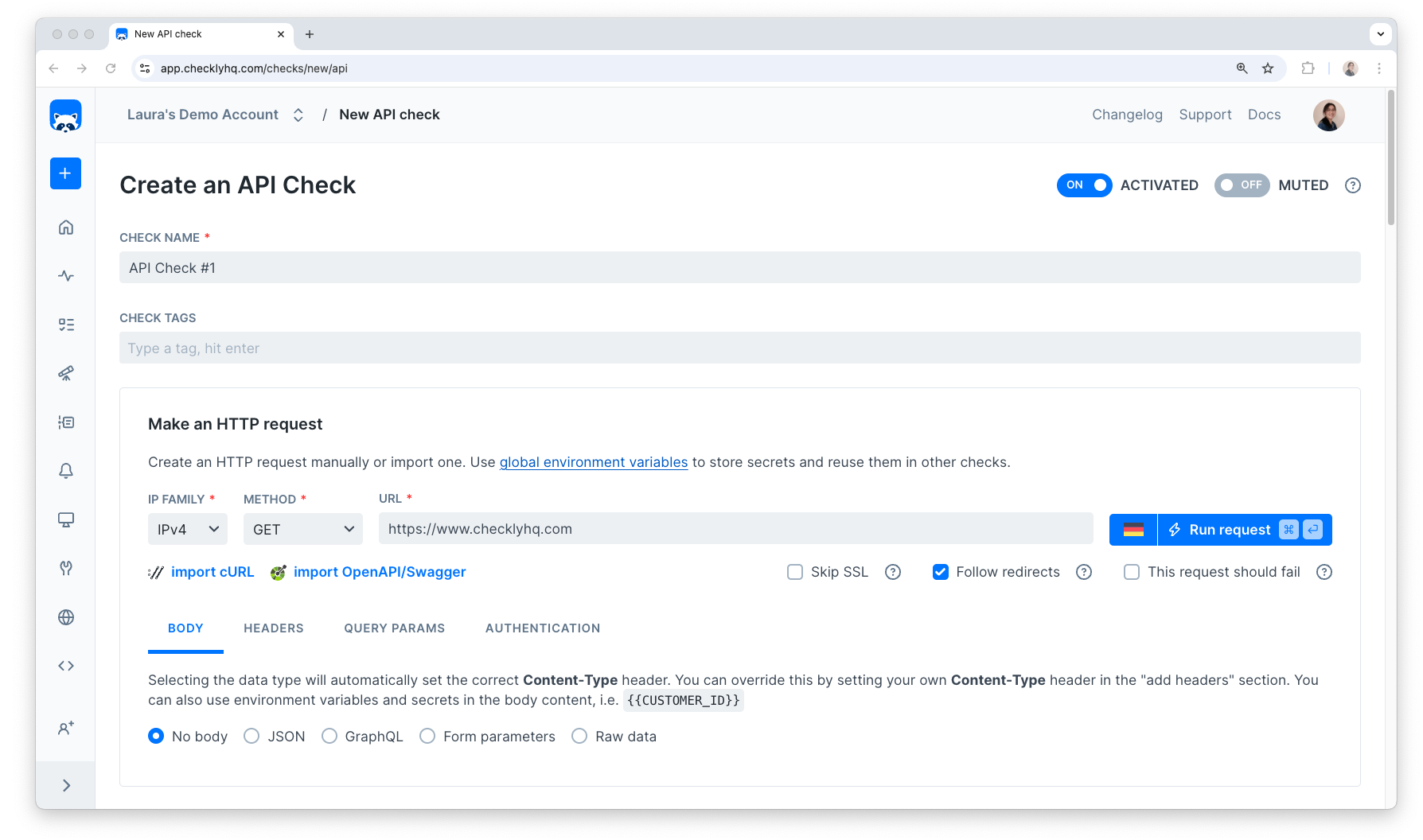 ### Name, tags, and description
* **Name:** A meaningful name helps you and your team quickly identify checks and improves the clarity of alerts when something fails
* **Tags:** let you group related checks and control which ones appear on your [dashboards](/communicate/dashboards/overview)
* **Descriptions:** add context about what a check does or why it exists
Together, these fields improve alert clarity and play an important role in incident investigation. [Rocky AI](/resolve/ai-root-cause-analysis/overview) uses this information to provide more accurate root cause and user impact analysis.
### HTTP request
This is where you configure the API endpoint. The most important part of your API check is its URL and method. Optionally, you can define body data, headers, query parameters and authentication for the API check. These [request settings](/detect/synthetic-monitoring/api-checks/configuration) determine the actions taken by the API and the response sent back.
Endpoints can be accessed and manipulated through [HTTP methods](https://developer.mozilla.org/en-US/docs/Web/HTTP/Methods). Not all methods are valid for all endpoints.
You can import a cURL command, Swagger.json or OpenAPI specification here too.
### Setup and teardown scripts
Setup scripts allow you to do last minute processing of test data and request options. These scripts execute before any requests are made. Teardown scripts are run after the HTTP request has finished, but before any assertions are validated. With a maximum execution time of 10 seconds, these scripts are useful for things like signing HMAC requests, requesting tokens, setting up or cleaning up test data and scrubbing sensitive response data for regulatory reasons.
[Read more about setup and teardown scripts](/detect/synthetic-monitoring/api-checks/setup-and-teardown)
### Response time limits
Sometimes APIs can be slow, but not broken. We call this degraded. You can set [response time limits](/detect/synthetic-monitoring/api-checks/response-limits) to specify when an API check should be marked as degraded and when it should be marked as failed.
### Assertions
This is where you determine whether the response of the HTTP request is correct or not.
You can assert on different sources. These could be:
* The HTTP status code returned from the API
* Something missing or required within the response body
* A specific response header
* A specific response time
[Read more about assertions](assertions)
### Scheduling & locations
You can configure your checks to run from our [public](/concepts/locations) locations, or use a Checkly Agent to host your own [private](/platform/private-locations/overview) locations. If you don't select more than one location and you've disabled retrying checks from the same location, we will pick a random location when retrying checks.
Checkly runs your API checks based on an interval you set. The shortest interval you can run is every 10 seconds and the longest is every 24 hours.
A 1-second interval is available upon request — [contact us](mailto:support@checklyhq.com) if you'd like to learn more.
### Retries & alerting
Select your preferred [retry strategy](/communicate/alerts/retries) for failed checks.
Choose which [alert channels](/communicate/alerts/channels) to get notified through when your check runs into issues. If we don't have your preferred alert method, why not try out our [webhooks](/integrations/alerts/webhooks)?
### Testing
You can run your check as an [E2E test](/detect/testing/overview) locally or from your CI/CD pipeline to validate your freshly deployed application. Use the Checkly CLI, or configure integrations with Vercel and GitHub.
## CLI example
The [Checkly CLI](/guides/getting-started-with-monitoring-as-code/) gives you a JavaScript/TypeScript-native workflow for coding, testing and deploying synthetic monitoring at scale, from your code base.
You can define an API check via the CLI. For example:
```ts hello-api.check.ts theme={null}
import { ApiCheck, AssertionBuilder, Frequency } from 'checkly/constructs'
new ApiCheck('hello-api-1', {
name: 'Hello API',
activated: true,
frequency: Frequency.EVERY_1M,
request: {
method: 'GET',
url: 'https://mac-demo-repo.vercel.app/api/hello',
assertions: [
AssertionBuilder.statusCode().equals(200)
],
}
})
```
The above example defines:
* The basic check properties like `name`, `activated` etc.
* The `GET` HTTP method and target `url` of the request.
* An array of assertions to assert the HTTP response status is correct.
For more options, see the [Check construct reference](/constructs/overview).
### Name, tags, and description
* **Name:** A meaningful name helps you and your team quickly identify checks and improves the clarity of alerts when something fails
* **Tags:** let you group related checks and control which ones appear on your [dashboards](/communicate/dashboards/overview)
* **Descriptions:** add context about what a check does or why it exists
Together, these fields improve alert clarity and play an important role in incident investigation. [Rocky AI](/resolve/ai-root-cause-analysis/overview) uses this information to provide more accurate root cause and user impact analysis.
### HTTP request
This is where you configure the API endpoint. The most important part of your API check is its URL and method. Optionally, you can define body data, headers, query parameters and authentication for the API check. These [request settings](/detect/synthetic-monitoring/api-checks/configuration) determine the actions taken by the API and the response sent back.
Endpoints can be accessed and manipulated through [HTTP methods](https://developer.mozilla.org/en-US/docs/Web/HTTP/Methods). Not all methods are valid for all endpoints.
You can import a cURL command, Swagger.json or OpenAPI specification here too.
### Setup and teardown scripts
Setup scripts allow you to do last minute processing of test data and request options. These scripts execute before any requests are made. Teardown scripts are run after the HTTP request has finished, but before any assertions are validated. With a maximum execution time of 10 seconds, these scripts are useful for things like signing HMAC requests, requesting tokens, setting up or cleaning up test data and scrubbing sensitive response data for regulatory reasons.
[Read more about setup and teardown scripts](/detect/synthetic-monitoring/api-checks/setup-and-teardown)
### Response time limits
Sometimes APIs can be slow, but not broken. We call this degraded. You can set [response time limits](/detect/synthetic-monitoring/api-checks/response-limits) to specify when an API check should be marked as degraded and when it should be marked as failed.
### Assertions
This is where you determine whether the response of the HTTP request is correct or not.
You can assert on different sources. These could be:
* The HTTP status code returned from the API
* Something missing or required within the response body
* A specific response header
* A specific response time
[Read more about assertions](assertions)
### Scheduling & locations
You can configure your checks to run from our [public](/concepts/locations) locations, or use a Checkly Agent to host your own [private](/platform/private-locations/overview) locations. If you don't select more than one location and you've disabled retrying checks from the same location, we will pick a random location when retrying checks.
Checkly runs your API checks based on an interval you set. The shortest interval you can run is every 10 seconds and the longest is every 24 hours.
A 1-second interval is available upon request — [contact us](mailto:support@checklyhq.com) if you'd like to learn more.
### Retries & alerting
Select your preferred [retry strategy](/communicate/alerts/retries) for failed checks.
Choose which [alert channels](/communicate/alerts/channels) to get notified through when your check runs into issues. If we don't have your preferred alert method, why not try out our [webhooks](/integrations/alerts/webhooks)?
### Testing
You can run your check as an [E2E test](/detect/testing/overview) locally or from your CI/CD pipeline to validate your freshly deployed application. Use the Checkly CLI, or configure integrations with Vercel and GitHub.
## CLI example
The [Checkly CLI](/guides/getting-started-with-monitoring-as-code/) gives you a JavaScript/TypeScript-native workflow for coding, testing and deploying synthetic monitoring at scale, from your code base.
You can define an API check via the CLI. For example:
```ts hello-api.check.ts theme={null}
import { ApiCheck, AssertionBuilder, Frequency } from 'checkly/constructs'
new ApiCheck('hello-api-1', {
name: 'Hello API',
activated: true,
frequency: Frequency.EVERY_1M,
request: {
method: 'GET',
url: 'https://mac-demo-repo.vercel.app/api/hello',
assertions: [
AssertionBuilder.statusCode().equals(200)
],
}
})
```
The above example defines:
* The basic check properties like `name`, `activated` etc.
* The `GET` HTTP method and target `url` of the request.
* An array of assertions to assert the HTTP response status is correct.
For more options, see the [Check construct reference](/constructs/overview).