> ## Documentation Index
> Fetch the complete documentation index at: https://www.checklyhq.com/docs/llms.txt
> Use this file to discover all available pages before exploring further.
# Testing
> Learn how to create, configure, and manage testing in Checkly.
Checkly combines testing and monitoring into one workflow. With Checkly, you can:
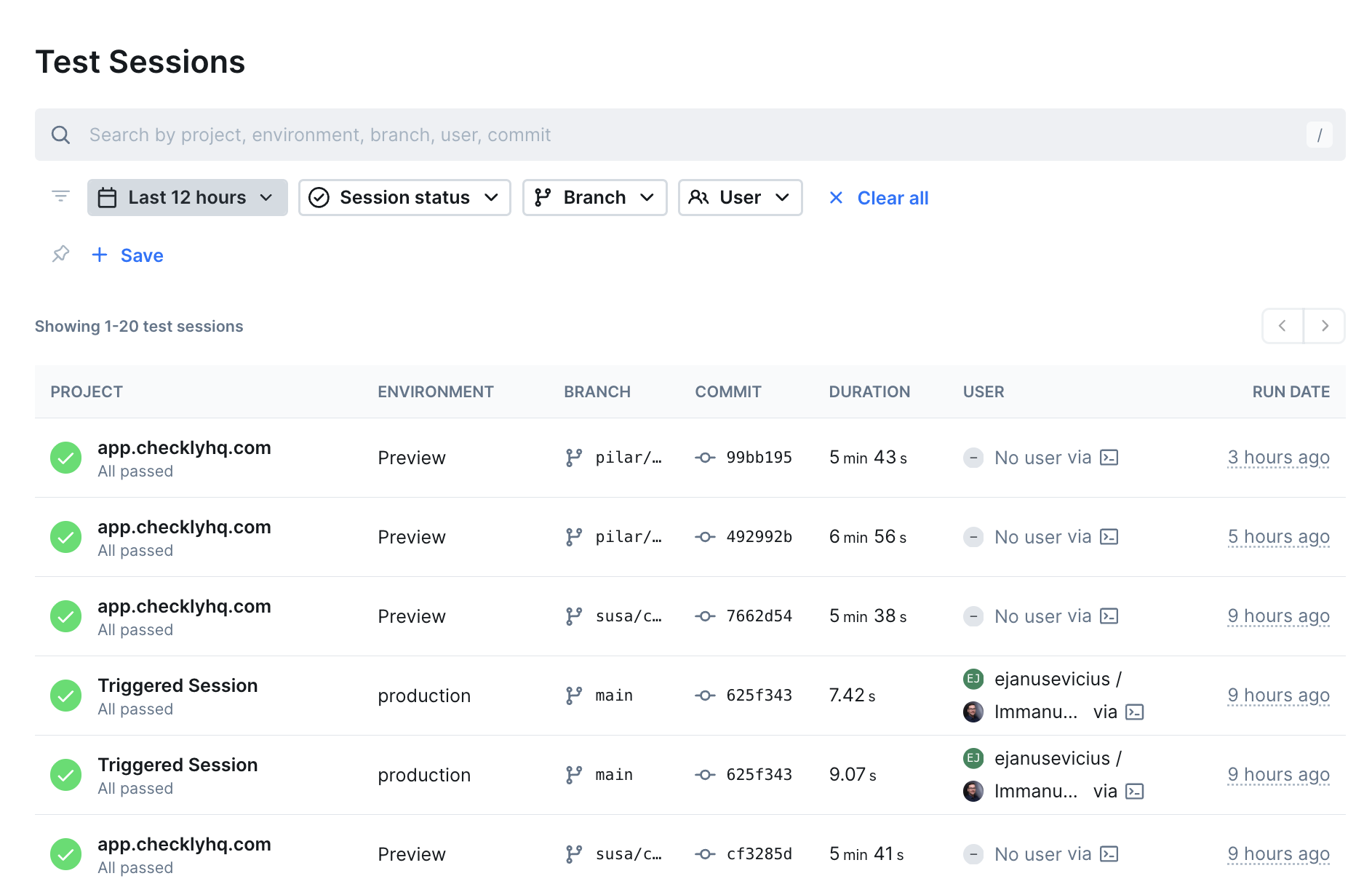
 * Run automated browser tests that simulate user interactions
* Set up API tests to verify endpoints and services
* Plan recurring test execution on a schedule
* Run tests from [Checkly's global locations](/concepts/locations)
## Test Types
Create a single test and use it for both pre-production validation and production monitoring:
Simple HTTP requests to verify your API endpoints are responding correctly.
Create an [API test](/detect/synthetic-monitoring/api-checks/overview)
Advanced tests that combine multiple API calls and browser actions.
Create a [Multi-step test](/detect/synthetic-monitoring/multistep-checks/overview)
Full browser automation to test complex user interactions and workflows.
Create a [Browser test](/detect/synthetic-monitoring/browser-checks/overview)
Import your entire test project and run Playwright completely natively.
Create a [Playwright test](/detect/synthetic-monitoring/playwright-checks/overview)
Verify that non-HTTP services are reachable by checking connectivity to a host and port.
Create a [TCP monitor](/detect/uptime-monitoring/tcp-monitors/overview)
Check that your DNS records resolve as expected and catch misconfigurations or propagation issues.
Create a [DNS monitor](/detect/uptime-monitoring/dns-monitors/overview)
## Run Playwright tests on the cloud
Use `npx checkly pw-test` to run your existing Playwright tests on Checkly's global infrastructure. Tests run from real cloud locations with full observability — traces, videos, screenshots, and logs.
```bash Terminal theme={null}
npx checkly pw-test --location="eu-west-1" -- --grep="@smoke"
```
Customize the dependency installation step for the cloud environment:
```bash Terminal theme={null}
npx checkly pw-test --install-command='npm install --no-scripts'
```
Learn more in the [`checkly pw-test` CLI reference](/cli/checkly-pw-test).
## Analyze local test results
Use the [Playwright Reporter](/detect/testing/playwright-reporter) to upload local and CI Playwright test results to Checkly. View screenshots, videos, and traces alongside your monitoring data.
## Benefits of testing with Checkly
* **One platform for testing and monitoring** — Use the same tests for pre-production validation and production monitoring
* **Catch issues early** — Identify problems at any stage of your delivery pipeline
* **Code-first approach** — Write tests in code, store them in repositories, and use version control
* **Global coverage** — Run tests from multiple locations to match your user base
* Run automated browser tests that simulate user interactions
* Set up API tests to verify endpoints and services
* Plan recurring test execution on a schedule
* Run tests from [Checkly's global locations](/concepts/locations)
## Test Types
Create a single test and use it for both pre-production validation and production monitoring:
Simple HTTP requests to verify your API endpoints are responding correctly.
Create an [API test](/detect/synthetic-monitoring/api-checks/overview)
Advanced tests that combine multiple API calls and browser actions.
Create a [Multi-step test](/detect/synthetic-monitoring/multistep-checks/overview)
Full browser automation to test complex user interactions and workflows.
Create a [Browser test](/detect/synthetic-monitoring/browser-checks/overview)
Import your entire test project and run Playwright completely natively.
Create a [Playwright test](/detect/synthetic-monitoring/playwright-checks/overview)
Verify that non-HTTP services are reachable by checking connectivity to a host and port.
Create a [TCP monitor](/detect/uptime-monitoring/tcp-monitors/overview)
Check that your DNS records resolve as expected and catch misconfigurations or propagation issues.
Create a [DNS monitor](/detect/uptime-monitoring/dns-monitors/overview)
## Run Playwright tests on the cloud
Use `npx checkly pw-test` to run your existing Playwright tests on Checkly's global infrastructure. Tests run from real cloud locations with full observability — traces, videos, screenshots, and logs.
```bash Terminal theme={null}
npx checkly pw-test --location="eu-west-1" -- --grep="@smoke"
```
Customize the dependency installation step for the cloud environment:
```bash Terminal theme={null}
npx checkly pw-test --install-command='npm install --no-scripts'
```
Learn more in the [`checkly pw-test` CLI reference](/cli/checkly-pw-test).
## Analyze local test results
Use the [Playwright Reporter](/detect/testing/playwright-reporter) to upload local and CI Playwright test results to Checkly. View screenshots, videos, and traces alongside your monitoring data.
## Benefits of testing with Checkly
* **One platform for testing and monitoring** — Use the same tests for pre-production validation and production monitoring
* **Catch issues early** — Identify problems at any stage of your delivery pipeline
* **Code-first approach** — Write tests in code, store them in repositories, and use version control
* **Global coverage** — Run tests from multiple locations to match your user base