> ## Documentation Index
> Fetch the complete documentation index at: https://www.checklyhq.com/docs/llms.txt
> Use this file to discover all available pages before exploring further.
# URL Monitor Configuration
> Configure your URL monitor to ensure your HTTP-based services are always available.
### Basic Setup
Monitor public URLs by specifying the endpoint you want to track.
 * **Request method:** Always GET
* **URL:** The HTTP(S) URL to monitor (e.g. [https://api.example.com](https://api.example.com))
* **IP family:** Choose between IPv4 (default) or IPv6
* **Follow redirects:** Automatically follow 30x redirects
* **Skip SSL:** Skip SSL certificate validation
* **This request should fail:** Treat HTTP error codes (4xx and 5xx) as passed. Please note that successful responses still pass. Only failed assertions will cause the check to fail
### Assertions
Use assertions to validate the status code of your URL request. When one or more assertions fail, an alert is triggered:
* **Request method:** Always GET
* **URL:** The HTTP(S) URL to monitor (e.g. [https://api.example.com](https://api.example.com))
* **IP family:** Choose between IPv4 (default) or IPv6
* **Follow redirects:** Automatically follow 30x redirects
* **Skip SSL:** Skip SSL certificate validation
* **This request should fail:** Treat HTTP error codes (4xx and 5xx) as passed. Please note that successful responses still pass. Only failed assertions will cause the check to fail
### Assertions
Use assertions to validate the status code of your URL request. When one or more assertions fail, an alert is triggered:
 For more details, see our documentation on [Assertions](/docs/detect/assertions).
### Response Time Limits
Set performance thresholds to ensure your application meets speed requirements:
For more details, see our documentation on [Assertions](/docs/detect/assertions).
### Response Time Limits
Set performance thresholds to ensure your application meets speed requirements:
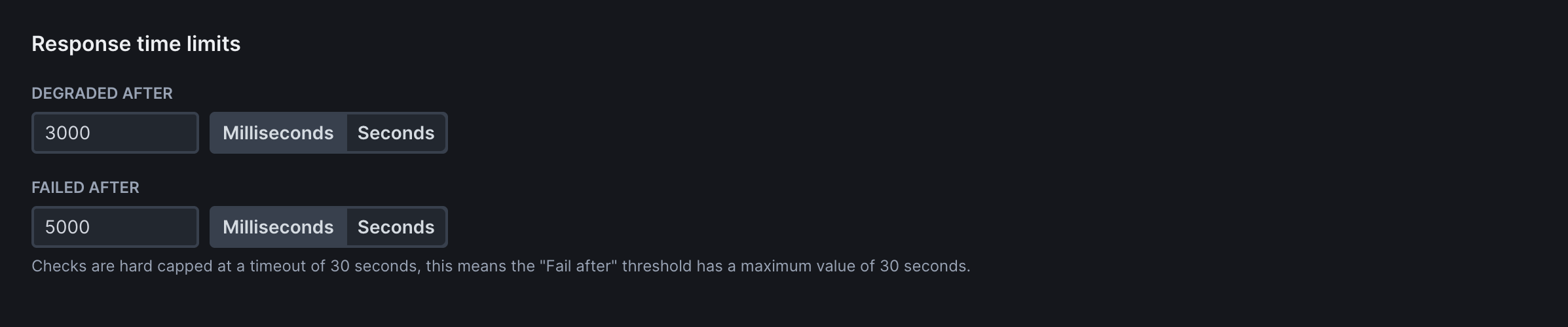 * **Degraded After**: Time threshold (in milliseconds) after which the check is marked as degraded but not failed. Use for performance warnings without triggering failure alerts
* **Failed After**: Time threshold after which the check fails completely. Use for hard performance limits where slow responses should trigger alerts
### Frequency
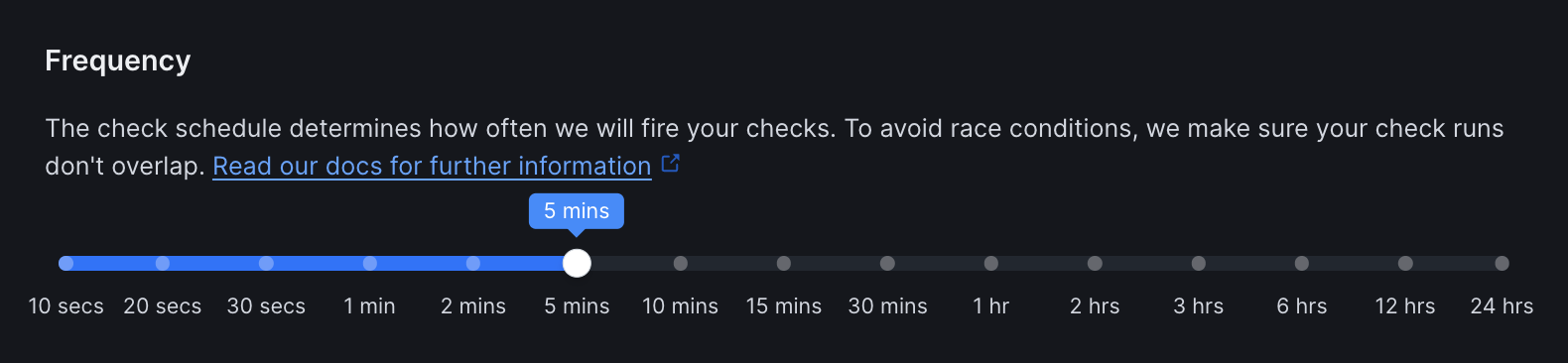
Set how often the monitor runs (every 10 seconds to 24 hours):
* **Degraded After**: Time threshold (in milliseconds) after which the check is marked as degraded but not failed. Use for performance warnings without triggering failure alerts
* **Failed After**: Time threshold after which the check fails completely. Use for hard performance limits where slow responses should trigger alerts
### Frequency
Set how often the monitor runs (every 10 seconds to 24 hours):
 ### Scheduling Strategy
Choose when and how your checks run across multiple locations:
### Scheduling Strategy
Choose when and how your checks run across multiple locations:
 * **Round Robin** (Default): Checks run on one of the selected locations each time it is scheduled
* **Parallel**: Checks run from all selected locations simultaneously. Higher consumption but provides immediate global visibility for critical services
Learn more in our documentation on [Scheduling strategies](/docs/concepts/scheduling/#scheduling-strategies).
### Locations
Select [public](/docs/concepts/locations#public-locations) or [private](/docs/platform/private-locations/overview) locations to run the monitor from.
* **Round Robin** (Default): Checks run on one of the selected locations each time it is scheduled
* **Parallel**: Checks run from all selected locations simultaneously. Higher consumption but provides immediate global visibility for critical services
Learn more in our documentation on [Scheduling strategies](/docs/concepts/scheduling/#scheduling-strategies).
### Locations
Select [public](/docs/concepts/locations#public-locations) or [private](/docs/platform/private-locations/overview) locations to run the monitor from.
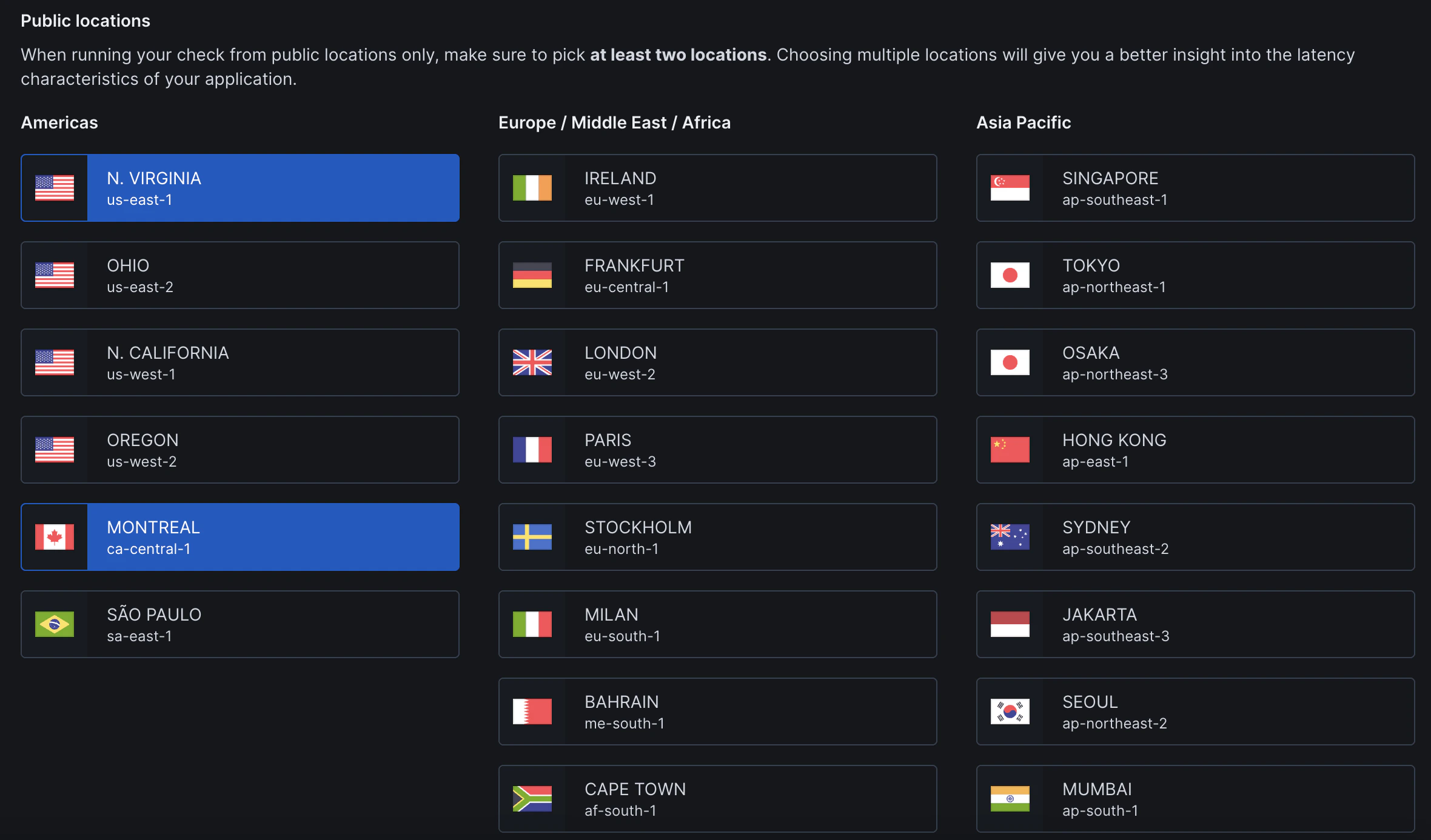 We recommend to chose at least 2-3 locations that best represent your user base for optimal monitoring coverage.
### Retries
Select the retry strategy to determine how failed checks are retried:
We recommend to chose at least 2-3 locations that best represent your user base for optimal monitoring coverage.
### Retries
Select the retry strategy to determine how failed checks are retried:
 | Strategy | Description |
| --------------- | ---------------------------------------------------------------------------------------- |
| **None** | No retries - fail immediately on first failure for fastest detection |
| **Single** | Retry once after failure with configurable delay |
| **Fixed** | Retry a specific number of times with consistent intervals between attempts |
| **Linear** | Increase retry delay linearly with each attempt to avoid overwhelming failed services |
| **Exponential** | Double the retry delay with each attempt for maximum protection against service overload |
### Alert Settings
Configure notifications for your team:
| Strategy | Description |
| --------------- | ---------------------------------------------------------------------------------------- |
| **None** | No retries - fail immediately on first failure for fastest detection |
| **Single** | Retry once after failure with configurable delay |
| **Fixed** | Retry a specific number of times with consistent intervals between attempts |
| **Linear** | Increase retry delay linearly with each attempt to avoid overwhelming failed services |
| **Exponential** | Double the retry delay with each attempt for maximum protection against service overload |
### Alert Settings
Configure notifications for your team:
 #### Notification Scope
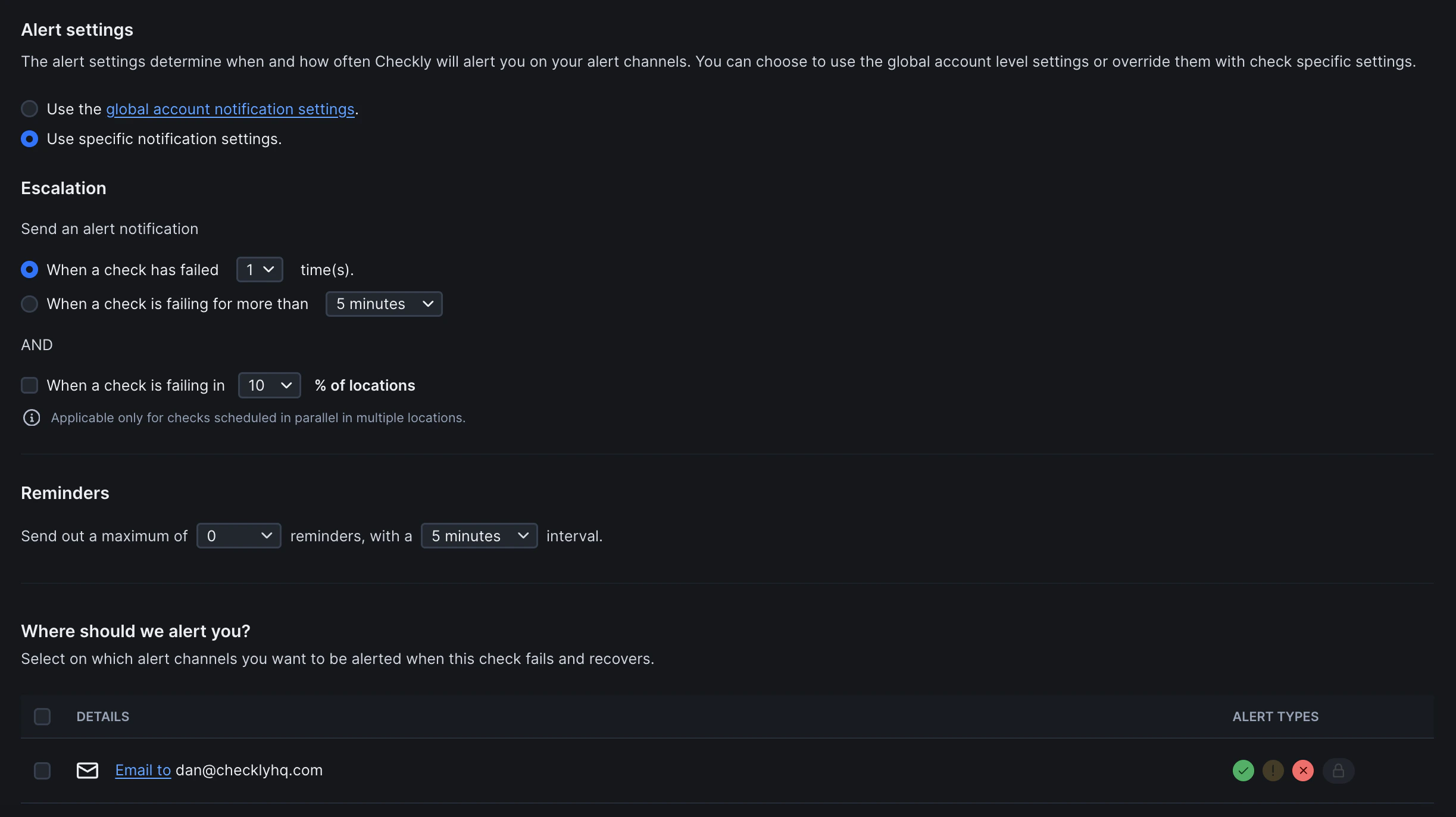
Choose how alerts are configured for this monitor:
| Option | Description |
| -------------------------------------------- | ------------------------------------------------------------------ |
| **Use global account notification settings** | Inherit notification preferences from Global Notification Settings |
| **Use specific notification settings** | Configure alert behavior exclusively for this check |
#### Escalation Rules
Control when alerts are triggered:
**Primary Trigger** (Choose one):
* **When a check has failed X time(s)**: Sends alert after specified consecutive failures
* **When a check is failing for more than Y minutes**: Sends alert if failure duration exceeds threshold
**Additional Condition** (Optional):
* **When a check is failing in Z% of locations**: Only applies to checks running in parallel across multiple locations
#### Reminders
Configure follow-up alerts after initial failure notification:
| Setting | Description |
| --------------------- | ------------------------------------------------------ |
| **Maximum reminders** | Number of follow-up alerts (0 = no reminders) |
| **Reminder interval** | Time between reminders (only if maximum reminders > 0) |
#### Alert Channels
Define where notifications are sent when checks fail or recover. Additional channels can be configured in global notification settings.
**Alert Types** (per channel):
* ✅ **Success/Recovery**: Check has recovered from failure
* ⚠ **Degraded**: Check is degraded but not failed
* ❌ **Failure**: Check has failed
**Global Alert Settings**: By default, monitors inherit your account's notification preferences. Select "Use specific notification settings" to customize alerts for individual monitors.
### Additional Settings
* **Name:** Give your monitor a clear name to identify it in dashboards and alerts
* **Description:** Add context about what this monitor does and why it matters. Supports markdown, max 500 characters. When a failure occurs, [Rocky AI](/docs/ai/rocky-ai) uses the description to provide more accurate [root cause and user impact analysis](/docs/resolve/ai-root-cause-analysis/overview)
* **Tags:** Use tags to organize monitors across [dashboards](/docs/communicate/dashboards/overview/) and [maintenance windows](/docs/communicate/maintenance-windows/overview)
#### Notification Scope
Choose how alerts are configured for this monitor:
| Option | Description |
| -------------------------------------------- | ------------------------------------------------------------------ |
| **Use global account notification settings** | Inherit notification preferences from Global Notification Settings |
| **Use specific notification settings** | Configure alert behavior exclusively for this check |
#### Escalation Rules
Control when alerts are triggered:
**Primary Trigger** (Choose one):
* **When a check has failed X time(s)**: Sends alert after specified consecutive failures
* **When a check is failing for more than Y minutes**: Sends alert if failure duration exceeds threshold
**Additional Condition** (Optional):
* **When a check is failing in Z% of locations**: Only applies to checks running in parallel across multiple locations
#### Reminders
Configure follow-up alerts after initial failure notification:
| Setting | Description |
| --------------------- | ------------------------------------------------------ |
| **Maximum reminders** | Number of follow-up alerts (0 = no reminders) |
| **Reminder interval** | Time between reminders (only if maximum reminders > 0) |
#### Alert Channels
Define where notifications are sent when checks fail or recover. Additional channels can be configured in global notification settings.
**Alert Types** (per channel):
* ✅ **Success/Recovery**: Check has recovered from failure
* ⚠ **Degraded**: Check is degraded but not failed
* ❌ **Failure**: Check has failed
**Global Alert Settings**: By default, monitors inherit your account's notification preferences. Select "Use specific notification settings" to customize alerts for individual monitors.
### Additional Settings
* **Name:** Give your monitor a clear name to identify it in dashboards and alerts
* **Description:** Add context about what this monitor does and why it matters. Supports markdown, max 500 characters. When a failure occurs, [Rocky AI](/docs/ai/rocky-ai) uses the description to provide more accurate [root cause and user impact analysis](/docs/resolve/ai-root-cause-analysis/overview)
* **Tags:** Use tags to organize monitors across [dashboards](/docs/communicate/dashboards/overview/) and [maintenance windows](/docs/communicate/maintenance-windows/overview)