> ## Documentation Index
> Fetch the complete documentation index at: https://checklyhq.com/docs/llms.txt
> Use this file to discover all available pages before exploring further.
# How to Use Setup and Teardown Scripts for Better API Monitoring
> Setup and teardown scripts are fundamental tools to tailor API checks to your target endpoints. This guide presents real-world examples to help you master these tools.
## The importance of self-contained checks
Checkly's [API Monitoring](/learn/monitoring/api-monitoring) checks run independently and on different schedules, possibly even following different retry logic when failures occur. It is therefore important not to create dependencies between them, which could introduce false failures and flakiness. Checkly prevents this antipattern by having each check run fully isolated in its own sandbox.
But how do you run complex API checks that have prerequisites (e.g., auth tokens, test data) that themselves require an API call or other preparation steps? That's what [setup and teardown scripts](/detect/synthetic-monitoring/api-checks/setup-and-teardown) are made for:
* **Setup scripts** run before the API check's main request. Use them to prepare test data, fetch tokens, or configure the request.
* **Teardown scripts** run after the HTTP request completes. Use them to clean up test data, scrub sensitive information, or normalize responses.
## Setup scripts
Setup scripts prepare everything needed before the main HTTP request runs. Common tasks include:
* HTTP requests to other services (and parsing responses)
* Encrypting data payloads
* Generating unique IDs, timestamps, and date strings
To pass data from a setup script into the main HTTP request, you have direct access to the `request` object:
| Property | Description | Type |
| ------------------------- | ----------------------------------------------- | ------ |
| `request.method` | The HTTP request method, e.g., 'GET', 'POST' | String |
| `request.url` | The request URL. Query parameters are appended. | String |
| `request.body` | The request body in string format. | String |
| `request.headers` | The request headers. | Object |
| `request.queryParameters` | The request query parameters. | Object |
For example, set the `Authorization` header with `request.headers['Authorization'] = my_token`, or set the request body with `request.body = JSON.stringify({ id: 123 })`.
> Available libraries depend on which [Runtime](/platform/runtimes/overview) you have chosen. See the [runtime specification](/platform/runtimes/runtime-specification) for details.
### Prepare test data
A self-contained check is responsible for preparing (and cleaning up) all the test data it needs. Let's look at an example.
We [use Checkly to monitor Checkly](https://blog.checklyhq.com/how-we-monitor-checkly/)! One of our checks verifies that `DELETE /v1/checks/{id}` works correctly. To verify that, we need a check to actually delete. We can create a new check in the setup script, retrieve its unique `id`, and pass it to the main HTTP request.
Our main request hits the `DELETE` endpoint at `https://api.checklyhq.com/v1/checks`:
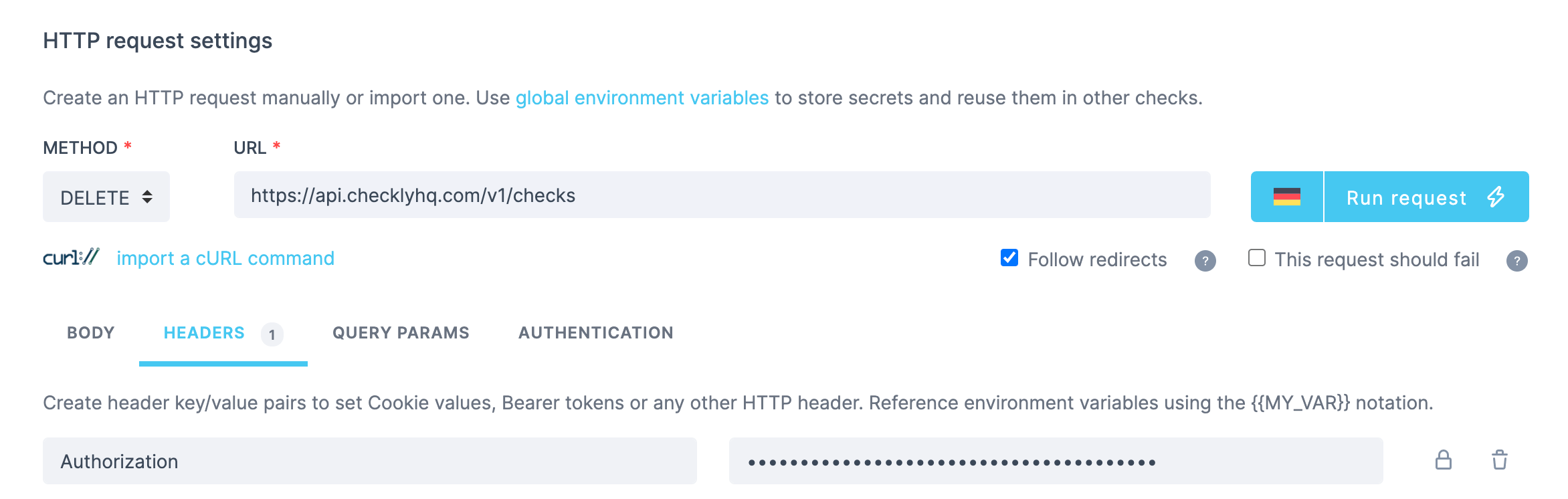 The request includes the `Authorization` header set to `Bearer `.
Now for the setup script. We use [axios](https://axios-http.com/) to create a dummy check:
```js SetupScript.js theme={null}
const axios = require("axios")
const apiKey = process.env.API_KEY
const { data } = await axios({
method: "post",
url: "https://api.checklyhq.com/v1/checks",
headers: {
Authorization: `Bearer ${apiKey}`
},
data: {
name: "dummy_check",
checkType: "BROWSER",
frequency: 5,
activated: true,
locations: ["us-east-1"],
script:
'const assert = require("chai").assert;const puppeteer = require("puppeteer");const browser = await puppeteer.launch();const page =await browser.newPage();await page.goto("https://google.com/");const title = await page.title();assert.equal(title, "Google"); await new Promise(resolve => setTimeout(resolve, 1000)); browser.close();',
useGlobalAlertSettings: true,
degradedResponseTime: 10000,
maxResponseTime: 20000,
}
})
const checkId = data.id
request.url = request.url + "/" + checkId
```
We've built a fully autonomous API check that creates everything it needs to verify the delete endpoint works correctly.
Note that this check might still fail due to an issue with the `POST /v1/checks` endpoint used in the setup script, not the `DELETE` endpoint we're testing. The Checkly check result indicates whether the error occurred in the setup script or in the main HTTP request.
### Fetching dynamic test data
Sometimes you want to fetch test data from an external source—maybe the data changes often, or you want to make checks more dynamic.
This example creates a new product for a webshop using dynamic data:
1. Use a setup script to request random device information from an external API.
2. Map that data to match the target API's schema.
3. Send the data to `fakestoreapi.com`.
Our main request hits the `POST` endpoint at `https://fakestoreapi.com/products`:
The request includes the `Authorization` header set to `Bearer `.
Now for the setup script. We use [axios](https://axios-http.com/) to create a dummy check:
```js SetupScript.js theme={null}
const axios = require("axios")
const apiKey = process.env.API_KEY
const { data } = await axios({
method: "post",
url: "https://api.checklyhq.com/v1/checks",
headers: {
Authorization: `Bearer ${apiKey}`
},
data: {
name: "dummy_check",
checkType: "BROWSER",
frequency: 5,
activated: true,
locations: ["us-east-1"],
script:
'const assert = require("chai").assert;const puppeteer = require("puppeteer");const browser = await puppeteer.launch();const page =await browser.newPage();await page.goto("https://google.com/");const title = await page.title();assert.equal(title, "Google"); await new Promise(resolve => setTimeout(resolve, 1000)); browser.close();',
useGlobalAlertSettings: true,
degradedResponseTime: 10000,
maxResponseTime: 20000,
}
})
const checkId = data.id
request.url = request.url + "/" + checkId
```
We've built a fully autonomous API check that creates everything it needs to verify the delete endpoint works correctly.
Note that this check might still fail due to an issue with the `POST /v1/checks` endpoint used in the setup script, not the `DELETE` endpoint we're testing. The Checkly check result indicates whether the error occurred in the setup script or in the main HTTP request.
### Fetching dynamic test data
Sometimes you want to fetch test data from an external source—maybe the data changes often, or you want to make checks more dynamic.
This example creates a new product for a webshop using dynamic data:
1. Use a setup script to request random device information from an external API.
2. Map that data to match the target API's schema.
3. Send the data to `fakestoreapi.com`.
Our main request hits the `POST` endpoint at `https://fakestoreapi.com/products`:
 The setup script fetches random device information and maps it to the product schema:
```js SetupScript.js theme={null}
const axios = require('axios')
const { data } = await axios({
method: "GET",
url: "https://random-data-api.com/api/device/random_device",
})
const responseData = {
title: data.model,
price: data.id,
description: data.manufacturer,
category: "device"
}
request.body = JSON.stringify(responseData)
```
This creates an encapsulated check that fetches dynamic test data from an external API and uses it to test a webshop endpoint.
## Teardown scripts
Teardown scripts run after the HTTP request completes but before assertions evaluate. They have access to both the `request` and `response` objects. Common use cases include:
* Cleaning up test data created during the check
* Scrubbing sensitive data from responses before logging
* Normalizing responses for consistent assertions
### Cleaning up test data
If your setup script creates test data, use a teardown script to clean it up. This keeps your test environment clean and prevents data accumulation.
Building on the earlier example where we created a dummy check to test the delete endpoint, what if we're testing a `GET` endpoint instead? We'd need to clean up the dummy check after the test:
```js TeardownScript.js theme={null}
const axios = require("axios")
const apiKey = process.env.API_KEY
// The setup script stored the check ID in an environment variable
const checkId = process.env.DUMMY_CHECK_ID
if (checkId) {
await axios({
method: "delete",
url: `https://api.checklyhq.com/v1/checks/${checkId}`,
headers: {
Authorization: `Bearer ${apiKey}`
}
})
console.log('Cleaned up dummy check:', checkId)
}
```
### Scrubbing sensitive data
Before response data is logged or stored, you might need to redact sensitive information for compliance reasons:
```js TeardownScript.js theme={null}
const body = JSON.parse(response.body)
if (body.user) {
body.user.ssn = '[REDACTED]'
body.user.creditCard = '[REDACTED]'
body.user.email = body.user.email.replace(/(.{2}).*(@.*)/, '$1***$2')
}
response.body = JSON.stringify(body)
```
### Error handling differences
Setup and teardown scripts have different error handling behavior:
| Aspect | Setup Scripts | Teardown Scripts |
| ------------ | ---------------------------- | ------------------- |
| On error | Check **aborts** immediately | Check **continues** |
| HTTP request | Never executes | Already completed |
| Assertions | Never run | Still evaluate |
This means teardown scripts are safe for cleanup operations—if they fail, your assertions still run and you'll know if the main request worked.
## Combined patterns
### Create-then-delete workflow
For testing CRUD operations, you often need to create a resource, test operations on it, and then delete it:
**Setup script:**
```js SetupScript.js theme={null}
const axios = require("axios")
// Create a test user
const { data } = await axios.post('https://api.example.com/users', {
name: 'Test User',
email: `test-${Date.now()}@example.com`
}, {
headers: { Authorization: `Bearer ${process.env.API_KEY}` }
})
// Store the ID for the main request and teardown
process.env.TEST_USER_ID = data.id
request.url = `${request.url}/${data.id}`
```
**Main request:** `GET https://api.example.com/users` (tests retrieving the user)
**Teardown script:**
```js TeardownScript.js theme={null}
const axios = require("axios")
const userId = process.env.TEST_USER_ID
if (userId) {
await axios.delete(`https://api.example.com/users/${userId}`, {
headers: { Authorization: `Bearer ${process.env.API_KEY}` }
})
console.log('Deleted test user:', userId)
}
```
### Conditional cleanup
Sometimes you only want to clean up if the main request succeeded:
```js TeardownScript.js theme={null}
const axios = require("axios")
// Only clean up if the request was successful
if (response.statusCode >= 200 && response.statusCode < 300) {
const body = JSON.parse(response.body)
await axios.delete(`https://api.example.com/orders/${body.orderId}`, {
headers: { Authorization: `Bearer ${process.env.API_KEY}` }
})
console.log('Cleaned up test order')
}
```
## Read more
The setup script fetches random device information and maps it to the product schema:
```js SetupScript.js theme={null}
const axios = require('axios')
const { data } = await axios({
method: "GET",
url: "https://random-data-api.com/api/device/random_device",
})
const responseData = {
title: data.model,
price: data.id,
description: data.manufacturer,
category: "device"
}
request.body = JSON.stringify(responseData)
```
This creates an encapsulated check that fetches dynamic test data from an external API and uses it to test a webshop endpoint.
## Teardown scripts
Teardown scripts run after the HTTP request completes but before assertions evaluate. They have access to both the `request` and `response` objects. Common use cases include:
* Cleaning up test data created during the check
* Scrubbing sensitive data from responses before logging
* Normalizing responses for consistent assertions
### Cleaning up test data
If your setup script creates test data, use a teardown script to clean it up. This keeps your test environment clean and prevents data accumulation.
Building on the earlier example where we created a dummy check to test the delete endpoint, what if we're testing a `GET` endpoint instead? We'd need to clean up the dummy check after the test:
```js TeardownScript.js theme={null}
const axios = require("axios")
const apiKey = process.env.API_KEY
// The setup script stored the check ID in an environment variable
const checkId = process.env.DUMMY_CHECK_ID
if (checkId) {
await axios({
method: "delete",
url: `https://api.checklyhq.com/v1/checks/${checkId}`,
headers: {
Authorization: `Bearer ${apiKey}`
}
})
console.log('Cleaned up dummy check:', checkId)
}
```
### Scrubbing sensitive data
Before response data is logged or stored, you might need to redact sensitive information for compliance reasons:
```js TeardownScript.js theme={null}
const body = JSON.parse(response.body)
if (body.user) {
body.user.ssn = '[REDACTED]'
body.user.creditCard = '[REDACTED]'
body.user.email = body.user.email.replace(/(.{2}).*(@.*)/, '$1***$2')
}
response.body = JSON.stringify(body)
```
### Error handling differences
Setup and teardown scripts have different error handling behavior:
| Aspect | Setup Scripts | Teardown Scripts |
| ------------ | ---------------------------- | ------------------- |
| On error | Check **aborts** immediately | Check **continues** |
| HTTP request | Never executes | Already completed |
| Assertions | Never run | Still evaluate |
This means teardown scripts are safe for cleanup operations—if they fail, your assertions still run and you'll know if the main request worked.
## Combined patterns
### Create-then-delete workflow
For testing CRUD operations, you often need to create a resource, test operations on it, and then delete it:
**Setup script:**
```js SetupScript.js theme={null}
const axios = require("axios")
// Create a test user
const { data } = await axios.post('https://api.example.com/users', {
name: 'Test User',
email: `test-${Date.now()}@example.com`
}, {
headers: { Authorization: `Bearer ${process.env.API_KEY}` }
})
// Store the ID for the main request and teardown
process.env.TEST_USER_ID = data.id
request.url = `${request.url}/${data.id}`
```
**Main request:** `GET https://api.example.com/users` (tests retrieving the user)
**Teardown script:**
```js TeardownScript.js theme={null}
const axios = require("axios")
const userId = process.env.TEST_USER_ID
if (userId) {
await axios.delete(`https://api.example.com/users/${userId}`, {
headers: { Authorization: `Bearer ${process.env.API_KEY}` }
})
console.log('Deleted test user:', userId)
}
```
### Conditional cleanup
Sometimes you only want to clean up if the main request succeeded:
```js TeardownScript.js theme={null}
const axios = require("axios")
// Only clean up if the request was successful
if (response.statusCode >= 200 && response.statusCode < 300) {
const body = JSON.parse(response.body)
await axios.delete(`https://api.example.com/orders/${body.orderId}`, {
headers: { Authorization: `Bearer ${process.env.API_KEY}` }
})
console.log('Cleaned up test order')
}
```
## Read more
Full reference for setup and teardown scripts, including built-in variables and technical details.
Understand monitoring as code (MaC) via our Checkly CLI.
Learn end-to-end monitoring with puppeteer and playwright to test key website flows.