> ## Documentation Index
> Fetch the complete documentation index at: https://www.checklyhq.com/docs/llms.txt
> Use this file to discover all available pages before exploring further.
# Slack
> Configure the Slack integration to receive real-time alerts from Checkly
Setting up Slack as an alerting channel is simple:
1. First, install the Checkly Slack App into your Slack Workspace by going to [your integrations page](https://app.checklyhq.com/accounts/settings/account/integrations) and click "Connect Slack Workspace".
2. Then, head to [your alert settings](https://app.checklyhq.com/accounts/alerts/settings), click "Add more channels" and select a new Slack channel.
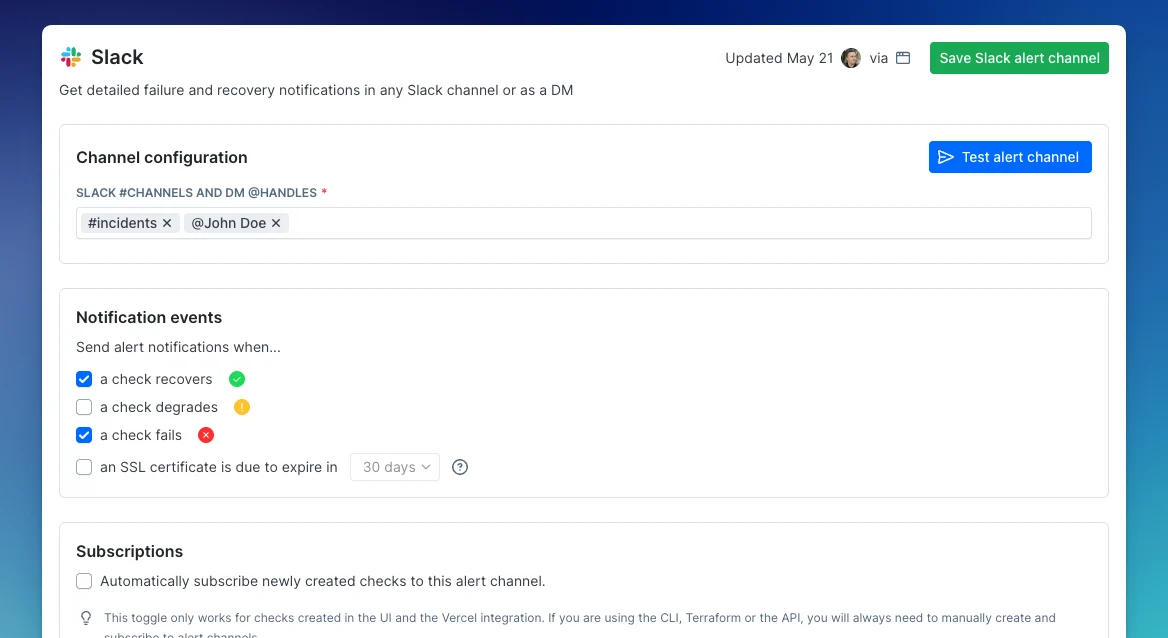 You can add any **#public-channel-name**, **@username** for Direct Messages or a channel ID. For private channels, the Checkly Slack app needs to be explicitly invited to that channel by tagging it like `@Checkly`.
If you're using a free Slack workspace, be aware of [message limits](https://slack.com/help/articles/115002422943-Usage-limits-for-free-workspaces). Exceeding these limits may prevent new alerts from being delivered.
## Example Failed Slack Alert
For each check and / or monitor, the Slack alert message contains key information, a possible root cause analysis and key actions like rerunning the check.
You can add any **#public-channel-name**, **@username** for Direct Messages or a channel ID. For private channels, the Checkly Slack app needs to be explicitly invited to that channel by tagging it like `@Checkly`.
If you're using a free Slack workspace, be aware of [message limits](https://slack.com/help/articles/115002422943-Usage-limits-for-free-workspaces). Exceeding these limits may prevent new alerts from being delivered.
## Example Failed Slack Alert
For each check and / or monitor, the Slack alert message contains key information, a possible root cause analysis and key actions like rerunning the check.
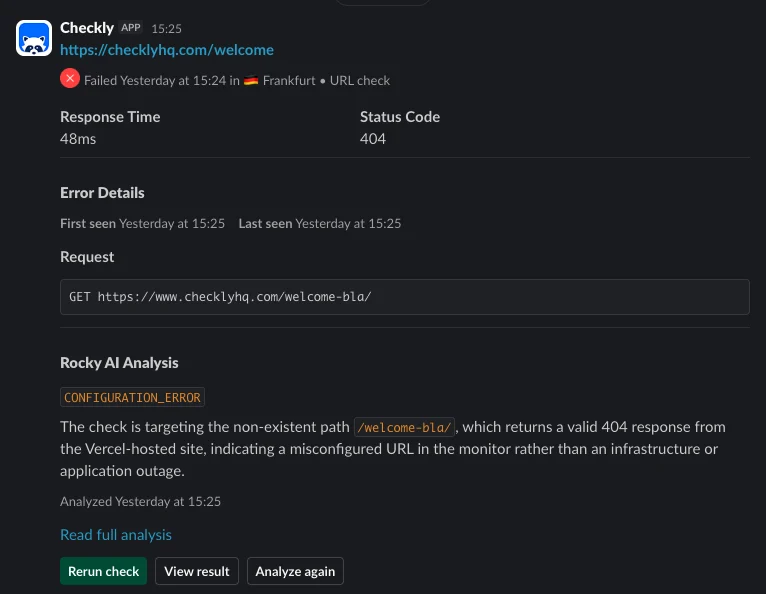 The root cause analysis uses AI to analyze your logs, traces, test source code, error information and other artefacts available to Checkly. Be aware that AI can make mistakes so outputs should be verified independently.
## Example Recovered Slack Alert
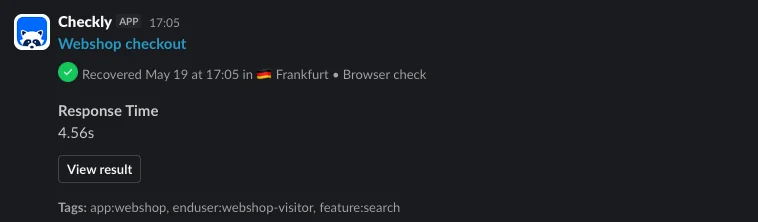
From the recovered Slack message, you can see the timestamp as well as a link to the check itself.
The root cause analysis uses AI to analyze your logs, traces, test source code, error information and other artefacts available to Checkly. Be aware that AI can make mistakes so outputs should be verified independently.
## Example Recovered Slack Alert
From the recovered Slack message, you can see the timestamp as well as a link to the check itself.
 ## Migrating from the deprecated Slack webhook alert channels
Checkly previously only had Slack webhook based alert channels. These types of webhooks have been deprecated by Slack and are now also deprecated by Checkly. These webhook channels will keep working; we have not set a hard end-of-life date.
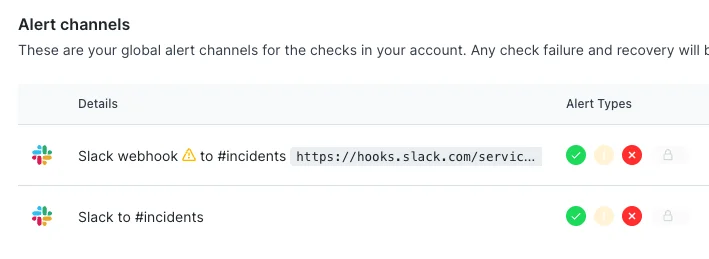
You can recognize the deprecated channel in your alert channels list. It is named "Slack webhook" and has an alert icon.
## Migrating from the deprecated Slack webhook alert channels
Checkly previously only had Slack webhook based alert channels. These types of webhooks have been deprecated by Slack and are now also deprecated by Checkly. These webhook channels will keep working; we have not set a hard end-of-life date.
You can recognize the deprecated channel in your alert channels list. It is named "Slack webhook" and has an alert icon.
 To help you migrate from the old webhook based alert to the Slack app based alerts, we added a "Convert to Slack App alert channel" button in each current webhook-based alert channel. Just click the button, confirm which channels you want to migrate or add new ones, and click "Create Slack App alert channel".
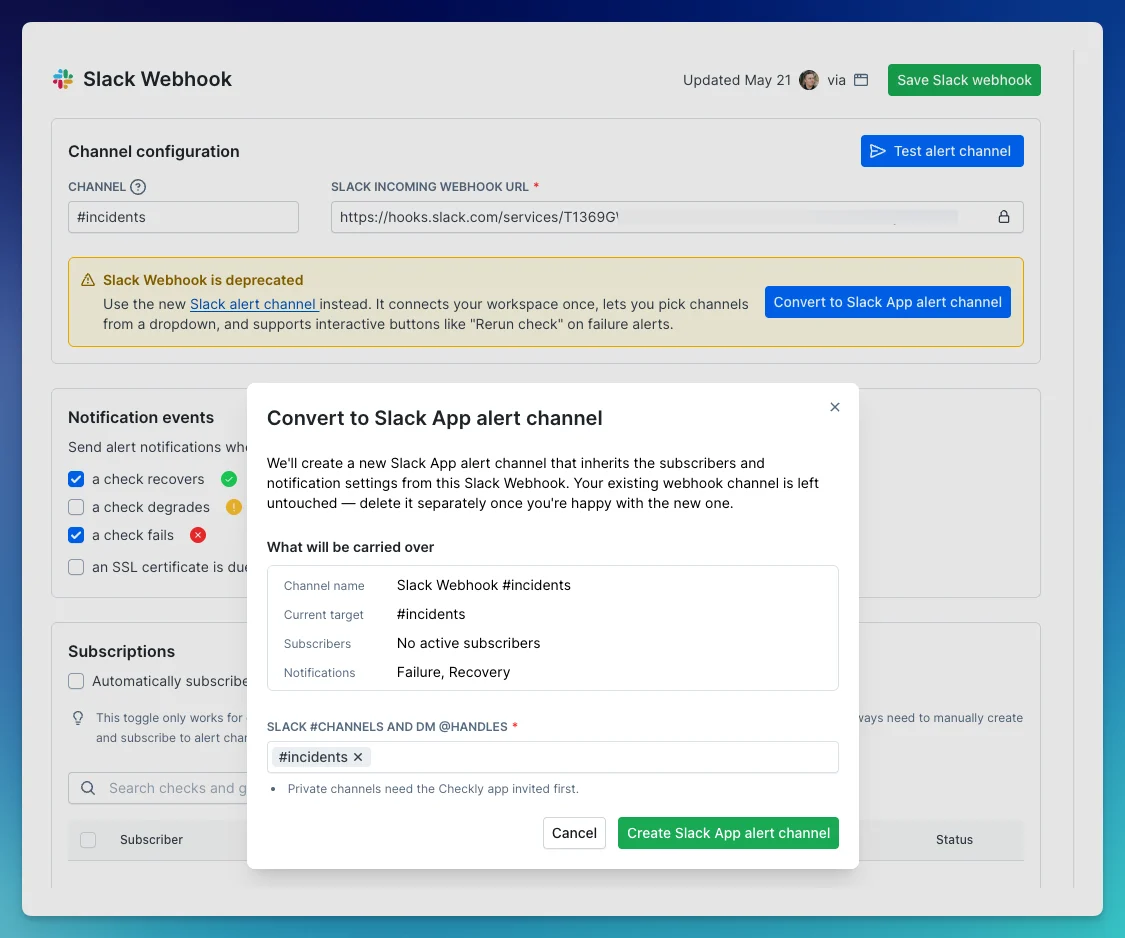 After this, you can safely delete the deprecated channel.
## Permissions
Checkly requests these Slack permissions for the Checkly Slack app to work within your workspace:
| Permission | Description |
| :------------------ | :------------------------------------------------------------------------------------------------------------- |
| `app_mentions:read` | Detects @mentions to start Cloud Agents and respond to requests |
| `channels:history` | Reads previous messages in threads for extra context |
| `channels:join` | Automatically joins public channels when invited or requested. |
| `channels:read` | Accesses channel metadata (IDs and names) to post replies and updates |
| `chat:write` | Sends status updates and notifications on triggered actions like rerunning checks |
| `groups:history` | Reads previous messages in private channels for extra context |
| `groups:read` | Accesses private channel metadata to post responses |
| `im:history` | Accesses direct message history for extra context |
| `mpim:history` | Accesses group DM history for multi-participant conversations |
| `users:read` | Matches Slack users with Checkly accounts for permissions and secure access |
| `links:read` | Read links for allow-listed domains like [app.checklyhq.com](http://app.checklyhq.com) to provide rich context |
| `links:write` | Writes rich context for allow-listed domains like [app.checklyhq.com](http://app.checklyhq.com) |
## Privacy Policy
For information about how Checkly collects, uses, and protects your data, see our [Privacy Policy](https://checklyhq.com/privacy).
After this, you can safely delete the deprecated channel.
## Permissions
Checkly requests these Slack permissions for the Checkly Slack app to work within your workspace:
| Permission | Description |
| :------------------ | :------------------------------------------------------------------------------------------------------------- |
| `app_mentions:read` | Detects @mentions to start Cloud Agents and respond to requests |
| `channels:history` | Reads previous messages in threads for extra context |
| `channels:join` | Automatically joins public channels when invited or requested. |
| `channels:read` | Accesses channel metadata (IDs and names) to post replies and updates |
| `chat:write` | Sends status updates and notifications on triggered actions like rerunning checks |
| `groups:history` | Reads previous messages in private channels for extra context |
| `groups:read` | Accesses private channel metadata to post responses |
| `im:history` | Accesses direct message history for extra context |
| `mpim:history` | Accesses group DM history for multi-participant conversations |
| `users:read` | Matches Slack users with Checkly accounts for permissions and secure access |
| `links:read` | Read links for allow-listed domains like [app.checklyhq.com](http://app.checklyhq.com) to provide rich context |
| `links:write` | Writes rich context for allow-listed domains like [app.checklyhq.com](http://app.checklyhq.com) |
## Privacy Policy
For information about how Checkly collects, uses, and protects your data, see our [Privacy Policy](https://checklyhq.com/privacy).