> ## Documentation Index
> Fetch the complete documentation index at: https://checklyhq.com/docs/llms.txt
> Use this file to discover all available pages before exploring further.
# Integrating Checkly in GitHub Deployments
GitHub deployments are webhook events triggered by GitHub whenever a deployment service reports a successful deployment
event. This works out-of-the-box with the following services.
* [Vercel for GitHub](https://vercel.com/docs/v2/git-integrations/vercel-for-github)
* [Heroku Pipelines](https://devcenter.heroku.com/articles/pipelines)
Any (SaaS) service that interacts with the [GitHub deployments API](https://developer.github.com/v3/repos/deployments/) and
reports the correct "success" message will work, both with production and preview deployments.
This integration has some [known limitations](/integrations/ci-cd/github/deployments#limitations). We recommend using the [Checkly CLI](/cli/overview) in your CI/CD pipeline instead.
## Setting up your GitHub integration
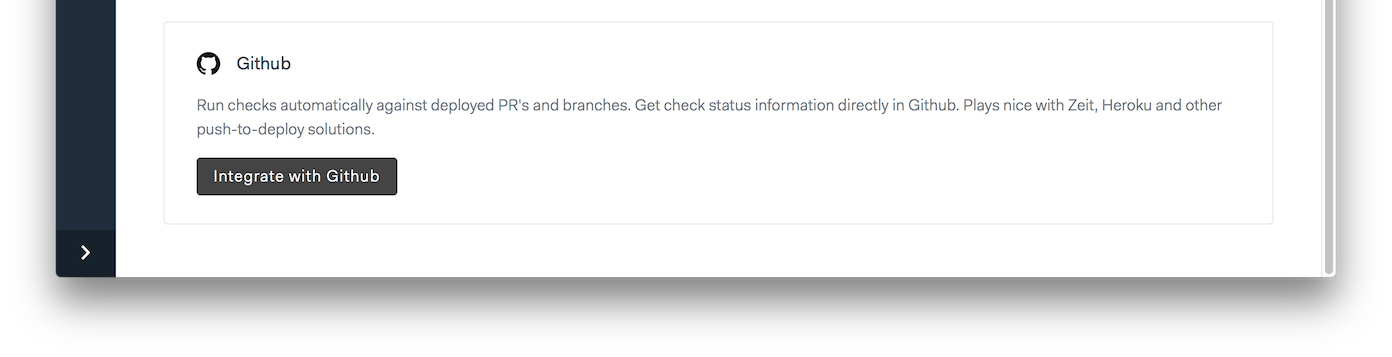
1. Go to the **integrations tab** in your account settings and click the "Integrate with GitHub" button.\\
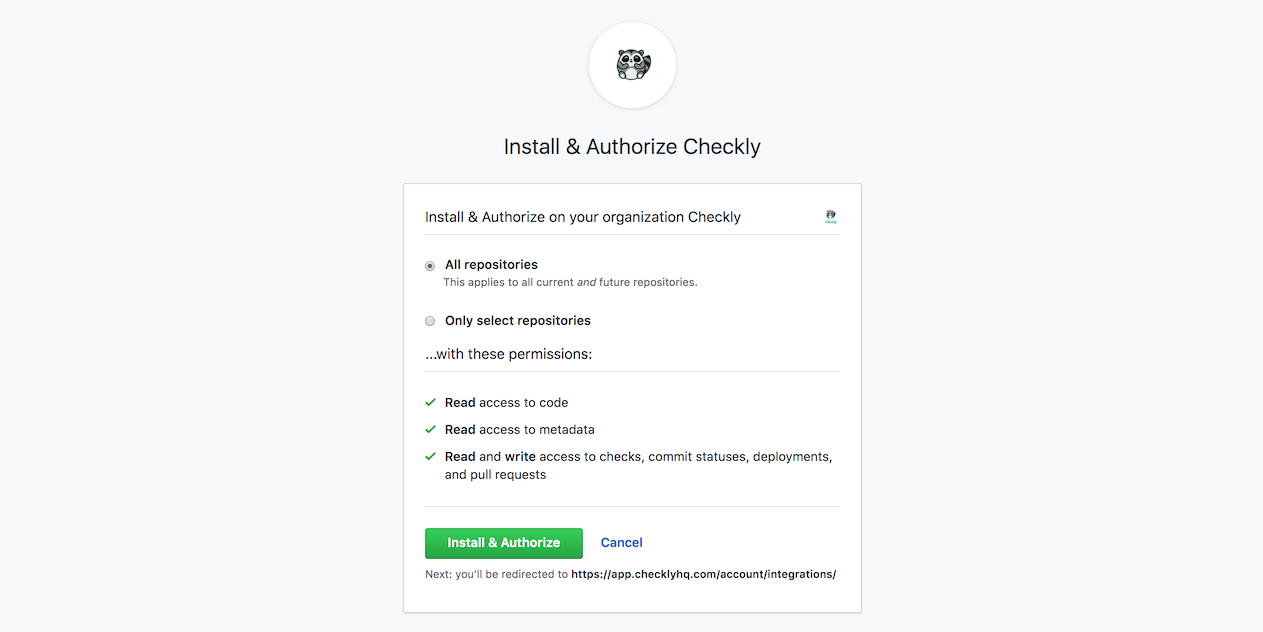
 2. You will be redirected to GitHub and prompted to select an account and install the Checkly GitHub App.\\
 3. When accepting the installation, you are redirected back to Checkly and the integration is installed.
Now, go to the **CI/CD tab** of the check you want to link to a GitHub repository. In Browser checks, this will be under "Change settings".
3. When accepting the installation, you are redirected back to Checkly and the integration is installed.
Now, go to the **CI/CD tab** of the check you want to link to a GitHub repository. In Browser checks, this will be under "Change settings".
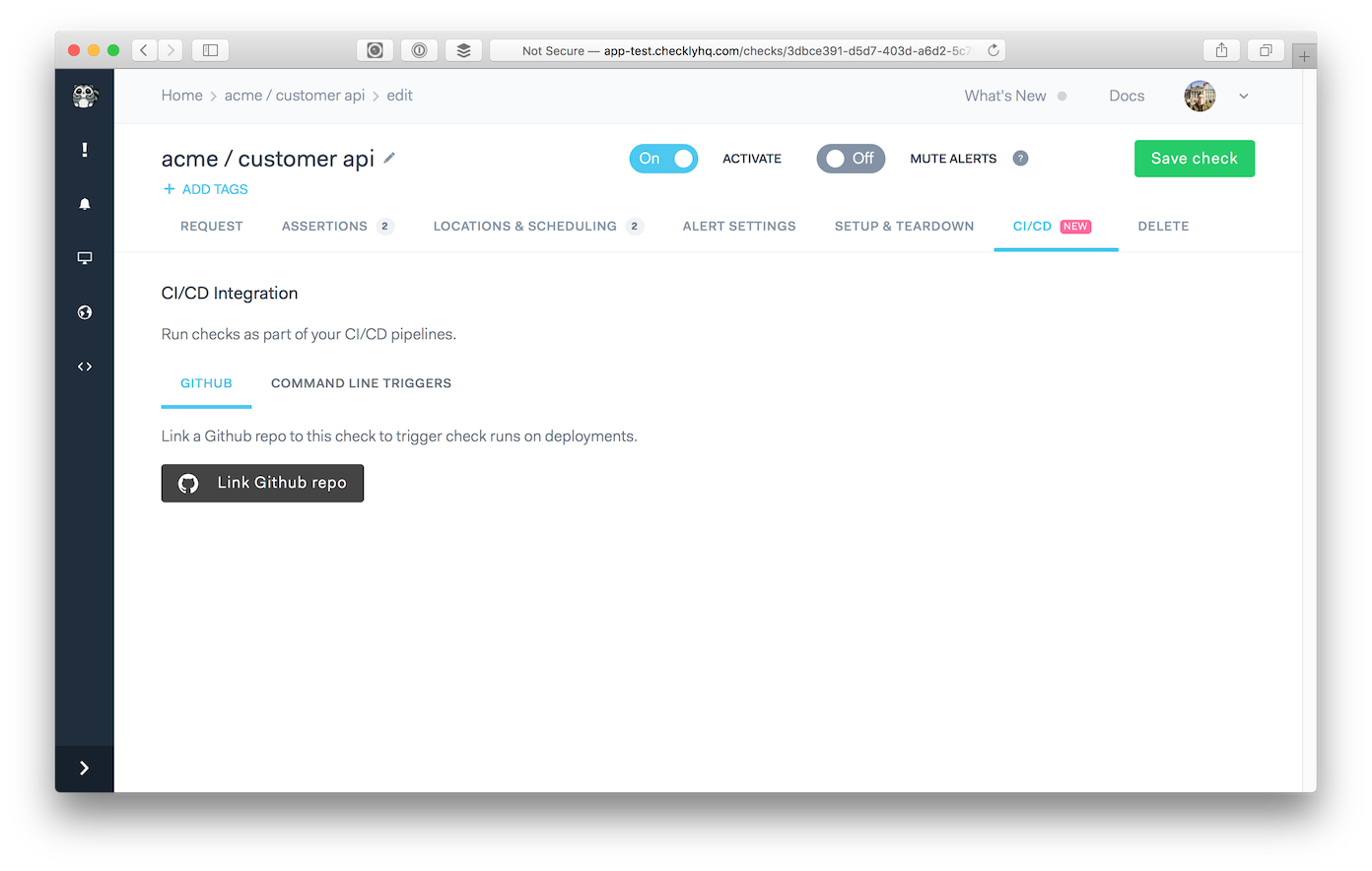 4. Click the **"Link GitHub repo"** button and select the repository you want to link.\\
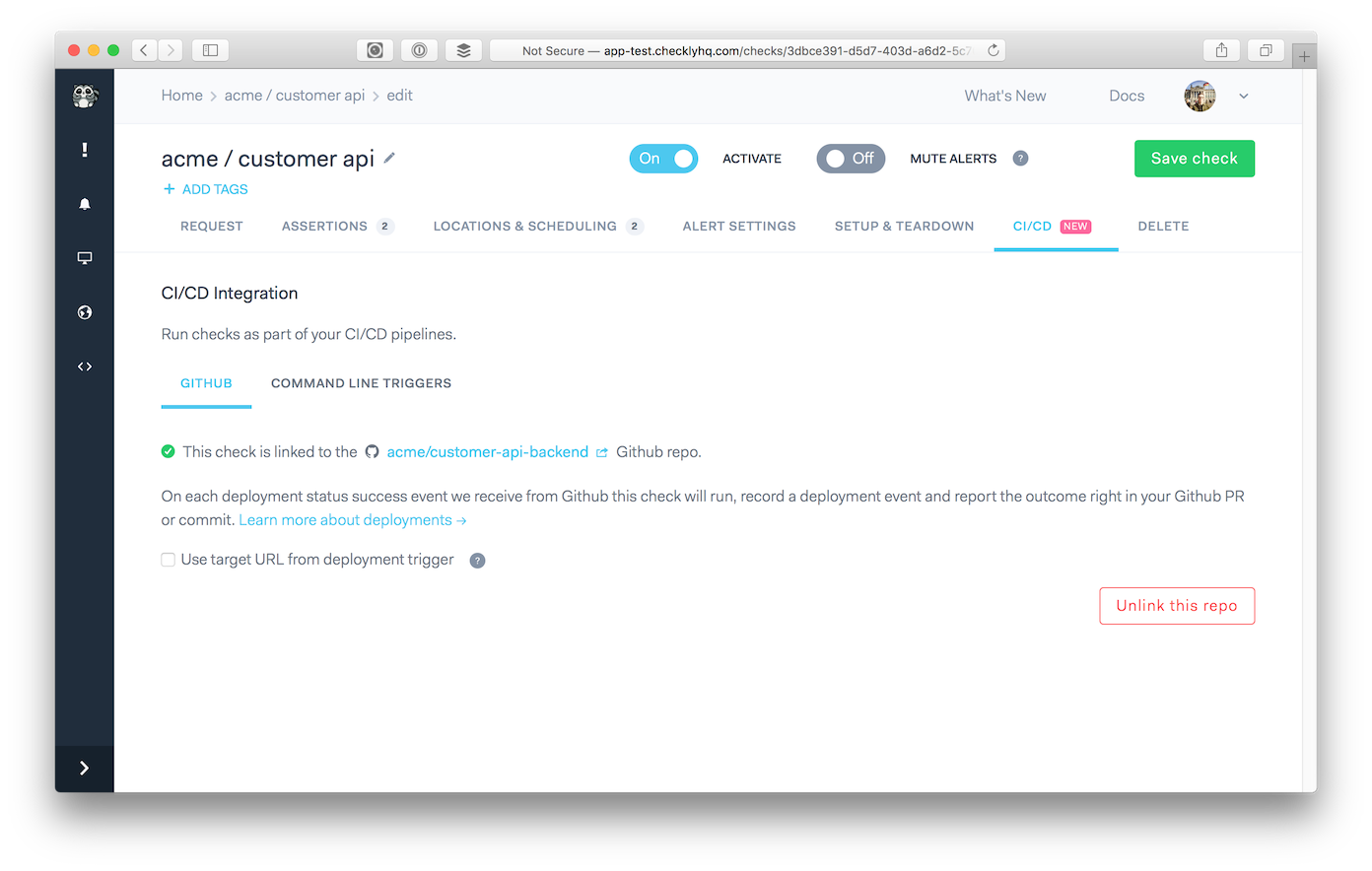 5. On each deployment event, we will run your check and report the results directly in **your GitHub timeline and PR overview**.\\
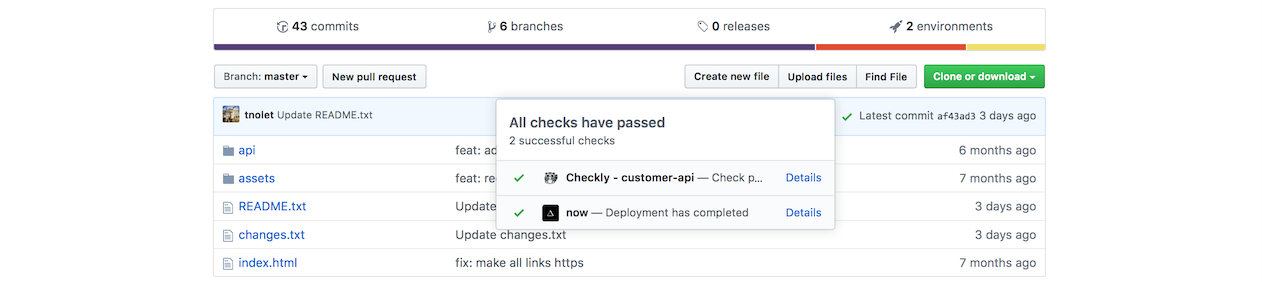 6. You will also get an overview of the check result in the *details* section
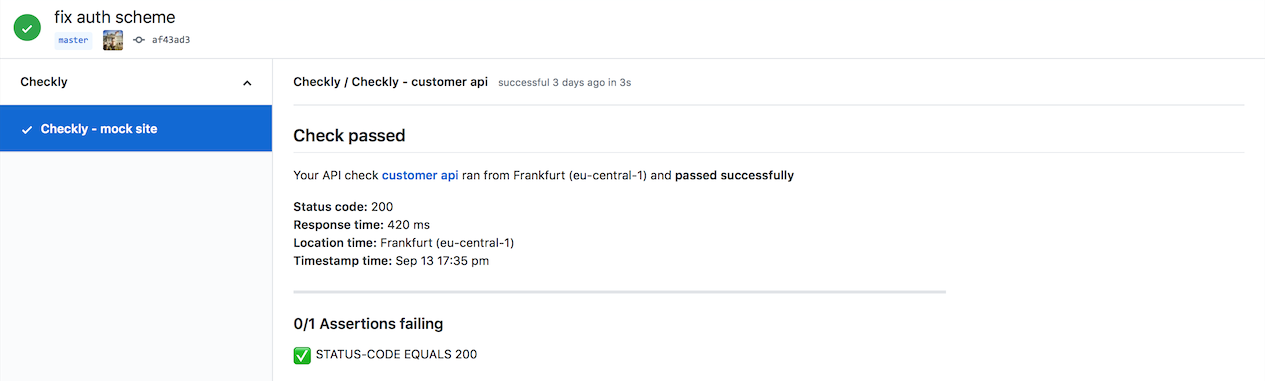 > You can hook up multiple checks to the same repo. We will just run all of them as a test suite.
## Using environment URLs
GitHub reports an **environment URL** on each deployment event. Depending on what deployment service you use,
this environment URL can be used to run your check on different target environments than configured in your check.
The primary use case for this is validating temporary review/branch deployments, such as those provided by Vercel
and Heroku Pipelines, before going to production.
So, when you enable the **"Use environment URL from deployment trigger"** checkbox there are two scenarios:
### API checks & environment URLs
With API checks, we replace the hostname part of your request url with the host in the environment URL.
For example:
* Your configured URL: `https://api.acme.com/v1/customers?page=1`
* Environment URL: `https://now.customer-api.qis6va2z7.now.sh`
* Replaced URL: `https://now.customer-api.qis6va2z7.now.sh/v1/customers?page=1`
Notice we only replace the **host** part, not the URL path or any query parameters.
### Browser checks & environment URLs
For browser checks, the environment URL is exposed as the `ENVIRONMENT_URL` environment variable. This means you can use that
variable in your code to replace any hardcoded URL you might have, i.e.:
```typescript test.spec.ts theme={null}
import { expect, test } from '@playwright/test'
test('assert response status of page', async ({ page }) => {
const targetUrl = process.env.ENVIRONMENT_URL || 'https://www.checklyhq.com'
const response = await page.goto(targetUrl)
expect(response.status()).toBeLessThan(400)
})
```
```javascript test.spec.js theme={null}
const { expect, test } = require('@playwright/test')
test('assert response status of page', async ({ page }) => {
const targetUrl = process.env.ENVIRONMENT_URL || 'https://www.checklyhq.com'
const response = await page.goto(targetUrl)
expect(response.status()).toBeLessThan(400)
})
```
This way we are setting the `targetUrl` variable to either the `ENVIRONMENT_URL` or just our main production URL.
Whenever a **Preview** deploy happens on GitHub, this check gets called and runs the script against the preview environment. This check also runs on a set interval, and checks our production environment.
This way, we kill two birds with one stone and don't need separate checks for separate environments.
## Limitations
GitHub deployments lacks support for several features:
* Client certificates are not applied.
* OpenTelemetry integration headers are not applied.
* Private locations are not available.
As an alternative, we recommend using the [Checkly CLI](/cli/overview) in your CI/CD pipeline. The CLI is much more powerful and fully supported.
> You can hook up multiple checks to the same repo. We will just run all of them as a test suite.
## Using environment URLs
GitHub reports an **environment URL** on each deployment event. Depending on what deployment service you use,
this environment URL can be used to run your check on different target environments than configured in your check.
The primary use case for this is validating temporary review/branch deployments, such as those provided by Vercel
and Heroku Pipelines, before going to production.
So, when you enable the **"Use environment URL from deployment trigger"** checkbox there are two scenarios:
### API checks & environment URLs
With API checks, we replace the hostname part of your request url with the host in the environment URL.
For example:
* Your configured URL: `https://api.acme.com/v1/customers?page=1`
* Environment URL: `https://now.customer-api.qis6va2z7.now.sh`
* Replaced URL: `https://now.customer-api.qis6va2z7.now.sh/v1/customers?page=1`
Notice we only replace the **host** part, not the URL path or any query parameters.
### Browser checks & environment URLs
For browser checks, the environment URL is exposed as the `ENVIRONMENT_URL` environment variable. This means you can use that
variable in your code to replace any hardcoded URL you might have, i.e.:
```typescript test.spec.ts theme={null}
import { expect, test } from '@playwright/test'
test('assert response status of page', async ({ page }) => {
const targetUrl = process.env.ENVIRONMENT_URL || 'https://www.checklyhq.com'
const response = await page.goto(targetUrl)
expect(response.status()).toBeLessThan(400)
})
```
```javascript test.spec.js theme={null}
const { expect, test } = require('@playwright/test')
test('assert response status of page', async ({ page }) => {
const targetUrl = process.env.ENVIRONMENT_URL || 'https://www.checklyhq.com'
const response = await page.goto(targetUrl)
expect(response.status()).toBeLessThan(400)
})
```
This way we are setting the `targetUrl` variable to either the `ENVIRONMENT_URL` or just our main production URL.
Whenever a **Preview** deploy happens on GitHub, this check gets called and runs the script against the preview environment. This check also runs on a set interval, and checks our production environment.
This way, we kill two birds with one stone and don't need separate checks for separate environments.
## Limitations
GitHub deployments lacks support for several features:
* Client certificates are not applied.
* OpenTelemetry integration headers are not applied.
* Private locations are not available.
As an alternative, we recommend using the [Checkly CLI](/cli/overview) in your CI/CD pipeline. The CLI is much more powerful and fully supported.