> ## Documentation Index
> Fetch the complete documentation index at: https://checklyhq.com/docs/llms.txt
> Use this file to discover all available pages before exploring further.
# Proxy Setup
> Configure HTTP proxies for Checkly Private Locations in enterprise environments. Set up proxy routing for both agent management traffic and check execution.
If you are operating our [Checkly Agent](/platform/private-locations/overview) behind an HTTP proxy,
for example in an enterprise environment, you can use an outgoing proxy for all check traffic. We recommend using the following
setup.
> Note you can also define a proxy for management traffic from your private location to the Checkly API where we ingest
> your telemetry and management events. See [the environment variables available to the Checkly Agent container](/platform/private-locations/agent-configuration)
## Setting an HTTP proxy for your Private Location
We recommend storing the URL of your proxy in a [global environment variable](https://app.checklyhq.com/environment-variables)
so you can easily reuse it in your Private Location configuration and checks. In the example below we store it as `PROXY_URL`
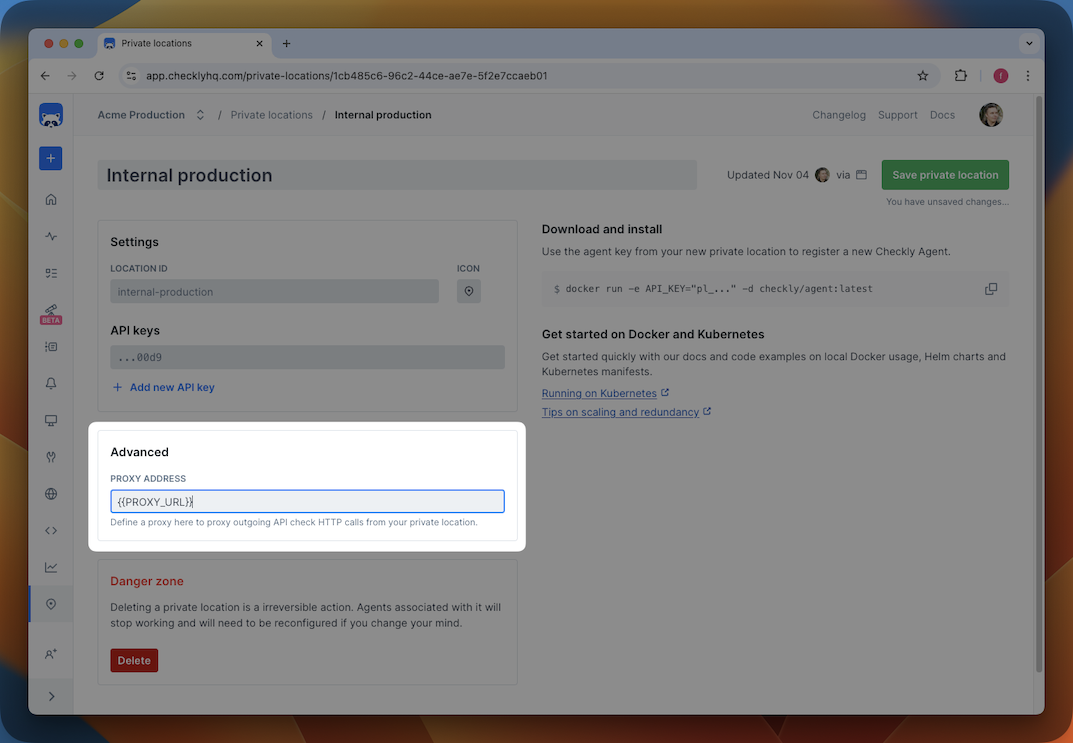
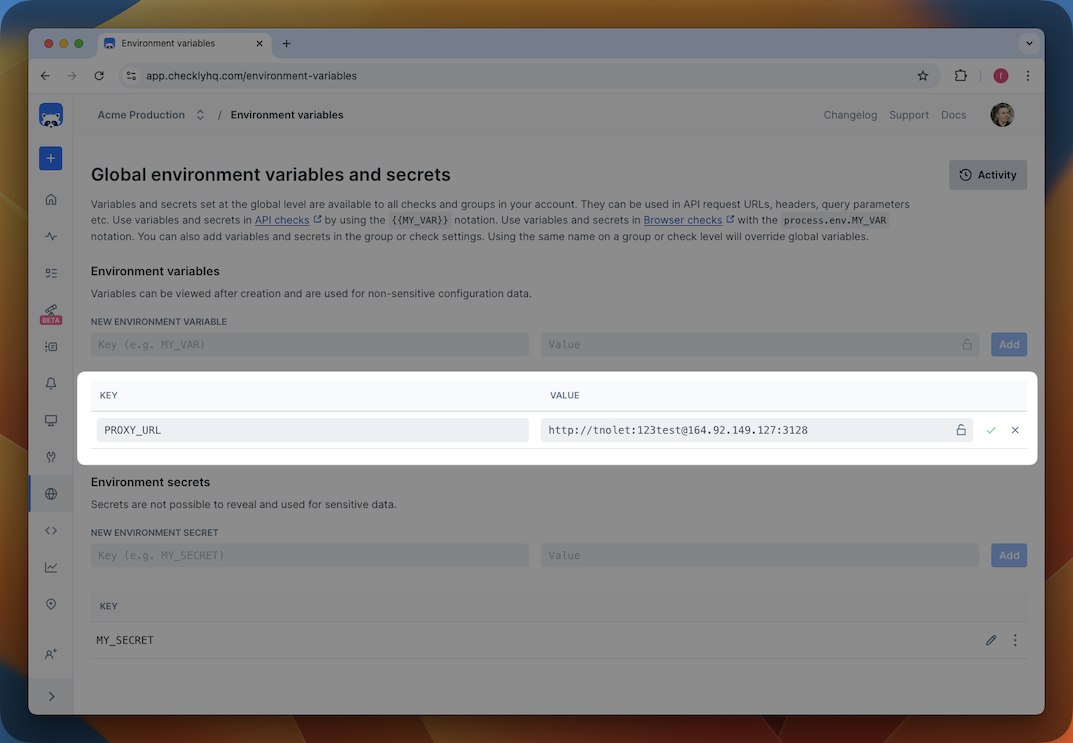 After this, you can reference this variable using `{{PROXY_URL}}` in the Private Location configuration.
 ## Using an HTTP proxy
With the setup complete, any API check or uptime monitor which uses that Private Location will automatically inherit the proxy configuration for outgoing traffic.
## Using an HTTP proxy with Browser checks
You can enable your proxy directly in your browser checks via a few extra lines of code, using the `process.env.PROXY_URL`
notation and Playwright Test's `test.use()` method:
```typescript use-proxy.spec.ts theme={null}
import { test } from '@playwright/test'
test.use({
proxy: {
server: process.env.PROXY_URL
}
})
test('Go to google.com', async ({ page }) => {
await page.goto('https://google.com')
})
```
```javascript use-proxy.spec.js theme={null}
const { test } = require('@playwright/test')
test.use({
proxy: {
server: process.env.PROXY_URL
}
})
test('Go to google.com', async ({ page }) => {
await page.goto('https://google.com')
})
```
This is all that is required for a browser check to proxy all outbound network connections via your designated HTTP proxy.
Check out both the Playwright [networking docs](https://playwright.dev/docs/network#http-proxy) and the Chromium [network settings docs](https://www.chromium.org/developers/design-documents/network-settings/) for some more information.
## Using an HTTP proxy
With the setup complete, any API check or uptime monitor which uses that Private Location will automatically inherit the proxy configuration for outgoing traffic.
## Using an HTTP proxy with Browser checks
You can enable your proxy directly in your browser checks via a few extra lines of code, using the `process.env.PROXY_URL`
notation and Playwright Test's `test.use()` method:
```typescript use-proxy.spec.ts theme={null}
import { test } from '@playwright/test'
test.use({
proxy: {
server: process.env.PROXY_URL
}
})
test('Go to google.com', async ({ page }) => {
await page.goto('https://google.com')
})
```
```javascript use-proxy.spec.js theme={null}
const { test } = require('@playwright/test')
test.use({
proxy: {
server: process.env.PROXY_URL
}
})
test('Go to google.com', async ({ page }) => {
await page.goto('https://google.com')
})
```
This is all that is required for a browser check to proxy all outbound network connections via your designated HTTP proxy.
Check out both the Playwright [networking docs](https://playwright.dev/docs/network#http-proxy) and the Chromium [network settings docs](https://www.chromium.org/developers/design-documents/network-settings/) for some more information.