> ## Documentation Index
> Fetch the complete documentation index at: https://checklyhq.com/docs/llms.txt
> Use this file to discover all available pages before exploring further.
# Go / Golang
> Learn how to instrument your Go/Golang code with OpenTelemetry.
This guide will help you instrument the `net/http` stack of your Go application(s) with OpenTelemetry and send traces
to Checkly.
## Step 1: Install the OpenTelemetry SDK
Install the relevant OpenTelemetry packages:
```bash Terminal theme={null}
go get "go.opentelemetry.io/otel" \
"go.opentelemetry.io/otel/propagation" \
"go.opentelemetry.io/otel/sdk/trace" \
"go.opentelemetry.io/otel/exporters/otlp/otlptrace" \
"go.opentelemetry.io/otel/exporters/otlp/otlptrace/otlptracehttp" \
"go.opentelemetry.io/contrib/instrumentation/net/http/otelhttp"
```
## Step 2: Set up SDK
Create a file called `tracing.go` at the root of your project and add the following code:
```go tracing.go theme={null}
package main
import (
"context"
"errors"
"go.opentelemetry.io/otel"
"go.opentelemetry.io/otel/exporters/otlp/otlptrace"
"go.opentelemetry.io/otel/exporters/otlp/otlptrace/otlptracehttp"
"go.opentelemetry.io/otel/propagation"
"go.opentelemetry.io/otel/sdk/trace"
)
func setupOTelSDK(ctx context.Context) (shutdown func(context.Context) error, err error) {
var shutdownFuncs []func(context.Context) error
shutdown = func(ctx context.Context) error {
var err error
for _, fn := range shutdownFuncs {
err = errors.Join(err, fn(ctx))
}
shutdownFuncs = nil
return err
}
handleErr := func(inErr error) {
err = errors.Join(inErr, shutdown(ctx))
}
prop := newPropagator()
otel.SetTextMapPropagator(prop)
tracerProvider, err := newTraceProvider()
if err != nil {
handleErr(err)
return
}
shutdownFuncs = append(shutdownFuncs, tracerProvider.Shutdown)
otel.SetTracerProvider(tracerProvider)
return
}
func newPropagator() propagation.TextMapPropagator {
return propagation.NewCompositeTextMapPropagator(
propagation.TraceContext{},
propagation.Baggage{},
)
}
func newTraceProvider() (*trace.TracerProvider, error) {
traceClient := otlptracehttp.NewClient()
var traceExporter, err = otlptrace.New(context.Background(), traceClient)
if err != nil {
return nil, err
}
bsp := trace.NewBatchSpanProcessor(traceExporter)
tracerProvider := trace.NewTracerProvider(
trace.WithSampler(trace.AlwaysSample()),
trace.WithSpanProcessor(bsp),
)
return tracerProvider, nil
}
```
## Step 3: Initialize the instrumentation
Add or adapt the following code to your `main.go` file. The key parts are as follows:
1. Wrap the default `http.Handler` with the`otelhttp.NewHandler` function.
2. Add the `otelChecklyFilter` function to filter out the requests that should be traced and send to Checkly.
```go main.go theme={null}
package main
import (
"context"
"errors"
"log"
"net"
"net/http"
"os"
"os/signal"
"strings"
"go.opentelemetry.io/contrib/instrumentation/net/http/otelhttp"
)
func main() {
if err := run(); err != nil {
log.Fatalln(err)
}
}
func run() (err error) {
ctx, stop := signal.NotifyContext(context.Background(), os.Interrupt)
defer stop()
otelShutdown, err := setupOTelSDK(ctx)
if err != nil {
return
}
defer func() {
err = otelShutdown(context.Background())
}()
handler := http.Handler(http.DefaultServeMux)
wrappedHandler := otelhttp.NewHandler(handler, "", otelhttp.WithFilter(otelChecklyFilter))
srv := &http.Server{
Addr: ":8080",
BaseContext: func(_ net.Listener) context.Context { return ctx },
Handler: wrappedHandler,
}
srvErr := make(chan error, 1)
go func() {
srvErr <- srv.ListenAndServe()
}()
select {
case err = <-srvErr:
return
case <-ctx.Done():
stop()
}
err = srv.Shutdown(context.Background())
return
}
func otelChecklyFilter(req *http.Request) bool {
header := req.Header.Get("tracestate")
return header != "" && strings.Contains(header, "checkly=true")
}
```
## Step 4: Start your app with the instrumentation
Toggle on **Import Traces** and grab your OTel API key in the **OTel API keys** section of the [Traces page in the Checkly app](https://app.checklyhq.com/settings/account/traces) and take a note of the endpoint for the region you want to use.
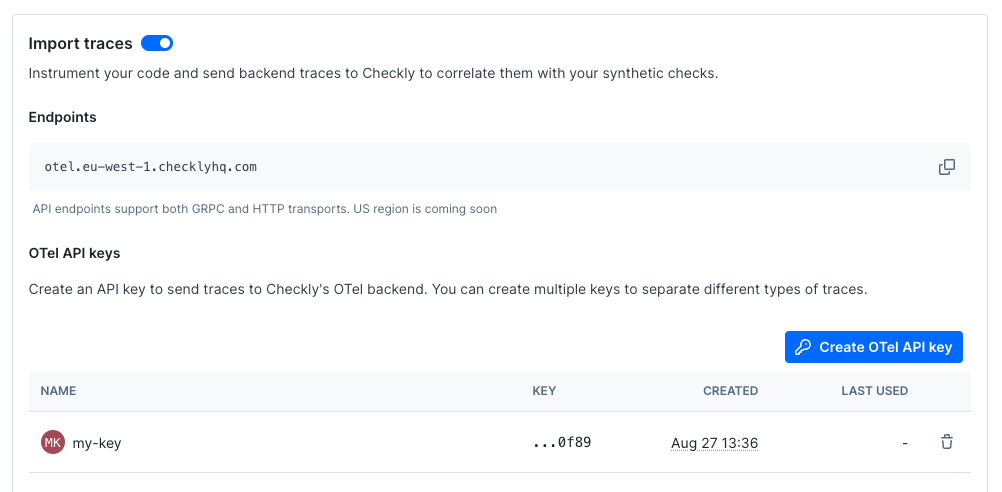 Now, export your API key in your shell by setting the `OTEL_EXPORTER_OTLP_HEADERS` environment variable.
```bash Terminal theme={null}
export OTEL_EXPORTER_OTLP_HEADERS="authorization="
```
Next, export the endpoint for the region you want to use and give your service a name.
```bash Terminal theme={null}
export OTEL_EXPORTER_OTLP_ENDPOINT="https://otel.eu-west-1.checklyhq.com"
export OTEL_SERVICE_NAME="your-service-name"
```
Then, explicitly set the protocol to use for the OTLP exporter.
```bash Terminal theme={null}
export OTEL_EXPORTER_OTLP_PROTOCOL="http/protobuf"
```
We are using the standard OpenTelemetry environment variables here to configure the OTLP exporter.
| Variable | Description |
| ----------------------------- | ---------------------------------------------------------------------- |
| `OTEL_EXPORTER_OTLP_HEADERS` | The `Authorization` HTTP header containing your Checkly OTel API key. |
| `OTEL_EXPORTER_OTLP_ENDPOINT` | The Checkly OTel API endpoint for the region you want to use. |
| `OTEL_EXPORTER_OTLP_PROTOCOL` | The protocol to use for the OTLP exporter. |
| `OTEL_SERVICE_NAME` | The name of your service to identify it among the spans in the web UI. |
Then run you app as usual:
```bash Terminal theme={null}
go run .
```
Now, export your API key in your shell by setting the `OTEL_EXPORTER_OTLP_HEADERS` environment variable.
```bash Terminal theme={null}
export OTEL_EXPORTER_OTLP_HEADERS="authorization="
```
Next, export the endpoint for the region you want to use and give your service a name.
```bash Terminal theme={null}
export OTEL_EXPORTER_OTLP_ENDPOINT="https://otel.eu-west-1.checklyhq.com"
export OTEL_SERVICE_NAME="your-service-name"
```
Then, explicitly set the protocol to use for the OTLP exporter.
```bash Terminal theme={null}
export OTEL_EXPORTER_OTLP_PROTOCOL="http/protobuf"
```
We are using the standard OpenTelemetry environment variables here to configure the OTLP exporter.
| Variable | Description |
| ----------------------------- | ---------------------------------------------------------------------- |
| `OTEL_EXPORTER_OTLP_HEADERS` | The `Authorization` HTTP header containing your Checkly OTel API key. |
| `OTEL_EXPORTER_OTLP_ENDPOINT` | The Checkly OTel API endpoint for the region you want to use. |
| `OTEL_EXPORTER_OTLP_PROTOCOL` | The protocol to use for the OTLP exporter. |
| `OTEL_SERVICE_NAME` | The name of your service to identify it among the spans in the web UI. |
Then run you app as usual:
```bash Terminal theme={null}
go run .
```