

IP range allowlisting
All of Checkly’s monitoring traffic comes from a fixed source of IP addresses. Allowlisting Checkly traffic by IP address is possible by configuring your network to only allow traffic from these IPs. Fetch the current list of Checkly IP addresses:- A JSON array of all IPv4s currently used
Terminal
- A JSON object with regions as keys and arrays of all IPv4s of that region as the value
Terminal
- A simple txt file. One IPv4 per line.
Terminal
- A JSON array of all IPv6s currently used
Terminal
- A JSON object with regions as keys and arrays of all IPv6s of that region as the value
Terminal
- A simple txt file. One IPv6 per line.
Terminal
Header/user agent allowlisting
If you are using Cloudflare or a similar provider, one or more of your automated checks might trigger a bot detection mechanism. If you want to prevent that from happening without exposing your website to any and all automated traffic, you might want to set up a new firewall rule allowing traffic from Checkly as long as it contains a specific header or sets a certain user agent. You can make the header and/or user agent specific to your own Checkly user account by grabbing the first eight digits of your unique user ID (or another fixed value of your choice), which you can find below your account name on the Account Settings page. Embedding this value in your checks will enable them to be allowed through by your firewall rules.Allowlisting API checks using headers
To allowlist API checks, allow traffic that contains a cookie in the shape ofCookie: "checkly-account:<UUID>", with <UUID> being your shortened Checkly ID or other chosen value.
You can then set the Cookie header while editing your check.
You can set the header at group-level using API check defaults to have it applied to every API check in the group.
Allowlisting Browser checks with user agents
To allowlist Browser checks, allow traffic with user agent containingCheckly/<UUID>, with <UUID> being your shortened Checkly ID or another chosen value.
You will then be able to set up the matching user agent in your Browser checks using Playwright’s userAgent property.
- TypeScript
- JavaScript
user-agent.spec.ts
Allowlisting Playwright Check Suites with user agents
Checkly appends(Checkly, https://www.checklyhq.com) to the user agent of every Playwright Check Suite, including a user agent you set yourself, so you don’t need to add it. See Default Checkly user agent.
To allowlist your own checks only, add Checkly/<UUID> to the user agent in your playwright.config.ts file and allow traffic with user agent containing that value.
For all projects:
playwright.config.ts
Checkly/abcd1234 (Checkly, https://www.checklyhq.com).
For individual projects:
To preserve the browser’s user agent while adding your identifier, append it to the device’s user agent:
playwright.config.ts
checkly.config.ts
Filtering Google Analytics
You might want to filter Checkly traffic in Google Analytics to prevent Checkly Browser checks from skewing your results. If you are using Google Analytics 4 or newer, Checkly traffic is already being excluded as it is recognized as coming from a known bot-traffic source.Older Google Analytics versions
If you want to filter Checkly traffic in older Google Analytics versions, here is one way to do it:- Add a UTM source tag to the URLs your requesting, i.e.:
- In Google Analytics, filter on campaign source.
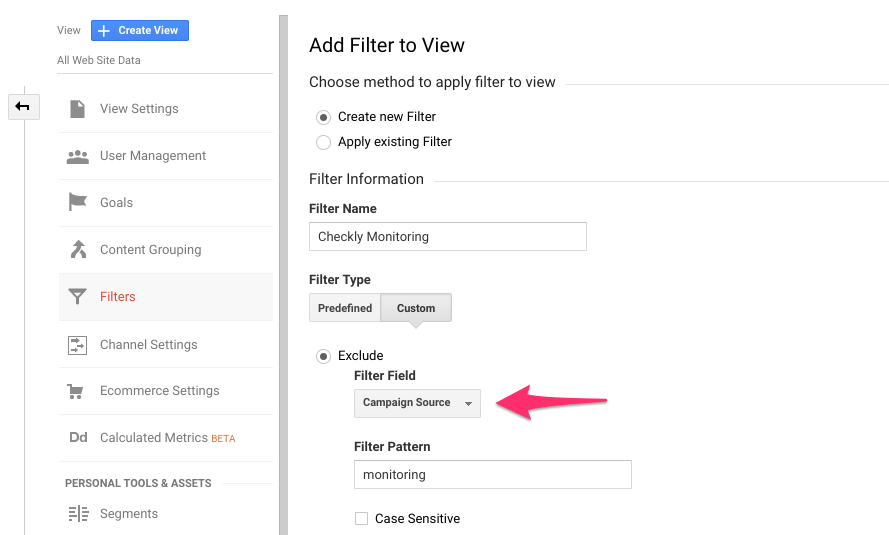
CloudFlare Verified Bot
Checkly is also registered with CloudFlare as a verified bot. If you are using CloudFlare’s Web Application Firewall (WAF) to protect your site, you can also allow traffic from Checkly by adding a custom WAF rule to enable traffic from verified bots. Specifically, the Checkly verified bot is included in the Monitoring & Analytics category. CloudFlare automatically syncs the latest Checkly IP addresses, so this approach can be easier to maintain than IP range allowlisting.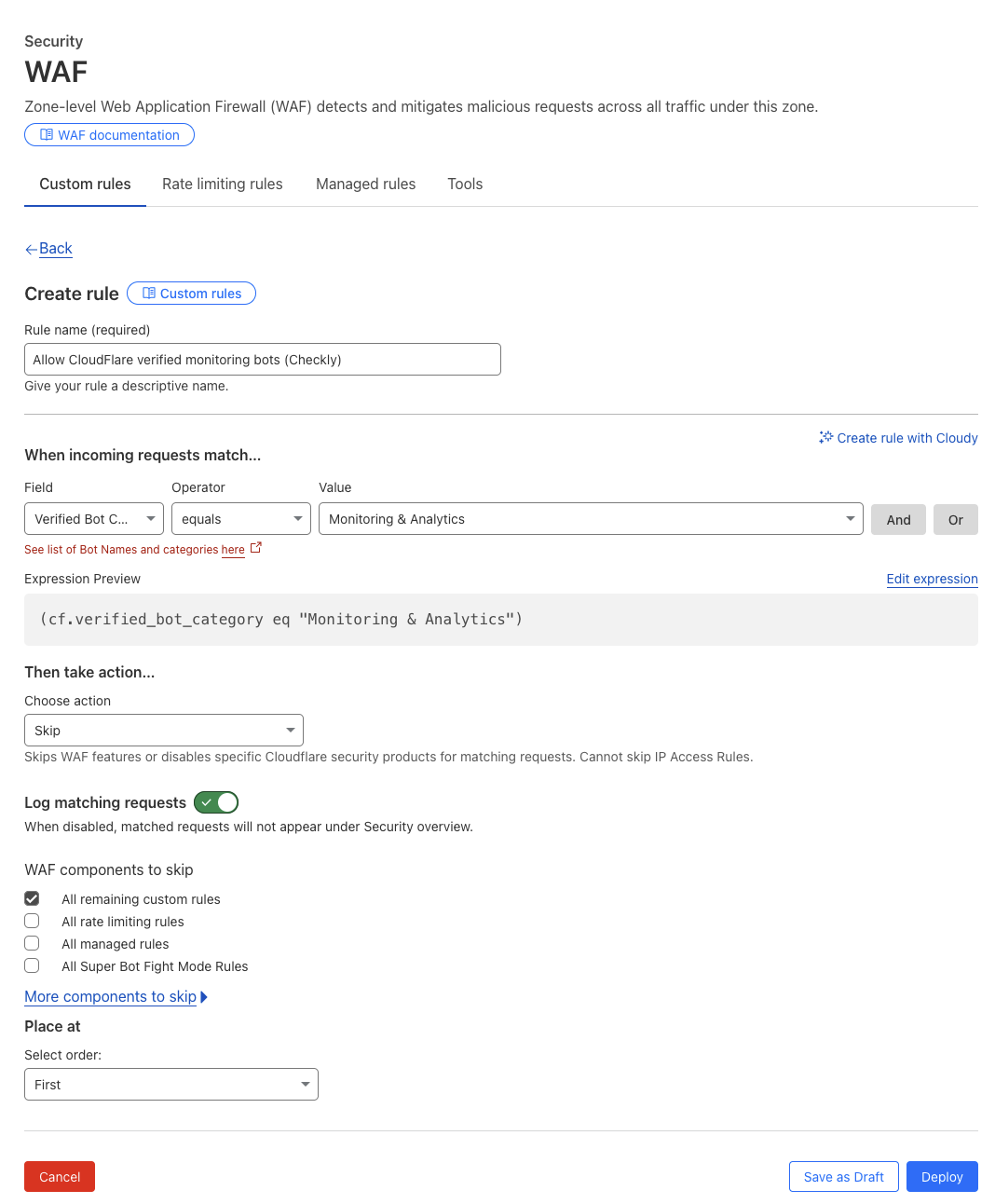
Default Checkly user agent
This is what Checkly sends as user agent:- API & Multistep checks:
Checkly/1.0 (https://www.checklyhq.com). - Browser checks: a Chrome user agent ending in
(Checkly, https://www.checklyhq.com), for exampleMozilla/5.0 (X11; Linux x86_64) AppleWebKit/537.36 (KHTML, like Gecko) Chrome/<version> Safari/537.36 (Checkly, https://www.checklyhq.com), where<version>is the Chromium version the check runs with. If you set your ownuserAgentin a Browser check, Checkly sends your value unchanged. - Playwright Check Suites: the browser’s user agent, or the
userAgentyou configure, with(Checkly, https://www.checklyhq.com)appended.
(Checkly, https://www.checklyhq.com) instead of the full string, which changes with the browser version.
Changing the user agent of a check will not change the browser or browser version, it will simply set a new string for user agent.