

traceparent header, its spans join the same trace as the check. Export is account-wide to one endpoint. To reach several backends, send to a Collector and route from there.
Prerequisites
Prerequisites
- A plan that includes trace export, otherwise the export settings cannot be saved.
- Export is controlled by Enable exporting traces under Export Traces on Settings > Traces. Import Traces does not need to be on.
- You enable export for the whole account. No per-check or per-group setting exists.
- An endpoint reachable from Checkly’s public locations for checks that run there, and from your private location’s network for checks that run there. Runs from public locations connect from Checkly’s static IP ranges, which include IPv6 addresses.
Set up
1
Enable export
Open Settings > Traces and, under Export Traces, select Enable exporting traces.
2
Enter the endpoint URL
Enter your backend’s OTLP/HTTP traces URL, for example
https://otel.acme.com/v1/traces. Use an https URL that ends in /v1/traces. Checkly only checks that the URL is well formed when you save, not the scheme, the path or that the endpoint answers.3
Add authentication headers
Click Add header and enter each header your endpoint expects as a key and a value, for example
Authorization with Bearer <token>. Put credentials in header rows, not in the URL. API checks and URL monitors drop the URL’s query string when they export. Click the lock next to a value to store it as an account secret, which the row then references as {{NAME}}. Any value written as {{NAME}} is replaced with the matching environment variable or secret when the check runs. Rows with an empty key or value are discarded.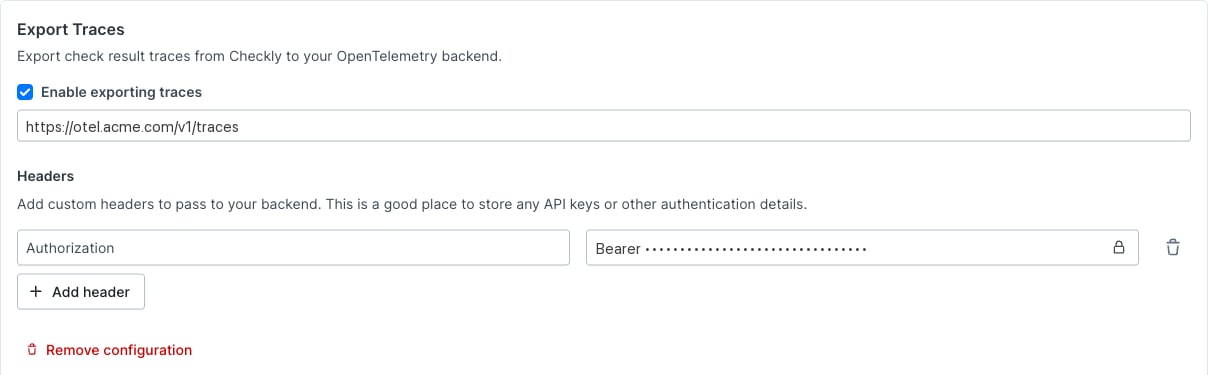
What is sent
Checkly sends one root span per check run, with no child spans. These check types take part:
The span is named after the check and has kind
CLIENT. Its OpenTelemetry status is always OK, even when the check fails. The check’s verdict is in checkly.check.status.
Span attributes
Each span also carries the resource attributes
service.name, set to checkly, and telemetry.sdk.language. Its instrumentation scope is checkly-tracer, or checkly-browser-tracer for Browser checks on the current runtime. When the Coralogix integration is on as well, spans can include the resource attributes cx.application.name and cx.subsystem.name.
checkly.check.tags carries the check’s tags as a string array, the check’s own tags first, then tags inherited from its group, deduplicated. Use it to filter or group traces by the same labels you organize your checks by, such as a team or workflow tag.
- The attribute is only present when the check has tags.
- At most 20 tags are exported per span. A tag longer than 128 characters is omitted entirely rather than truncated.
- Attributes are set on Checkly’s root span only. They do not propagate to your application’s own spans within the trace. To find a whole trace by tag, filter on the root span, then use its trace ID.
Trace headers
Checkly adds these headers to the requests a check makes:Correlate with your application’s traces
The exported span’s trace ID is the one in thetraceparent header the check sent to your application, and it equals the runtime variable CHECKLY_TRACE_ID. If your application honors traceparent, its spans and Checkly’s root span share one trace. The check result page shows the same ID under Traces, and a webhook template can include it as {{OTEL_TRACE_ID}} to build a link into your tool.
Two settings change the header your application receives:
- On API checks and URL monitors, a request header you define named
traceparentreplaces Checkly’s. - On API checks and URL monitors, a Coralogix custom trace header replaces
traceparent. Browser checks and Multistep checks send both headers.
Receive spans with an OpenTelemetry Collector
This configuration runs on theotelcol-contrib distribution of the OpenTelemetry Collector. It accepts OTLP/HTTP on port 4318 and requires a bearer token. It listens on plain HTTP, so put TLS in front of it, with a reverse proxy or the receiver’s tls settings, so that Checkly reaches an https URL. Replace debug with the exporter for your backend.
Authorization and the value Bearer <the same token>. Set the URL to the https address of this receiver, ending in /v1/traces.
For receivers, exporters, TLS and authentication, see the Collector configuration docs and the bearer token auth extension.
Delivery
- Checkly sends OTLP/HTTP with protobuf encoding. There is no gRPC, JSON or gzip option.
- Each export request times out after 5 seconds.
- Checkly may retry briefly on 429, 502, 503 and 504.
- Failures are logged on Checkly’s side and never shown in the UI.
Troubleshooting
- Nothing arrives. Check that Enable exporting traces is on, the URL ends in
/v1/traces, and the header rows match what your endpoint expects. Confirm the endpoint accepts OTLP/HTTP protobuf, since a gRPC-only receiver on port 4317 receives nothing, allows Checkly’s static IP ranges or your private location’s network, and answers within 5 seconds. Checkly shows no export errors, so read your endpoint’s logs and search your backend for the trace ID shown under Traces on a recent check result. - Only Browser check and Multistep check spans arrive. API checks and URL monitors drop the URL’s query string. Move credentials from the URL into a header row.
- Every span has status
OK. This is expected. Filter oncheckly.check.statusto find failed or degraded runs. - A check type you expected is missing. Only the types in What is sent export spans.