
We just updated our SSL certificate expiration monitoring. This update gives you more control over where and when you want to receive alerts.
Before today, certificate alerts were set as part of "Alert Settings" tab, either globally or using specific settings for checks & check groups. This wasn't all that flexible and more granular control was already on our public roadmap.
Today's update improves this by moving the SSL certificate expiration to "Alert Channels" — the same place where you set failure, degradation and success alerts.
This is how SSL monitoring works:
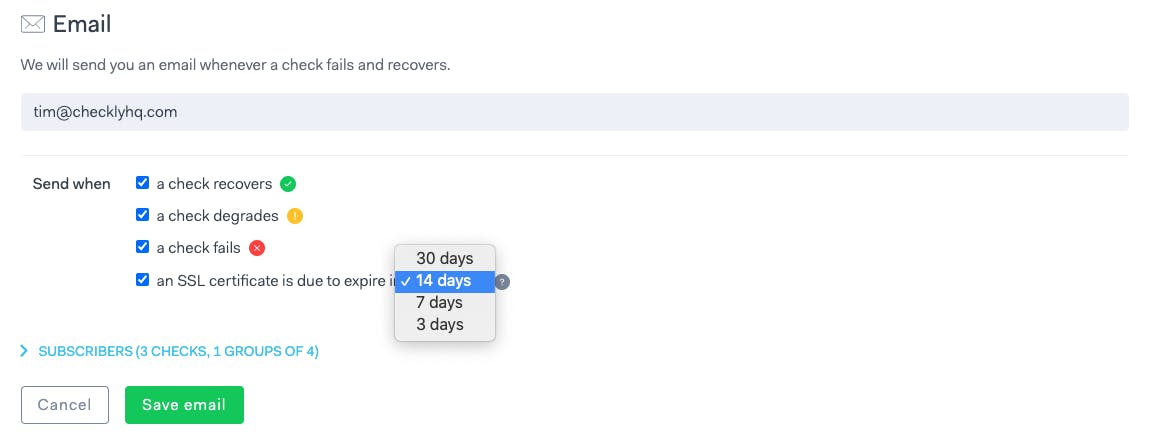
- You pick the alert channels on which you want to receive the expiration alerts. Finally! 🤯
- You can get alerted for multiple thresholds, for example 30 days and 3 days before the expiration date by setting multiple alerts channels.
Already existing SSL alerts will keep working for 3 months until we deprecate them. Don't worry, we will bug you via email and with a notice in the app.
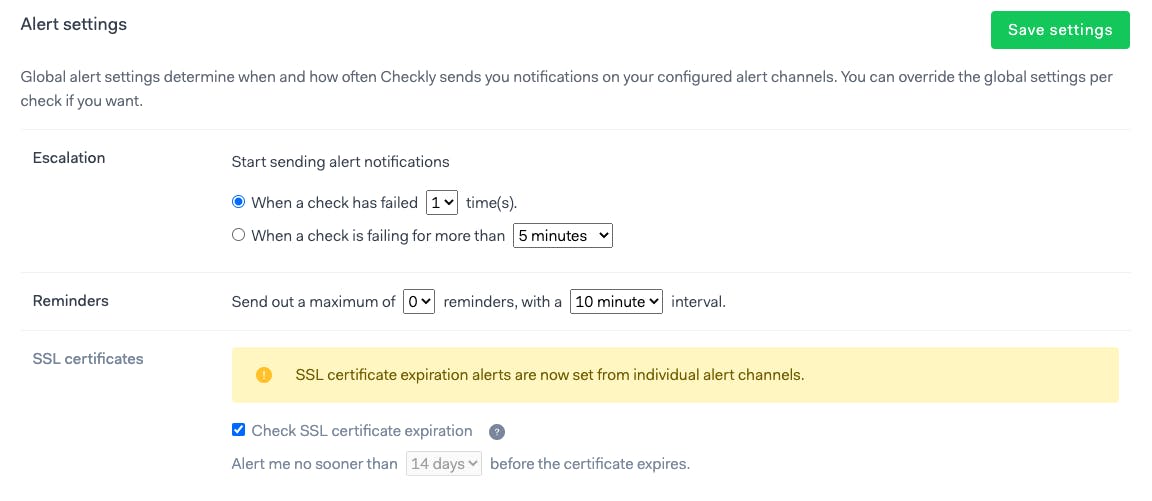
Your current SSL alerting settings under "Alert Settings" (either account-wide or specific ones to check/group) will be deprecated and will stop working in 3 months on November 13th, 2020.
If you have any questions or feedback, we’ll love to hear about it. Just use the chat bubble in the lower right corner.