MCP servers have a reputation: they eat your context window. CLIs paired with skills, on the other hand, are more token efficient. But is this still true? I dropped all my MCP servers five months ago. Five months is a long time in AI land.
When Anthropic came up with the concept of skills, many people stopped using MCP servers in favor of CLI tooling and skills. CLIs integrate nicely with coding agents and generally skills were supposed to be lighter on tokens because things were pulled in lazily and on demand. CLIs plus skills became the default advice for coding agents, and MCP got labeled as the token-hungry way to do the same thing.
We at Checkly are heavily involved in the Playwright ecosystem. Playwright offers an MCP server and a CLI, too. There's this "famous" YouTube video from the Playwright team making exactly the case for the CLI, and I bought it, and switched from MCP to the CLI.
The video was released in February 2026 and it aged poorly. There's no big difference in using CLIs or MCPs these days.
Why is MCP supposed to eat up your context window?
There were two real problems if you tried MCP servers in 2025.
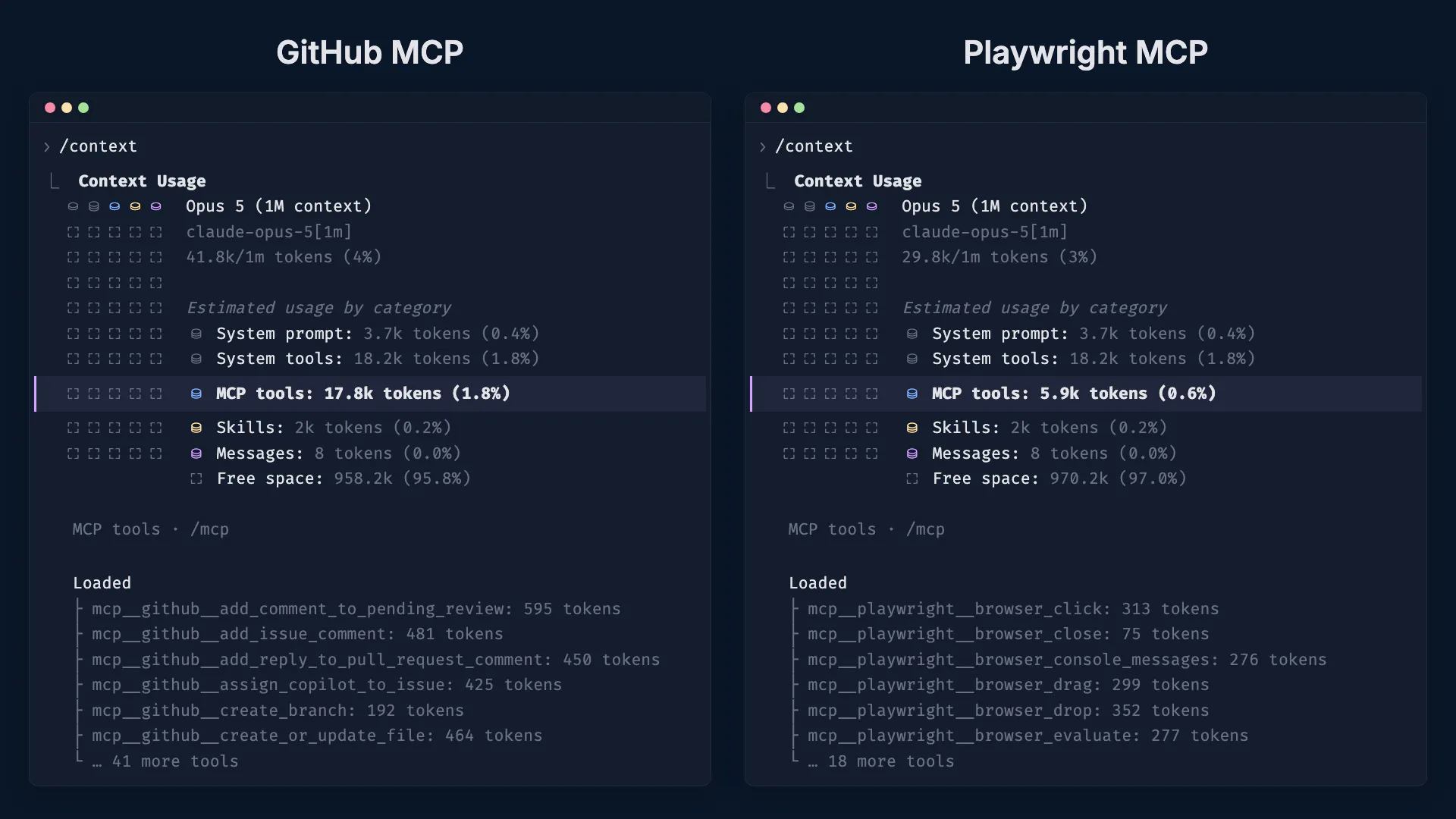
The major problem: the moment your agent connected to an MCP server, it pulled every tool definition into context. All of them, upfront, whether the conversation would ever touch them or not. For the Playwright MCP server that meant 48 tool schemas at 5.9k tokens before you typed a single prompt. This was the problem skills were supposed to solve.
And Playwright is a mild case. If you wanted to use GitHub's MCP server it wasted 17.8k tokens "for nothing".
If you switched to skills, agents only loaded the skill files' one-line description (roughly 30-50 tokens) and read the full files if the agent actually needed them. For established tooling like the gh CLI, you often don't even need a skill. Modern LLMs know their way around it pretty well with common CLI tools.
The second problem, and this one might be a bit more Playwright specific, was that every single MCP action, every click and every keystroke, came back with the entire page snapshot inlined. The context window was filling up with YAML wall after YAML wall. This is the part that produced the scary comparison numbers floating around.
So yes, back in 2025 the criticism was fair and it seemed like a no-brainer to use CLIs.
What changed since then
Both problems got fixed. On the upfront side, modern agent harnesses defer MCP tool loading and optimize tool calls with some tricks. Claude Code, for example, only keeps the tool names around and pulls a full tool definition in when a tool is actually called. Anthropic digs into the underlying idea of reading tool definitions on demand in "Code execution with MCP: Building more efficient agents". The key fact is that MCP tool definitions get pulled in lazily now, similar to how CLI skills work, and stay out of your context window until the agent actually needs them.
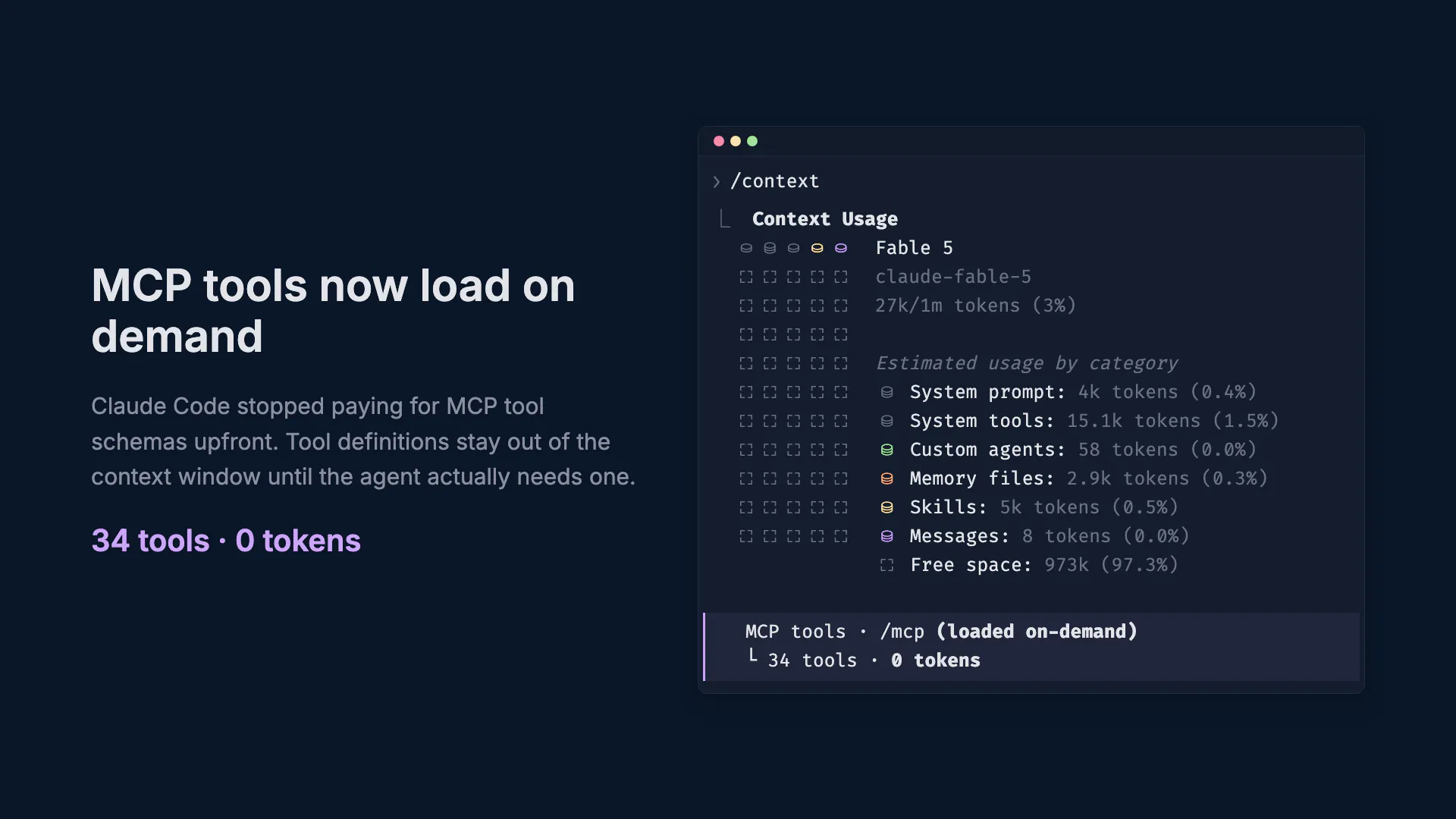
And on the per-action side, an MCP specification change allowed Playwright to stop inlining snapshots. Previously, the MCP spec was fairly strict about the communication flow. All content had to be included in the tool call results. This is the reason why the MCP always returned the current page snapshot. But with resource links the MCP server changed its general behavior and now writes snapshots to disk, responding with a resource URL. If the agent decides that it needs the current page snapshot it can go ahead and read it. But it won't be included if it isn't needed.
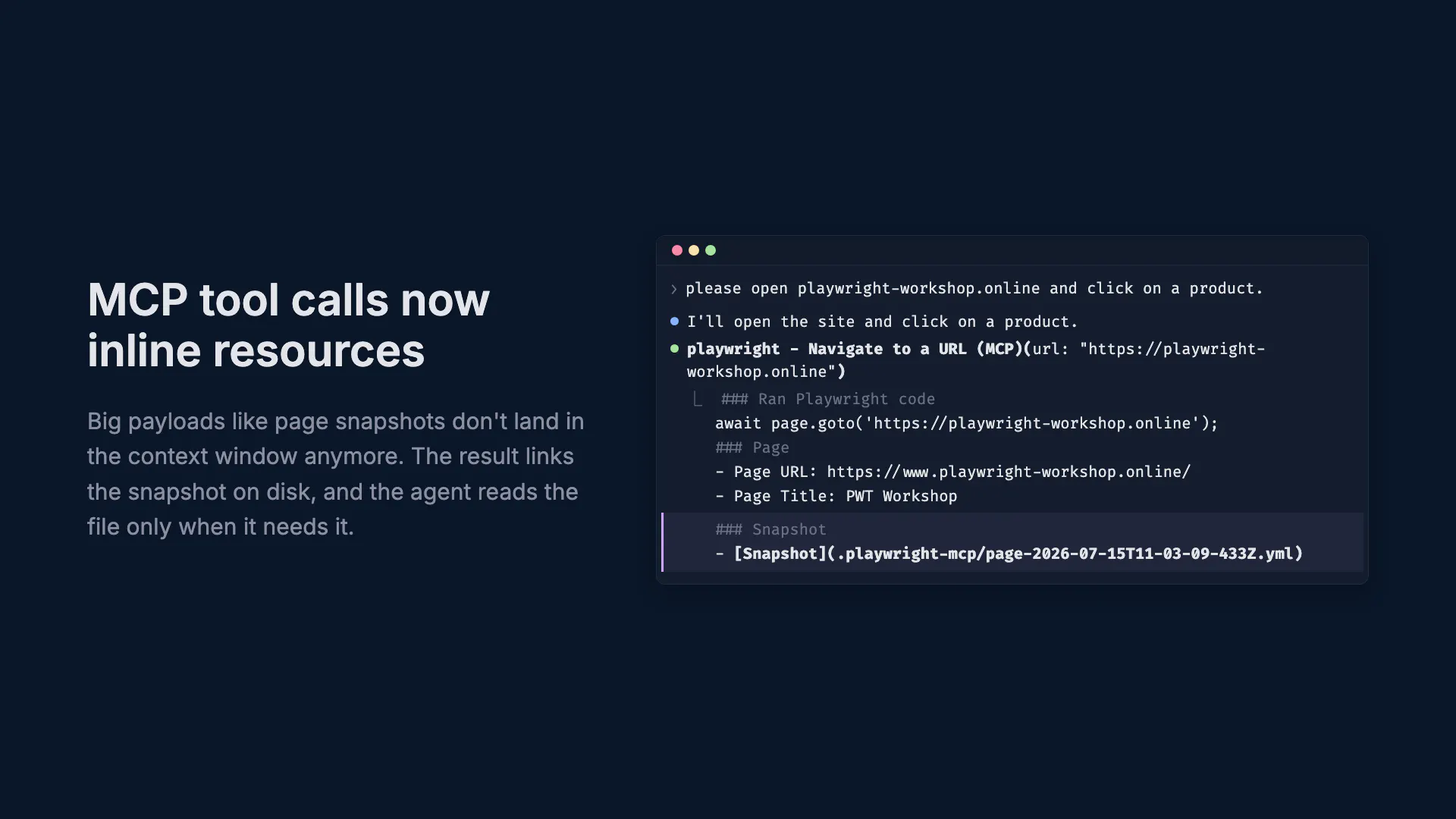
Writing page state to disk and letting the agent grep into it is exactly the pull model the CLI was praised for. By now, playwright-cli commands literally invoke the MCP tools by name under the hood (click calls browser_click, find calls browser_find). The Playwright CLI and MCP use the same backend, same snapshot files on disk.
There's no difference anymore?
But let's look at some numbers. I gave the same task to two fresh Claude Code sessions, one with the Playwright MCP server, one with only the playwright-cli and the installed CLI skill:
Please open my example demo shop and search for "liquid". Click the first product and add the product to the cart. Validate that the cart is showing the correct amount and close it.
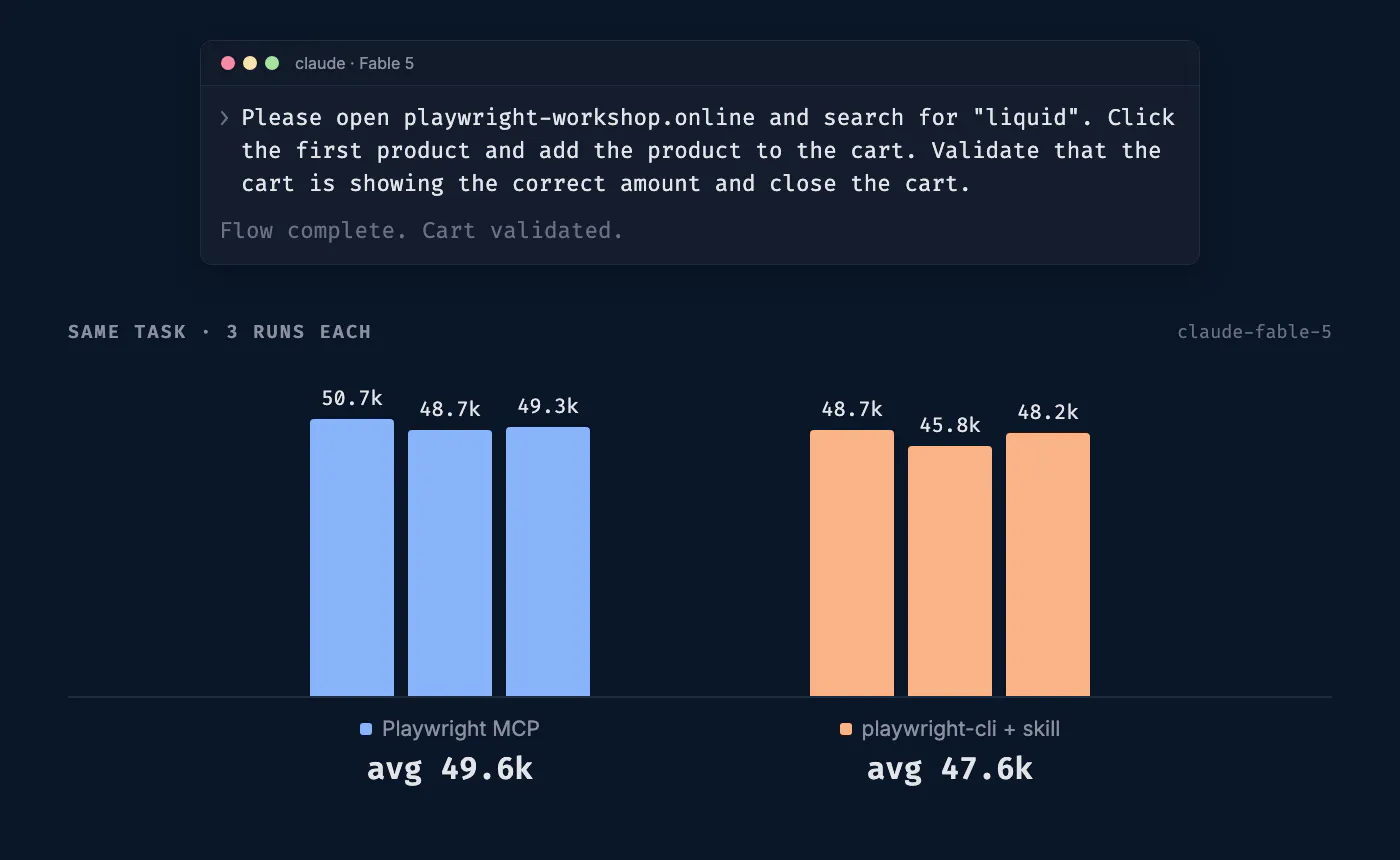
The result after running the same task three times was that MCP and skill-based CLI flows have more or less the same token consumption. The MCP session ended at 48k to 50k tokens of context, the CLI session at 45k to 48k. I didn't go much deeper but while seeing what both agent flows were doing it became obvious that they're both doing the exact same thing. There might be small differences, but the CLI output and MCP tool results look almost identical, so I didn't see much value in running the experiment again. I also ran this comparison live in our Playwright webinar; if you want to watch the measurement happen in real time, the recording is on-demand.
AI advice comes with an expiry date
It's exhausting but every piece of advice in the AI or agent space has a shelf life measured in months. "MCP loads all tools upfront" was true, then harnesses shipped deferred loading. "Playwright MCP inlines a snapshot per action" was true, then snapshots moved to disk. The viral Playwright video that made me switch was accurate when it was recorded and stale within a quarter.
So, "don't use MCP, it's too token hungry" is old news.
If a product provides a CLI and MCP, compare features and functionality first, because they often don't match. Take our own tooling at Checkly as an example: the Checkly CLI is built for the Monitoring as Code flow to create, test and deploy your monitoring from a local project. The Checkly MCP server is for live account operations like inspecting check health, investigating failures and kicking off Rocky AI root cause analyses.
Only when both sides genuinely match, like Playwright's do, does it come down to preference. And yes, I've since brought some of my MCP servers back. I prefer to use MCP in Claude Desktop and CLIs in Claude Code these days. But it's really up to you!
The only thing to keep in mind is that if there's a "common" best practice about token consumption, check your context window every now and then. What was true a couple of months ago probably isn't anymore.