Analyze and improve your tests with Rocky AI
Run your full test suite on your own infrastructure or from Checkly's 20+ global locations with a single command. Rocky AI analyzes every failure, groups errors, gives you fast root cause analysis, and helps you fix the problem.
npm install --save-dev @checkly/playwright-reporterThe Problem
Agents write tests faster than you can make sense of them
When agents generate hundreds of tests, you need a cloud that thinks as fast as they do. Checkly analyzes every result with Rocky AI, surfaces what actually matters, spots flaky tests before they waste your time, and hands back clear answers.
Results end up scattered
CI logs, local trace files, one-off HTML reports — test evidence is spread across a dozen places with no shared home for the team to review.
Patterns stay invisible
Each run is treated as a one-off event. Without history across builds, recurring failures and flaky tests go unnoticed until they become incidents.
Debugging is still manual
Even with traces captured, making sense of what actually failed — and why — still requires opening files locally and piecing context together by hand.
Results end up scattered
CI logs, local traces, and HTML reports with no shared home for team review.
Patterns stay invisible
Without history across builds, recurring failures and flaky tests go unnoticed.
Debugging is still manual
Making sense of failures still requires opening files locally and piecing context together.
What You Get
More than a place to store results.
Once test results are in Checkly, Rocky AI can analyze them, your team can track what keeps failing over time, and developers get a richer UI to pinpoint what went wrong.
Rocky AI analyzes every failure.
The backend service encountered an internal server error (500) on the /users/me endpoint and a DNS resolution failure (ENOTFOUND) when connecting to the authentication provider, preventing the application from loading user-specific UI components.
- •
The test timed out waiting for the 'select the location' button, which typically indicates the page failed to render completely or the user session was not correctly established.
error - •
OpenTelemetry spans show a 500 Internal Server Error for the 'api.checklyhq.com/users/me' endpoint and a 'getaddrinfo ENOTFOUND' error for 'checkly.eu.auth0.com', indicating critical infrastructure and dependency failures.
otel spans
When a test fails, Rocky AI reads the traces, network requests, and console logs automatically captured by the reporter and returns a root-cause analysis — no manual digging required.
Track what keeps failing over time.
Test Sessions
Every run is stored as a shared session in Checkly. Review failures across builds, spot recurring issues and flaky tests, and understand trends — something a local HTML report can't give you.
Replay failures step by step.
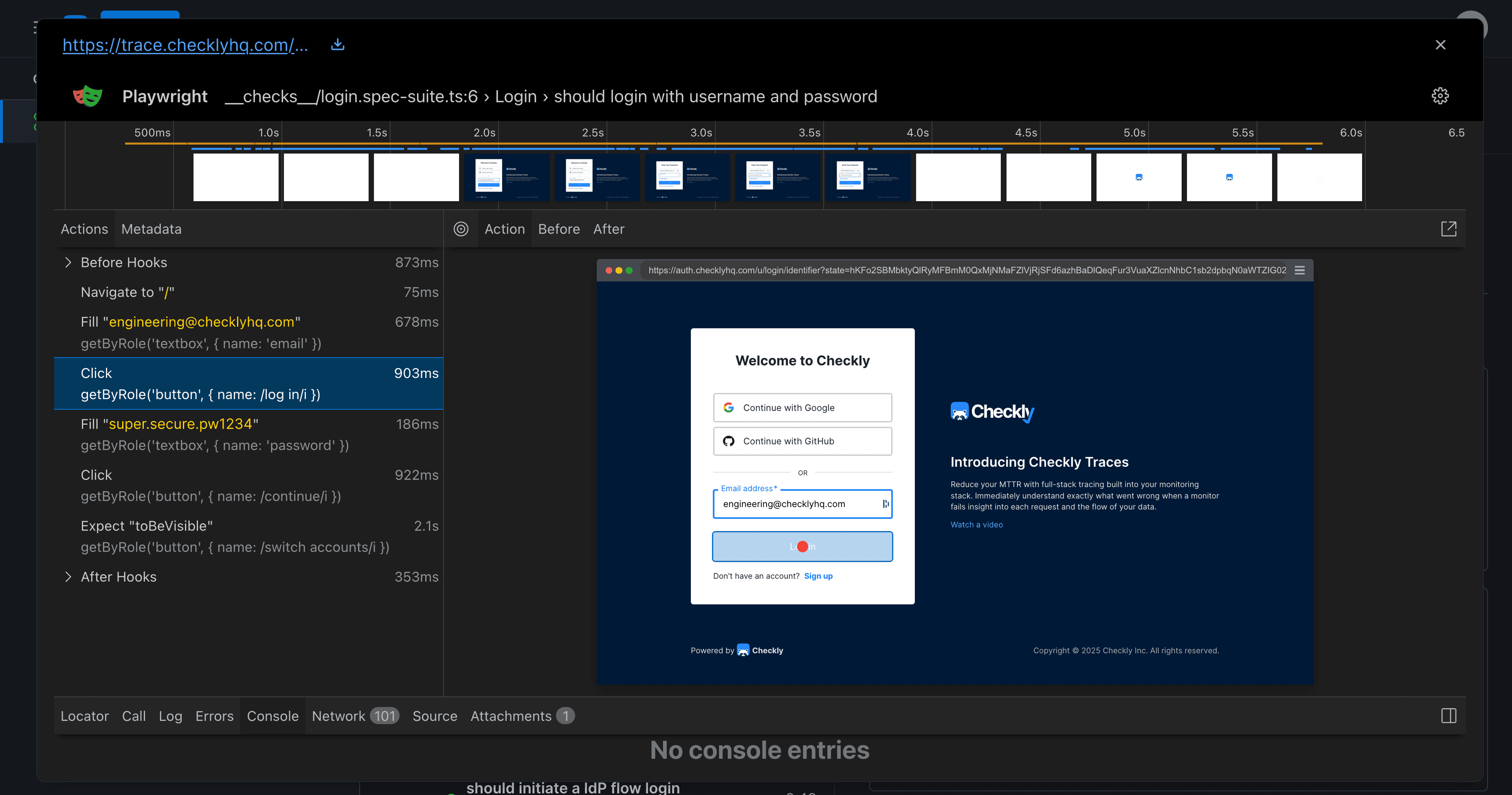
Playwright traces captured during the run are stored alongside results. Walk through each step with screenshots, network activity, and timing — without needing to reproduce the failure locally.
Every artifact you need to debug, in one place.
Error: Timed out 10000ms waiting for expect(locator).toBeVisible()
Locator: getByText('Order confirmed', { exact: true })
Expected: visible
Received: <element(s) not found>
Call log:
– expect.toBeVisible with timeout 10000ms
– waiting for getByText('Order confirmed', { exact: true })
at CheckoutPom.waitForConfirmation (/tmp/playwright-UFGgmg/user/__checks__/poms/CheckoutPom.ts:66:44)
at /tmp/playwright-UFGgmg/user/__checks__/e2e/checkout-flow.spec.ts:52:27
Screenshots, videos, network requests, console errors — every piece of evidence from a test run is captured and surfaced automatically. No more hunting through CI logs or re-running locally just to see what went wrong.
Run from 20+ global locations
Use npx checkly test in your CI pipeline to run from Checkly's global infrastructure. Catch regional failures and latency spikes before they hit production.
Automatic secret scrubbing
API keys, tokens, and passwords are redacted before upload. No extra config. Available on all plans, including free.
CPU & memory graphs
Track system resource usage during each test run. Spot whether flaky or failing tests correlate with resource pressure.
Git metadata, automatically
Branch, commit hash, and author are attached to every session automatically from GitHub Actions, GitLab CI, CircleCI, and local repos.
The Bigger Picture
From CI to production, in one platform.
Checkly Testing closes the loop between CI and production. Run from your own infrastructure or Checkly's global locations, analyze every failure with Rocky AI, and promote the checks that matter into always-on monitors — without switching platforms.
In your CI/CD pipeline
Run & report
Run your Playwright tests on your own infrastructure with the reporter, or use npx checkly test to run from Checkly's 20+ global locations. Traces, videos, logs, and results land in Checkly automatically.
Cloud-hosted sessions
Analyze & track
Rocky AI analyzes each failure. History accumulates across runs. Teams get a shared, persistent home for test results — with richer debugging context than a local report.
Production monitoring
Monitor in production
Take the tests that matter and deploy them as always-on monitors from 20+ global locations. The only reporter that offers this path.
Setup
Two minutes to install.
No cloud infrastructure to provision. No storage accounts to configure. Your existing npx playwright test workflow stays exactly the same — or run directly on Checkly's global infrastructure with npx checkly test.
Install
npm install --save-dev @checkly/playwright-reporterConfigure
Set credentials
Run tests
npx playwright testYour tests deserve a
production-grade home.
Connect your Playwright tests, get AI-powered failure analysis, and promote the checks that matter to always-on production monitors. Free to start, no credit card required.