
Honeycomb recently launched Canvas connectors, with Checkly serving among its first group of integration partners. With the Honeycomb Canvas connector for Checkly, the Canvas Agent can bring your synthetic monitoring into an investigation to help determine which checks are failing, from which locations, since when, and what Rocky AI identified as the likely root cause. And when an investigation finds a gap in your synthetic monitoring, the agent can even create a new check or update an existing one to close it, without leaving Canvas.
Canvas is Honeycomb's AI-powered investigation workspace, where engineers and the Canvas Agent work the same problem side by side. Honeycomb built the Checkly connector on top of the Checkly MCP server. Our part was making Checkly readable and usable by an agent. Their part was everything that makes it useful in the middle of an incident such as how the agent decides when to call Checkly, how results show up in Canvas, and how anything that changes your account gets approved first. That was the harder part, and Honeycomb got it right. We tried it before launch and were impressed by how well it works.
“Adding the Checkly connector to Canvas was one of our easiest integrations. Their MCP server is spec-compliant, works well, and its concise, reliable tools help the Canvas Agent make better decisions,” said Taylor Pratt, Product Manager at Honeycomb.
Why does an investigation need the outside-in view?
Honeycomb shows you what happened inside your system. During an incident, the first question is often about the outside. Did checkout actually break for users in Frankfurt? Which region saw it first?
Synthetic monitoring answers that. Checkly clicks through your app like a user, with Playwright browser checks, API checks, and uptime monitors running on a schedule from 20+ locations, whether or not real traffic is hitting the app. Checks retry before an alert fires, so when one fails, something real broke.
Until now, that signal lived in another tab. A user would need to open Checkly, find the failing check, and paste the result into the incident channel. Usually the person on call, usually at a bad hour.
What can the Canvas Agent do with Checkly?
The Canvas Agent can read your checks, assessing results, incidents, status pages, and Rocky AI root-cause analyses. It can also create and update checks, run a check, or start a new root-cause analysis, with your approval. In an investigation, that means it can:
- See which checks are failing right now, and from which locations.
- Pull a failed run with the error, the step that broke, and when the failures started.
- Read what Rocky AI found, including the likely root cause and the user impact, or start a fresh analysis.
- Look at your status pages. Have customers already been told?
- Re-run a check after the fix ships, so you know the flow works again before you close the incident.
- Create a check for a flow that had no coverage, or update one whose timeout or locations no longer fit.
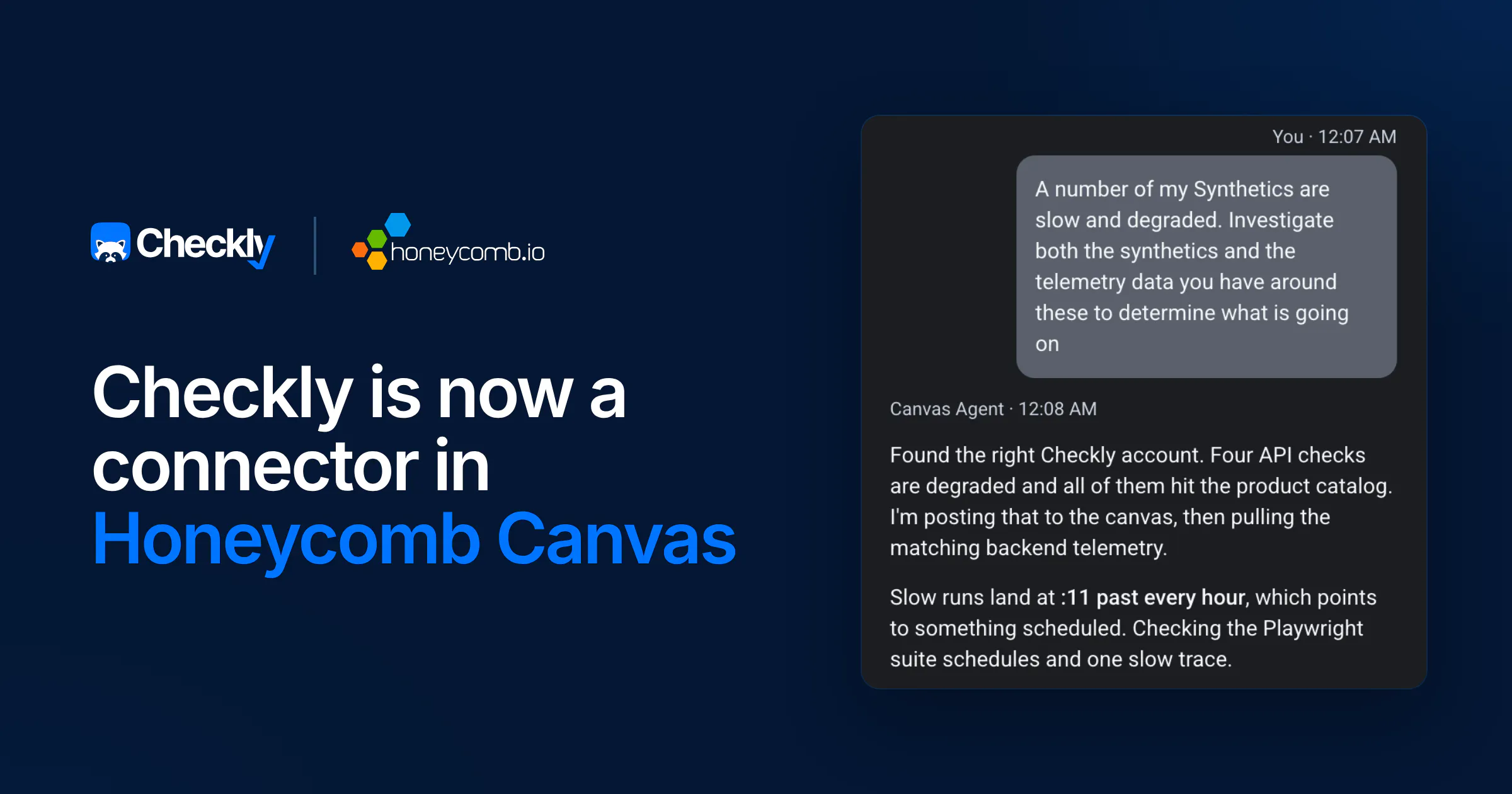
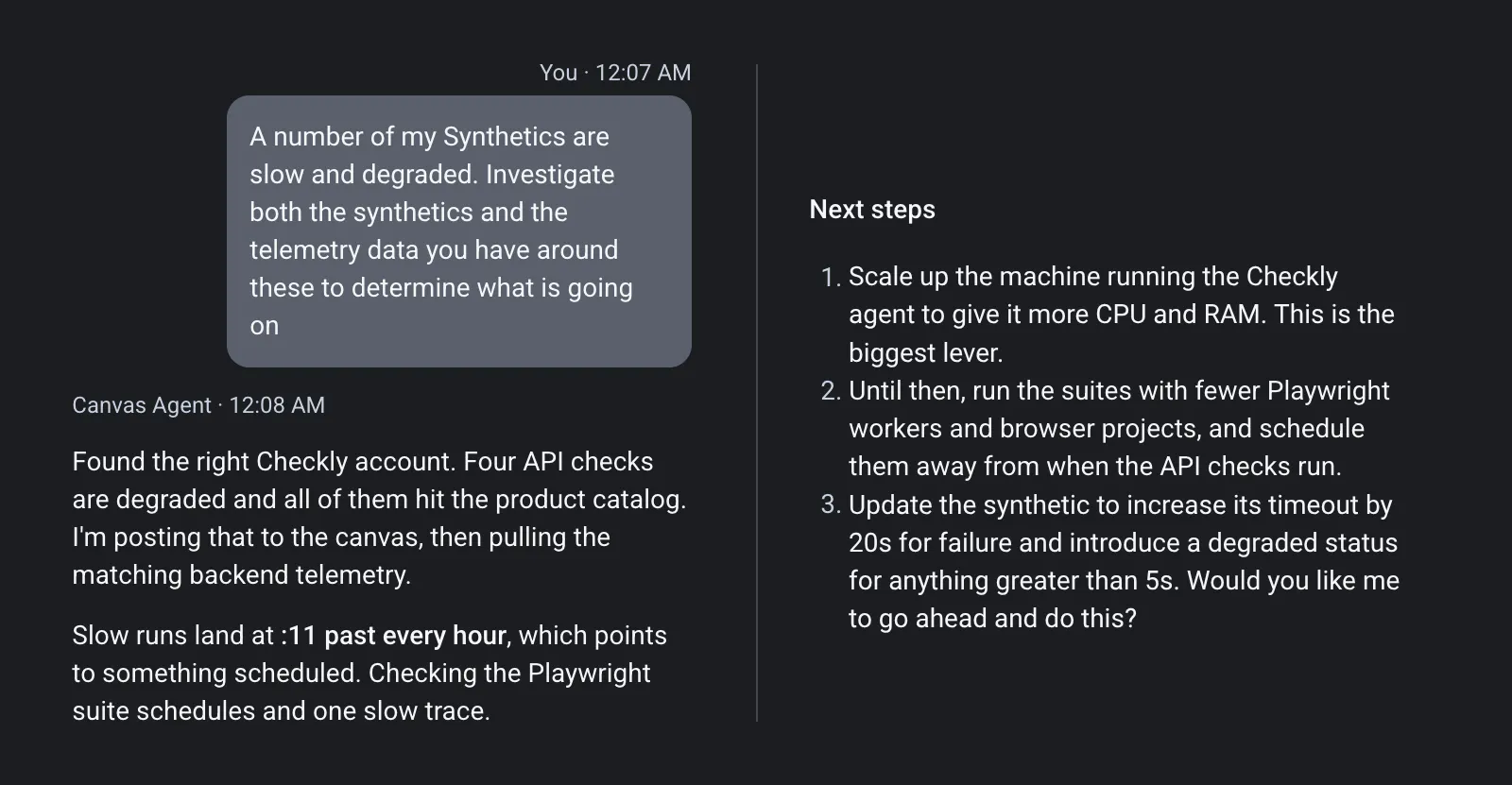
Here's a real example. In a demo environment running the OpenTelemetry Astronomy Shop, we asked the Canvas Agent: "A number of my synthetics are slow and degraded. Can you investigate both the synthetics and the telemetry data you have around these to determine what is going on?"
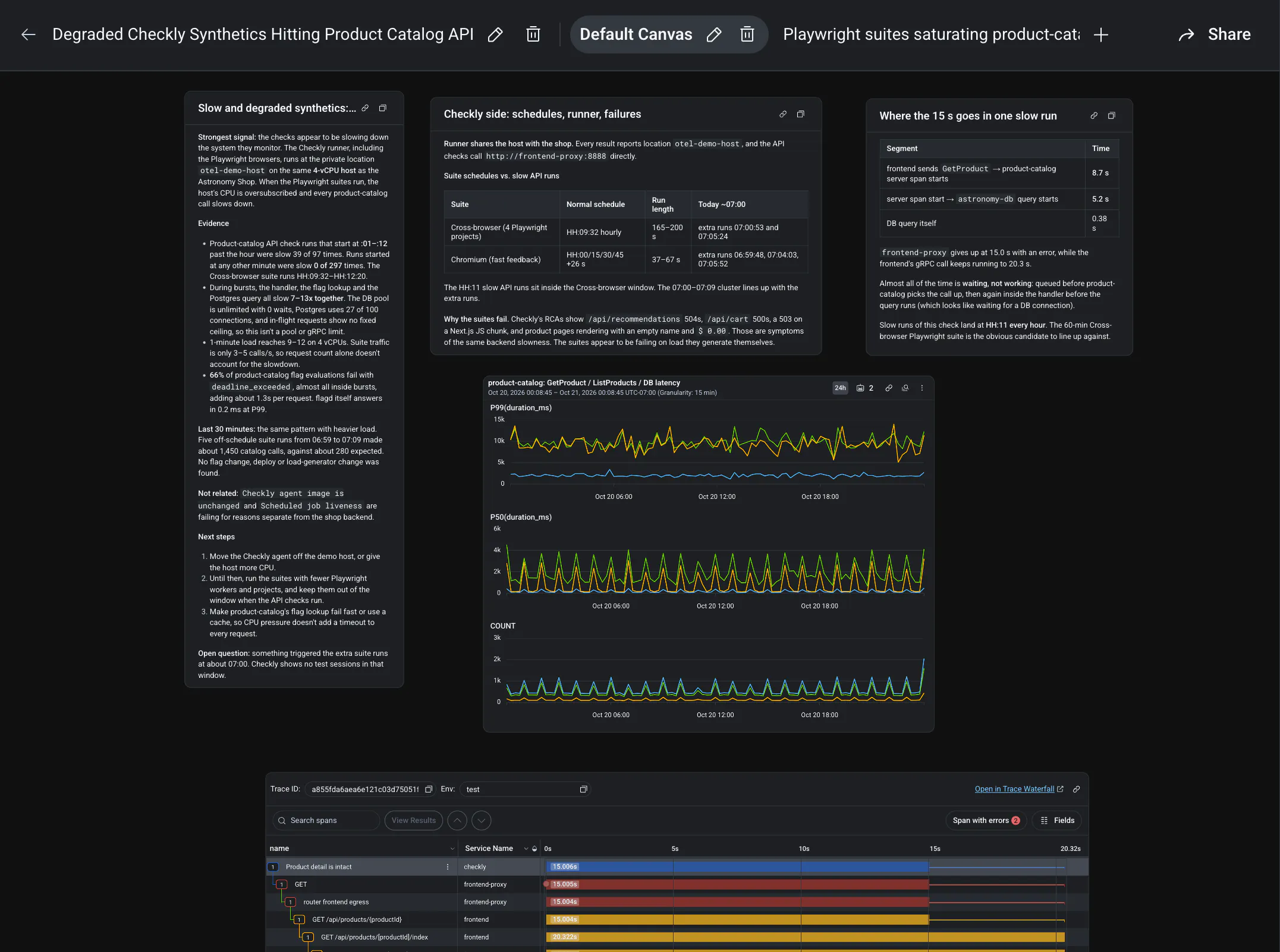
The agent found four degraded Checkly API checks, all hitting the product catalog service. It noticed the slow runs landed at 11 minutes past every hour, which pointed to something scheduled, and lined that up with an hourly Playwright check suite. It pulled Checkly's root-cause analyses for the failing runs and followed one slow trace in Honeycomb to see where 15 seconds went: almost all of it was waiting, not working.
The answer: the Checkly private location running the Playwright suites shared one small machine with the shop, so every heavy suite run slowed the product catalog down. One question, one correlated timeline, both sides of the story.
Reads run without asking. Anything that does something in Checkly, like triggering a check run or creating a new synthetic, waits for your approval each time. You can change that per tool in Canvas (Always allow, Ask, or Never).
Can you create Checkly checks from Canvas?
Yes. Most incidents end with a fix and a note to "add monitoring later," and later rarely comes. In Canvas, you can close the gap in the same place you found it. Ask the agent to create a browser check for the flow that just broke, or to update a check that no longer fits. In the example above, a natural follow-up is: "Update the synthetic to fail after 20 seconds and mark it degraded above 5 seconds." The agent shows you the change and asks for your approval first. Once you approve, it's a real Checkly check, live in your account.
If you manage your checks as code with the Checkly CLI, add the change to your repo too. The next deploy from your project overwrites changes made outside it.
How do you connect Checkly to Honeycomb Canvas?
You need a Honeycomb account with Canvas and a Checkly account. Setup takes about a minute:
- In Honeycomb, go to Canvas > Connectors.
- Find Checkly and select Connect.
- Sign in to Checkly and approve access on the authorization page. The connector shows a Connected badge when it's done.
Then open an investigation and ask about your checks. Something like: "Are any Checkly checks failing for the checkout flow right now?"
Each teammate connects their own Checkly login, and the agent only sees what that person can see in Checkly. If you belong to more than one Checkly account, name the one you want in your prompt. There's no API key to copy. You sign in with your usual Checkly login. Honeycomb's Checkly connector docs cover the rest.
Not on Checkly yet? Start free and have your first check running in a few minutes, then connect it to Canvas.
Already sending Checkly traces to Honeycomb?
Good. The two work in opposite directions, and they fit together.
Checkly can already export check traces to Honeycomb over OpenTelemetry, with the check ID on every span. A red check in Checkly becomes a query in Honeycomb in one click. The Canvas connector goes the other way: from inside your investigation, the agent reaches into Checkly for the check results, the root cause, and the status page. With both on, Canvas has the trace and the check that caught the failure in the same place.
Thanks, Honeycomb
Honeycomb and Checkly serve the same teams: engineers who own reliability and want tools built around how they actually work. Honeycomb gives them the inside view. Checkly gives them the outside view, what users actually saw. We don't build trace analysis, and Honeycomb doesn't build synthetic monitoring. Canvas is where the two meet.
We opened up Checkly through our MCP server so tools like Canvas could build on it. Seeing a partner take that and ship something this good at launch is exactly what we hoped for. Thanks to Taylor Pratt, Ronald Ekambi, and the Honeycomb team who built Canvas connectors, and for including us at launch.
If you run both, connect Checkly in Canvas and try it on your next investigation. If you run Honeycomb and want the outside-in signal, start free with Checkly. Either way, tell us how you use it in our community Slack.