
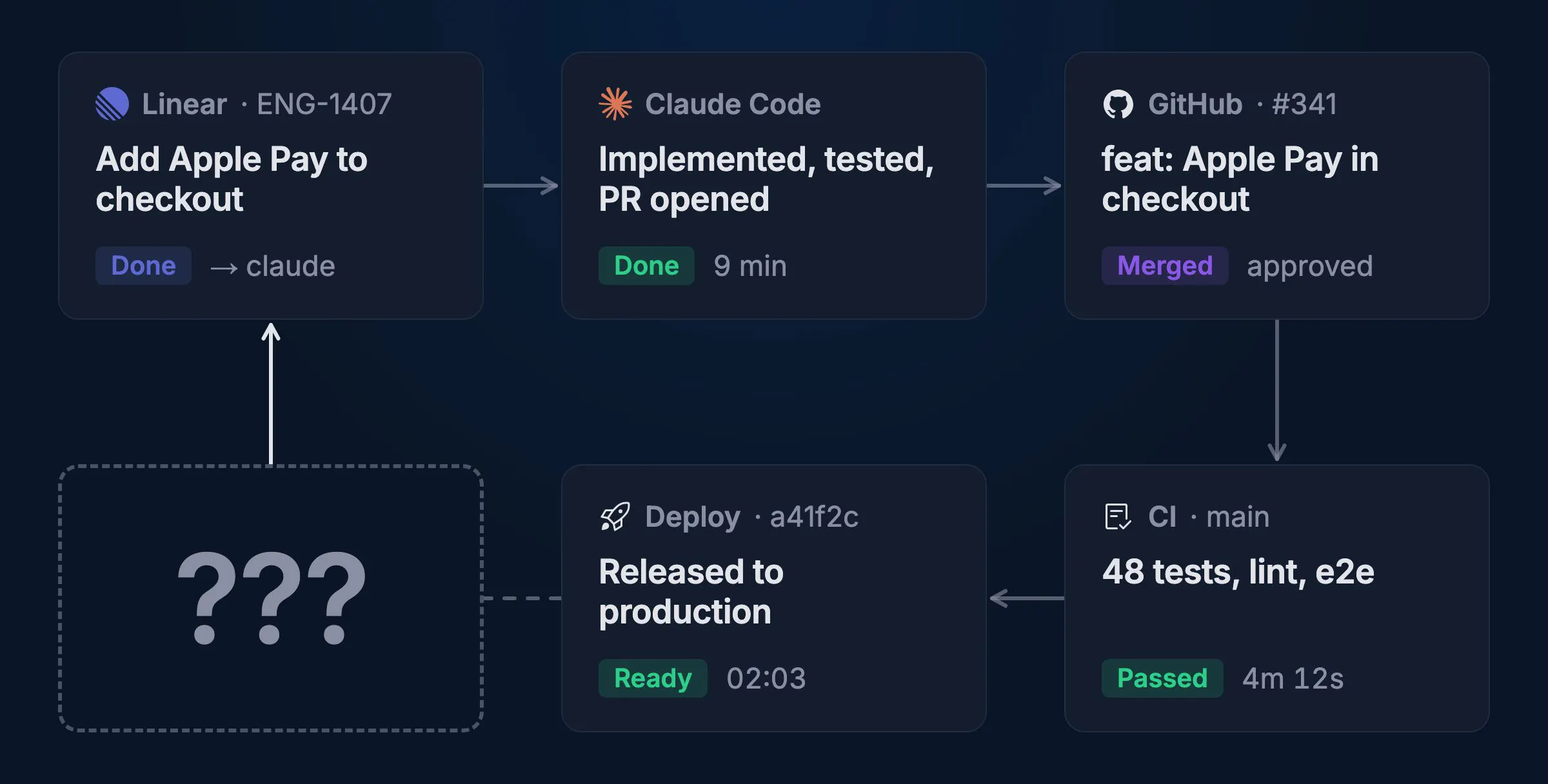
Most people investing in software factories fail to close the loop. Agents write, review, test and ship code, but then the factory loop ends.
What happens after deploy? Nobody knows.
What's a software factory, anyway?
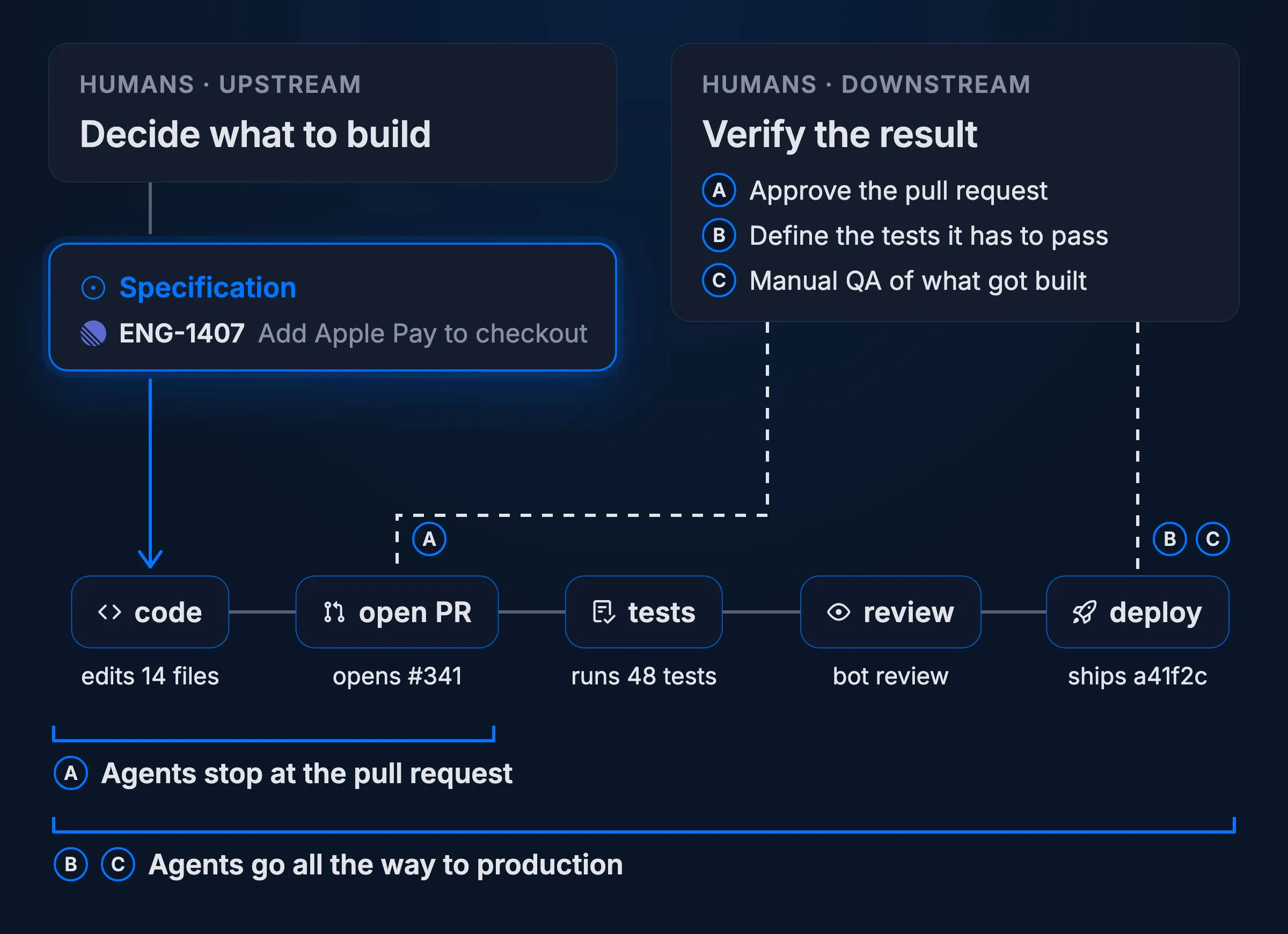
A software factory is a delivery loop where humans define the goals and agents do most of the work. They change the code, open pull requests, run tests, review and deploy. Where humans come in depends on the team and how much they trust their factory.
Humans should definitely be involved upstream. Until the machines entirely take over, it's still on us to decide what to build. Every factory loop starts with a signal, which is usually a specification in a Linear ticket or a GitHub issue.
Downstream, we decide what ships. How far the loop runs before that varies. Some teams approve every pull request, others define the tests a change has to pass and let agents deploy on their own, and some do manual QA of the new feature to make sure what they had in mind is actually what got built.
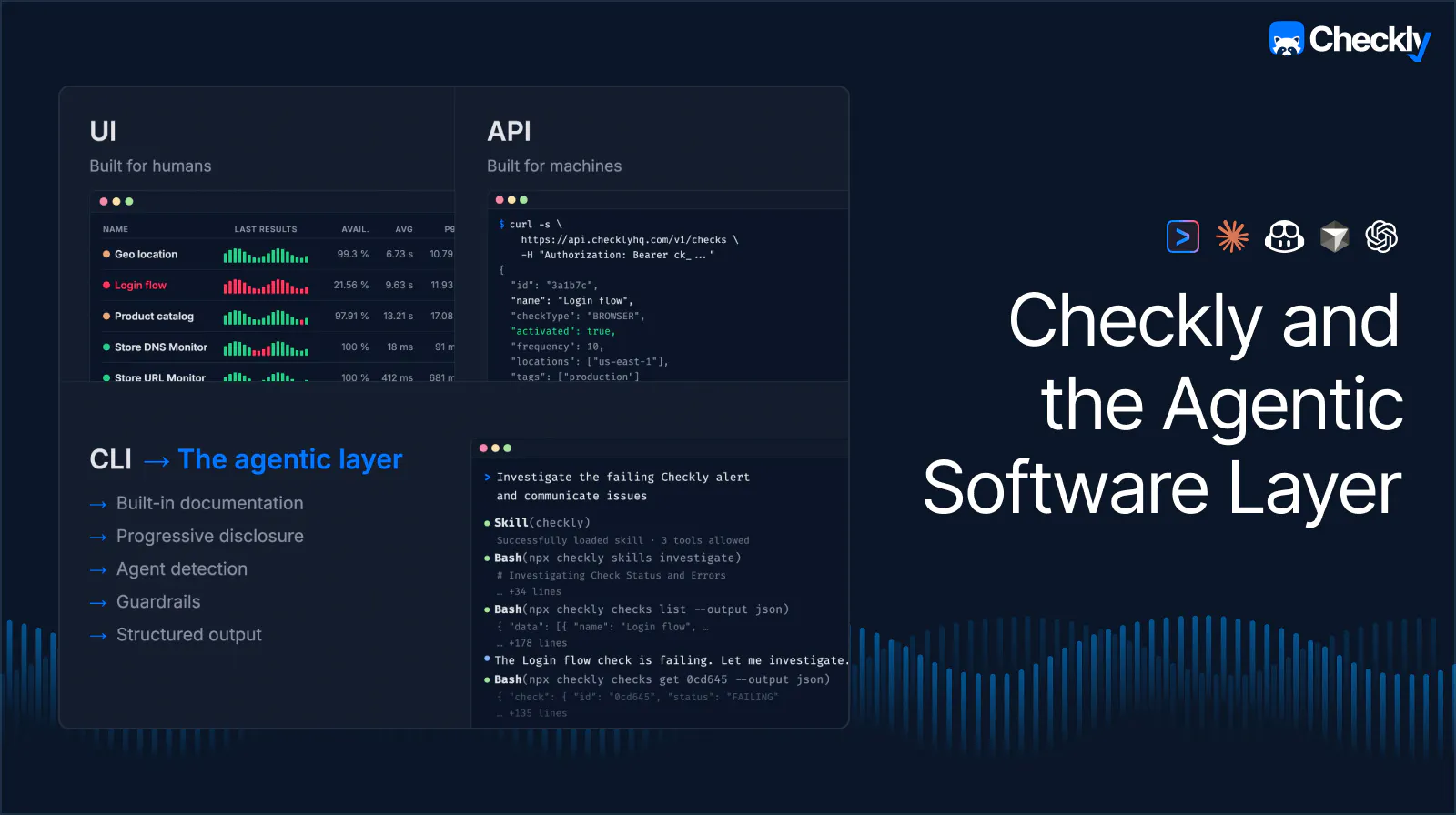
Regardless of where you're at right now, software factories don't work without trust in the system. And this trust doesn't come from letting agents run unchecked. Hannes, our CEO, put it bluntly in Checkly and the Agentic Software Layer: "Agents that can take action without guardrails are a liability."
Addy Osmani from Anthropic wrote a great piece on the topic called The code nobody reads. He boils trust in unread code down to two costs: how expensive it is to check the work, and, in his words, "how cheaply you can catch and undo a failure after it ships."
I like this framing because it exposes where most factories put their effort. Tests, reviews and CI all lower the first cost, and today's agents and harnesses lean hard on TDD for exactly that reason. The second cost gets a lot less attention. Once a change is live, what tells the factory that something broke, so it can kick off another loop? And how fast can it react before the failure gets expensive?
The cost of missing production signals
So, how do you know that all the features your agents shipped work in production? For most teams, the answer is a customer ticket saying that something doesn't work. The problem with this approach is that your customers are neither a fast nor a cheap monitoring system. Every minute between the deploy and the moment someone bothers to let you know adds to the second cost: more users hit a broken flow and more code changes pile on top of the one that caused the issue.
Production issues often come from code that looked fine. Most broken features passed review and ran green in a test environment. What breaks them is everything the tests didn't cover: production data, configuration, third-party services, real infrastructure. Your CI/CD pipeline can't catch these, because they only show up when a real user runs the real flow.
If you're lucky, the failure is visible in your logs somewhere. Server logs or frontend monitoring, all these tools only tell you that an exception was thrown or that the error rate went up. They don't tell you what the user tried to do, what they clicked, or what they saw. And plenty of failures don't throw at all. A pay button that never renders or a wrong price at checkout leaves every log clean, and your conversions drop without a single line telling you why. Worst of all, logs don't come to you. Even when the failure is in there, nobody goes looking until a customer runs into it.
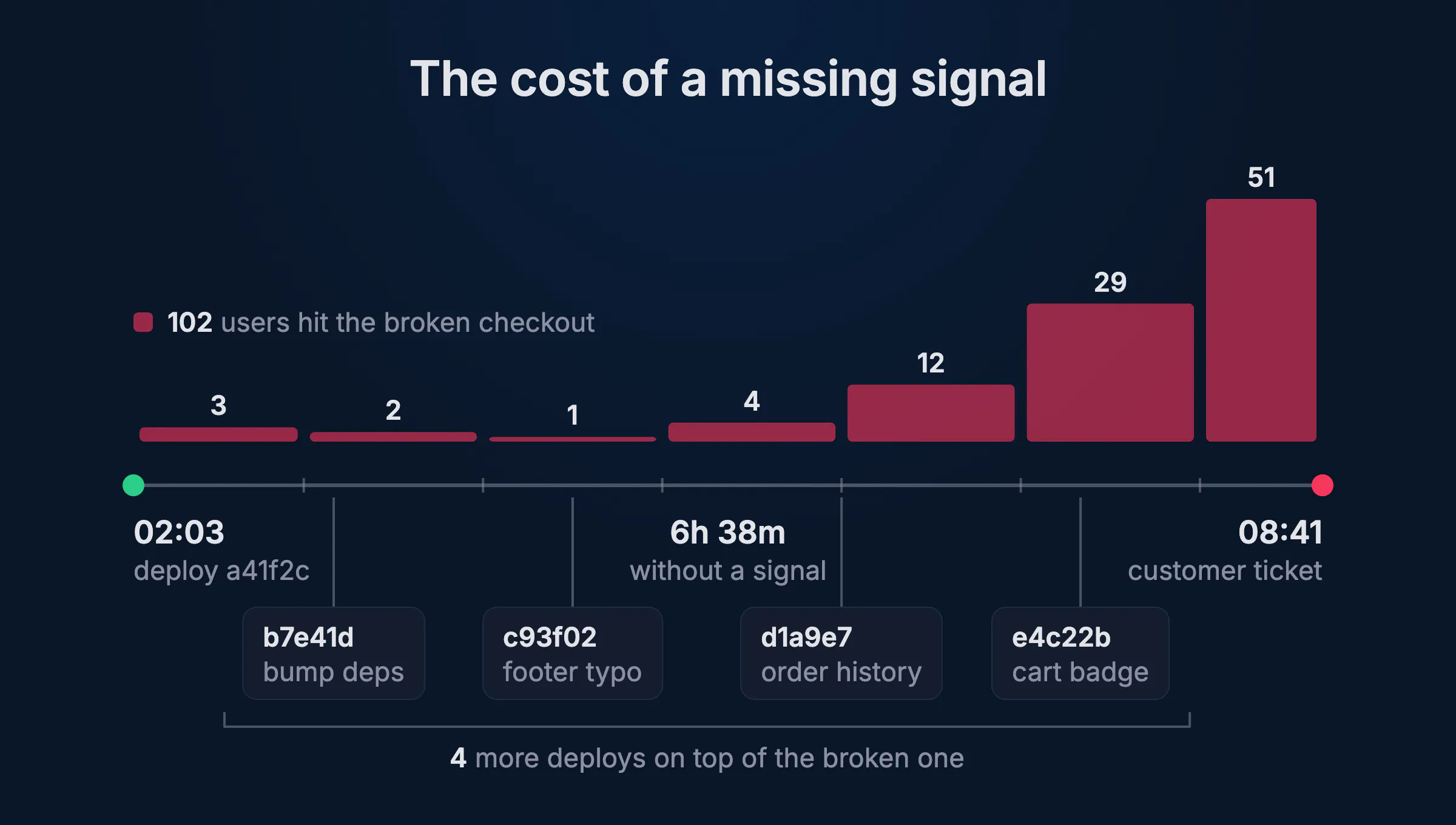
For agents, that thin signal is expensive. An agent has to reconstruct what the user did before it can even start on a fix, so it ends up guessing, poking around, and burning tokens to land on a low-confidence answer. Every guess drags out the fix, and the longer the fix takes, the higher the cost of undoing the failure.
A failed check is a verdict
This is where synthetic monitoring comes in. Checkly's Browser and Playwright Checks run your critical flows the way a user does, in real browsers, from multiple regions, up to every minute. When one fails, you know a specific flow is broken in production, and you know it right now. That's meaningful signal.
Two things make a failed check meaningful. First, it's a confirmation. A log line or a metric spike hints that something might be off, but a failed check proves that a flow your users depend on is broken. Second, it comes with evidence. The alert arrives with the failing step and error message, a screenshot of what the user would have seen, the Playwright trace with every action, DOM snapshot and request, the console and network logs, and Rocky AI's root cause analysis on top.
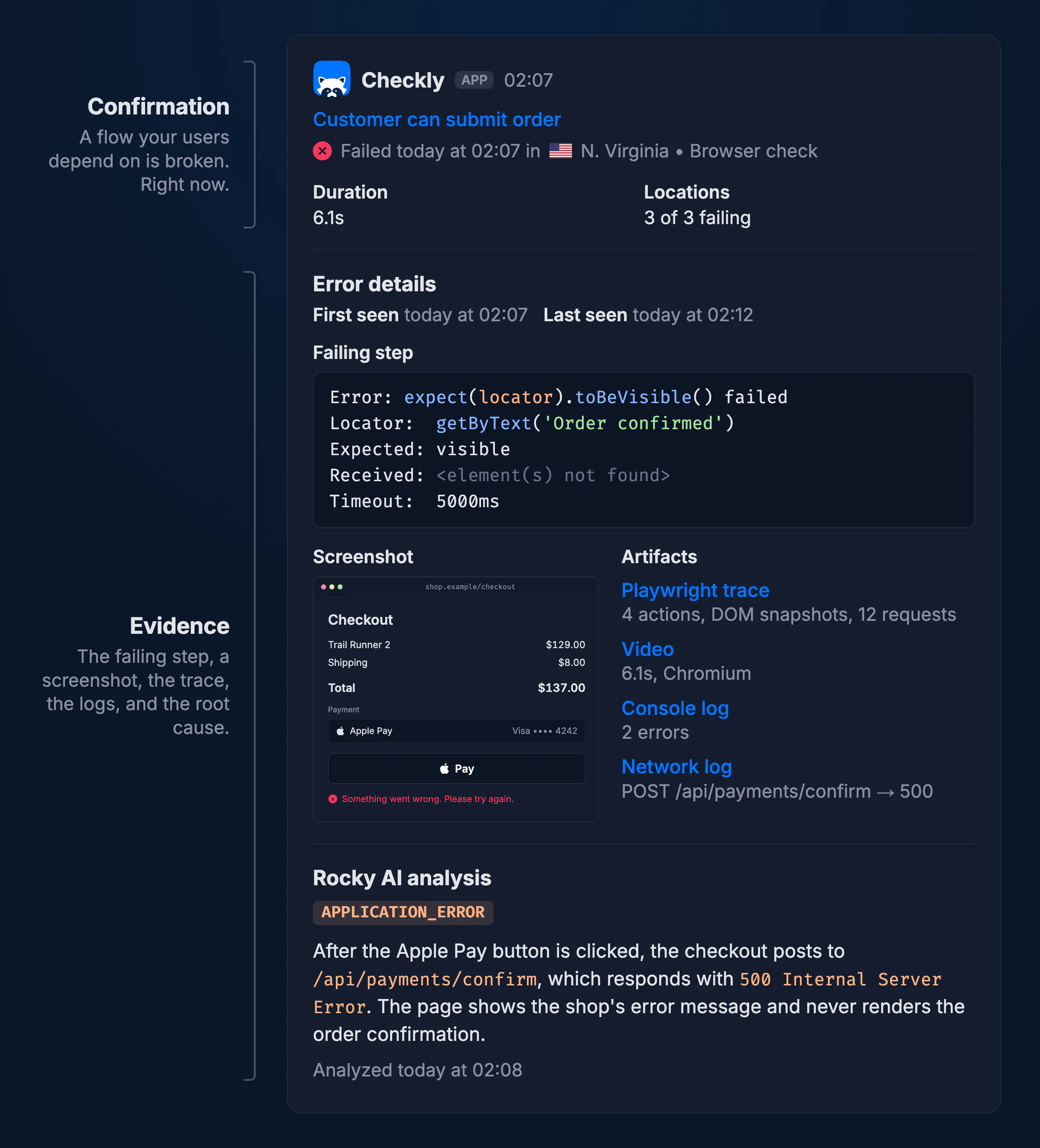
That's more than enough for an agent to get to work without guessing. And it's the same thing I want to look at when I get paged.
Wiring failed checks into the factory
To close the loop, connect this signal to your software factory: every failed check kicks off an agent run. Here's the flow.
- A critical check fails, and its webhook alert channel calls your agent platform.
- The agent run starts in the repository that owns the broken flow and loads a runbook skill.
- The agent pulls the evidence with the Checkly CLI (
npx checkly checks getreturns the failing result and Rocky's root cause). - It figures out what happened, fixes the app code, runs the tests and opens a draft pull request that links to the failed result.
- It runs the failing check against the pull request's preview deployment with
npx checkly test, so the reviewer sees the broken flow pass. - You review and merge. After the deploy, the check passes in production and closes the loop the failing one opened.
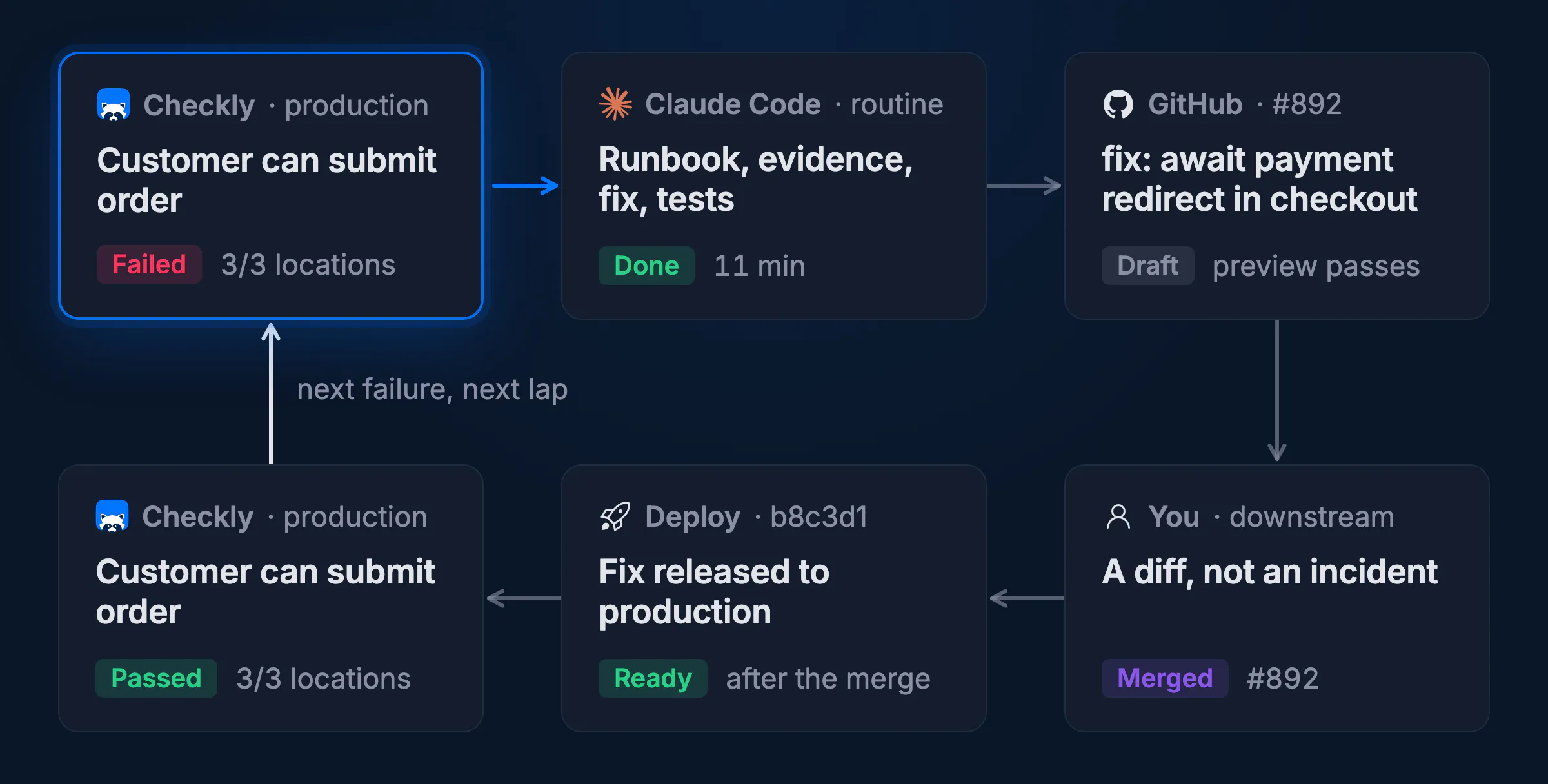
I built this whole flow with Claude Code routines, but it works with any agent you can start with a webhook, OpenClaw included.
The runbook decides what "fix it" means
Your runbook should ideally live in the repository as an agent skill. Once an agent is running, it can do pretty much anything its runbook and environment allow, so the skill decides what "fix it" means for your project. Mine triages the alert first (is this a flake, one region, or persistent?), gathers the evidence, correlates the failure with recent deploys, and then classifies: an app regression gets a pull request, a check that's outdated because the app changed on purpose gets a check update, and an upstream outage or a flake gets no pull request at all.
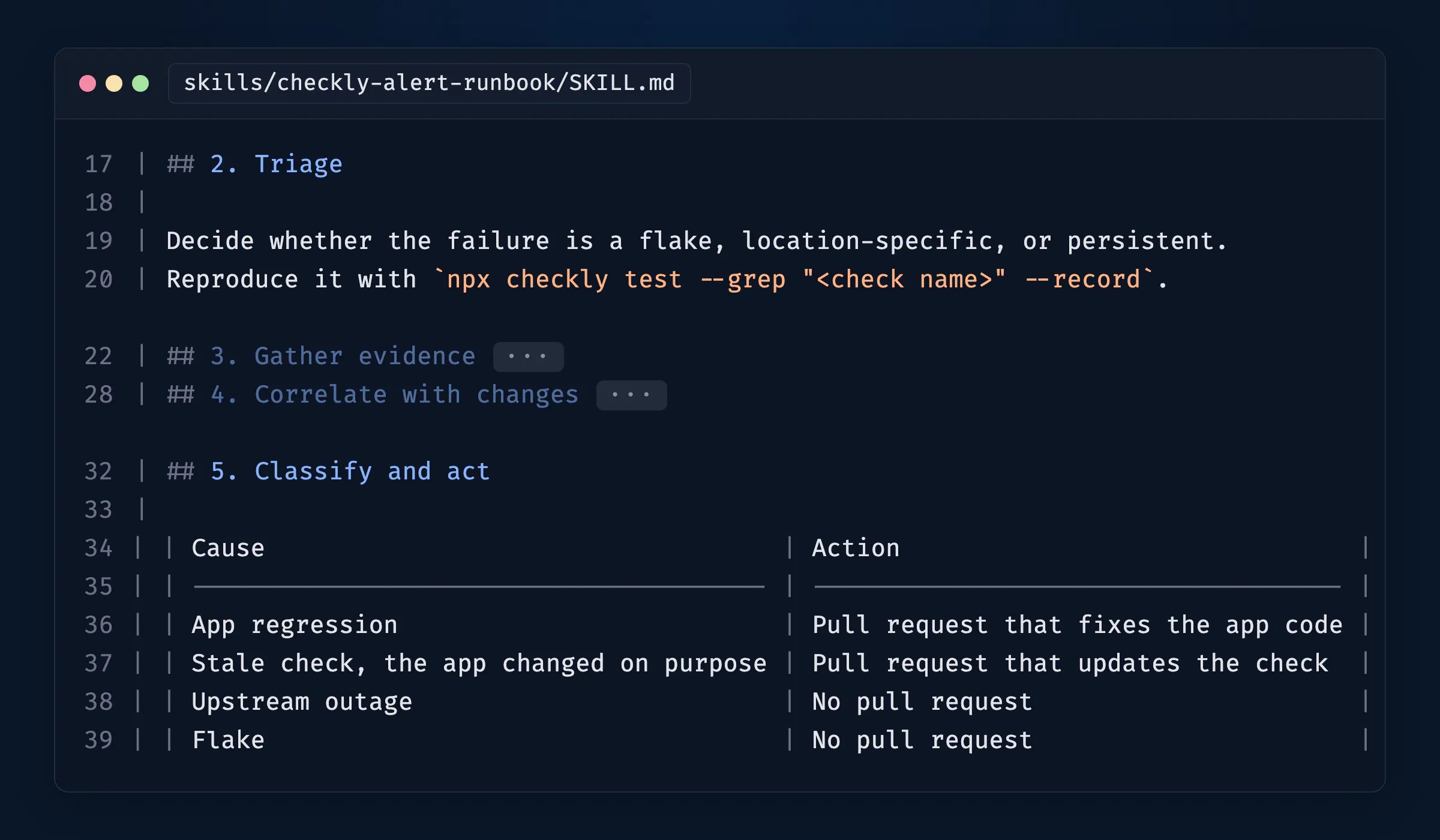
When I read my finished skill back, it looked a lot like the incident runbooks on-call teams keep in their wikis. Triage, gather evidence, check what changed, then fix, roll back or escalate. Chances are your SREs have this documented already. And if they work with agents, they feed it to the agent anyway, pasting the alert into Claude Code and pointing it at the wiki page. The webhook only changes who starts the run, and nobody has to wake up to paste the alert. So start the skill from the runbook you have. Your engineers follow it when they get paged, and the agent follows it when they don't.
If you want to set this up yourself, the agent-driven repair guide walks through all of it: the runbook skill, a Claude Code routine, the webhook alert channel as code, and how to verify it works.
Where you sit in the loop is up to you
A failed check is the same signal whether a human or an agent reads it. What happens next is the same trust dial as upstream, and every team sets it differently. Some stop at the alert: the agent posts the root cause to Slack, files a ticket, and a human picks it up. Others want a draft pull request and review it like any other change. A few let the agent merge once the check passes on the preview deployment, or roll back the last deploy on its own, and look at it in the morning. Each step further out is faster, and each one asks for a bit more trust.
I let my agents stop at the draft pull request. I still decide what ships, but I review a diff, not an incident. Your team might sit somewhere else, and that's fine. Either way, the factory doesn't have to wait for a customer to tell it something broke.
That's meaningful signal. For humans and agents.